
Estimate the Job from the Drawing to the Bid-Day Number
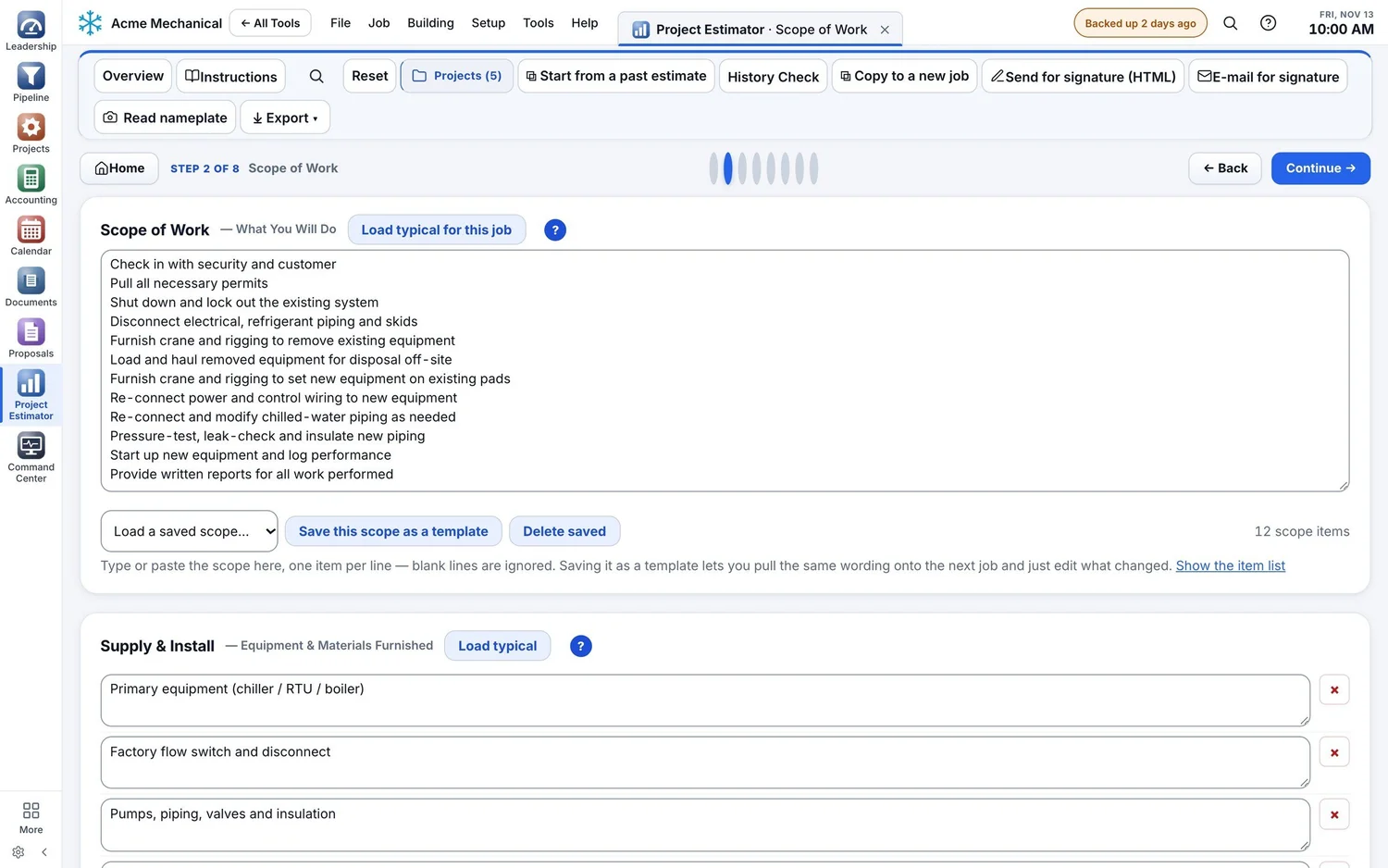
Estimates kept in separate spreadsheets drift apart and get retyped. HVAC Logix has three estimators for project, service and maintenance work. They share one Company Rates & Labor record, one price book and the same customers and buildings, so a price quoted in one is the price everywhere. The estimate then feeds the proposal, the booked job and job cost without being typed again.
Launching Early 2027 · Join the Early-Access List
Project, Service and Maintenance on One Set of Company Rates
Project Estimator
Labor, materials, subcontractors, equipment, fees, markups and tax for a retrofit, replacement or new project, with options and alternates, bid and procurement, and the client proposal issued from the same numbers.
Learn MoreShow Less
Contractors go broke looking busy when cost and price get confused. The Project Estimator works in gross margin and keeps the proposal tied to the estimate, so the price you send is the price you meant.
- Sell price = cost ÷ (1 − margin), the figure your profit and loss reports.
- Loaded cost adds overhead and warranty reserve before margin is measured.
- Optional escalation, contingency and bond for federal and MACC work.
- Equipment options priced side by side move the owner from whether to which.
- After award, a change-order log re-prices the contract; only approved rows move it.
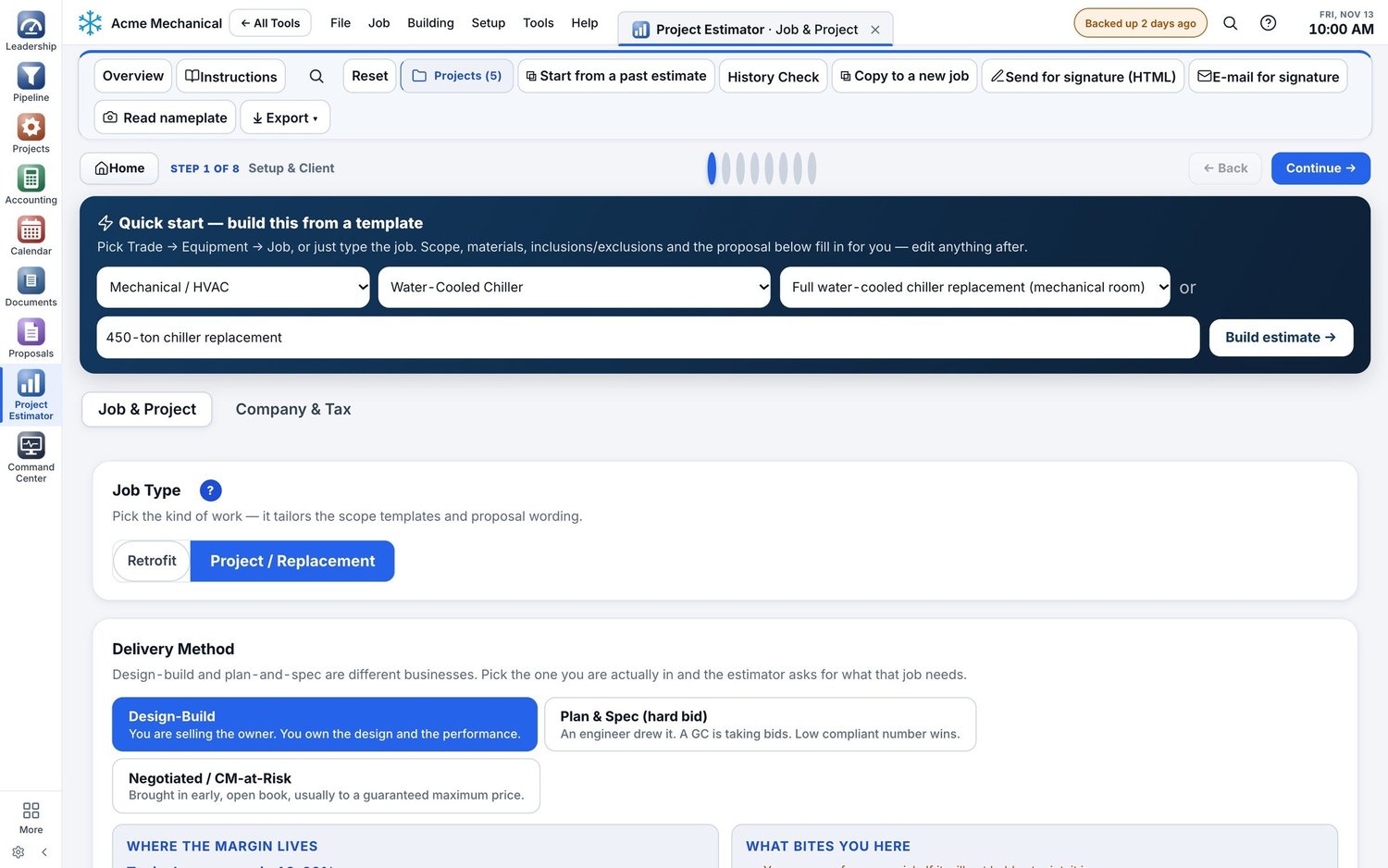
Starting every estimate from a blank page wastes hours, so a template builds the scope and lines for the job type.
Service Estimator
The same screen with the project-only work removed, for service repairs and small retrofits. It also publishes the price book that technicians quote from on the phone, priced by the same engine as the office estimate.
Learn MoreShow Less
A repair priced and signed before the technician leaves the roof is cash you would otherwise chase for a week. The phone price book makes that possible without giving away your numbers.
- Priced from your hours, crew size, loaded labor cost, margin, material markup and trip charge.
- The phone never receives cost, hours, markup or margin; Field Sync strips them a second time.
- Publishing warns in red when the rate card has moved since the last publish.
- An approved quote needs the customer's signature and becomes a work order and a won deal.
- The office re-checks every line; an old price is flagged, never silently changed.
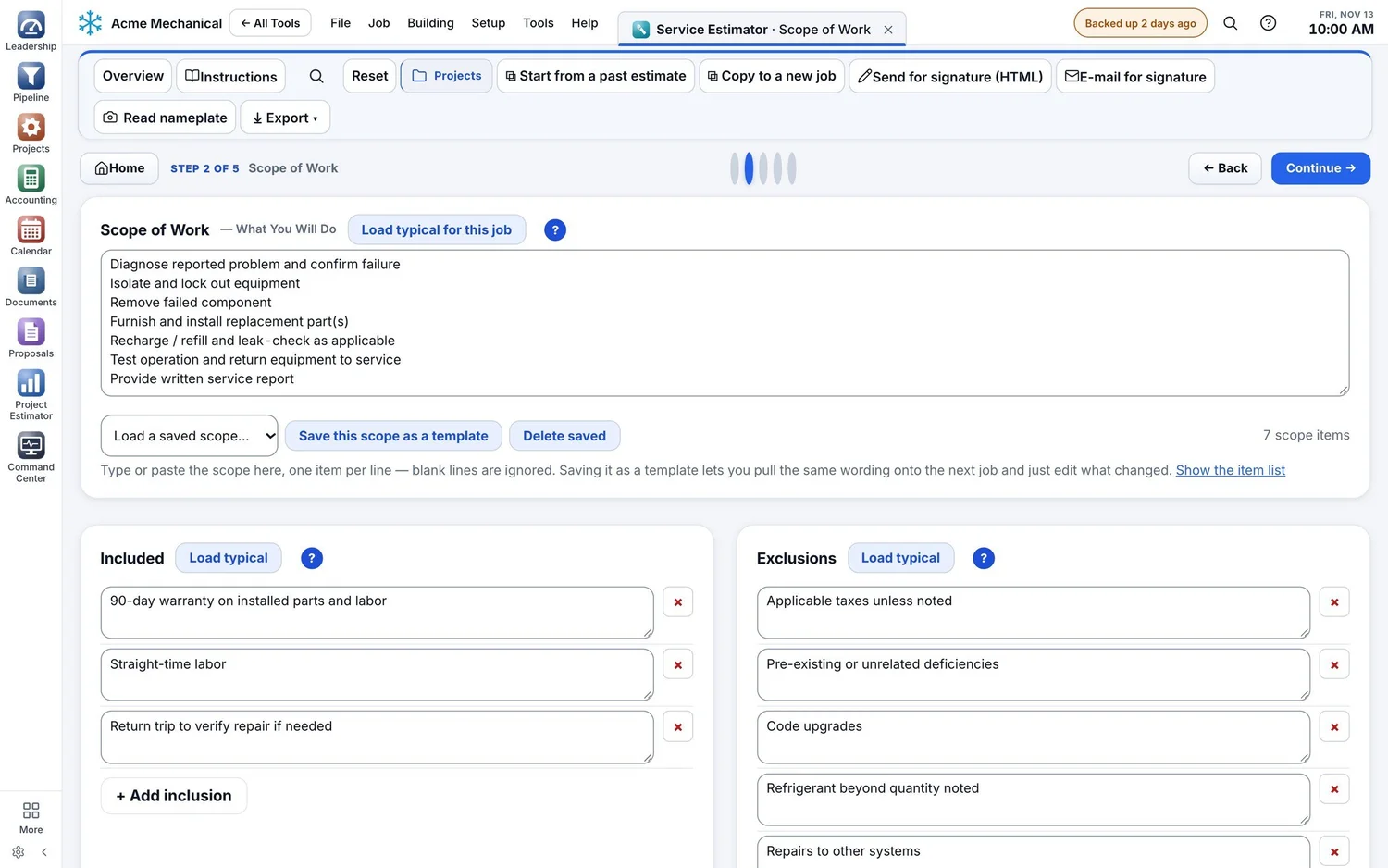
Service repairs need a fast, clear scope, so the Service Estimator writes it with what is included.
Maintenance Estimator
Builds an agreement from the bottom: each covered unit, its tasks at the chosen frequency, the hours at the skill tier required, and materials, rolled up to an annual cost, a margin and a price with a multi-year schedule.
Learn More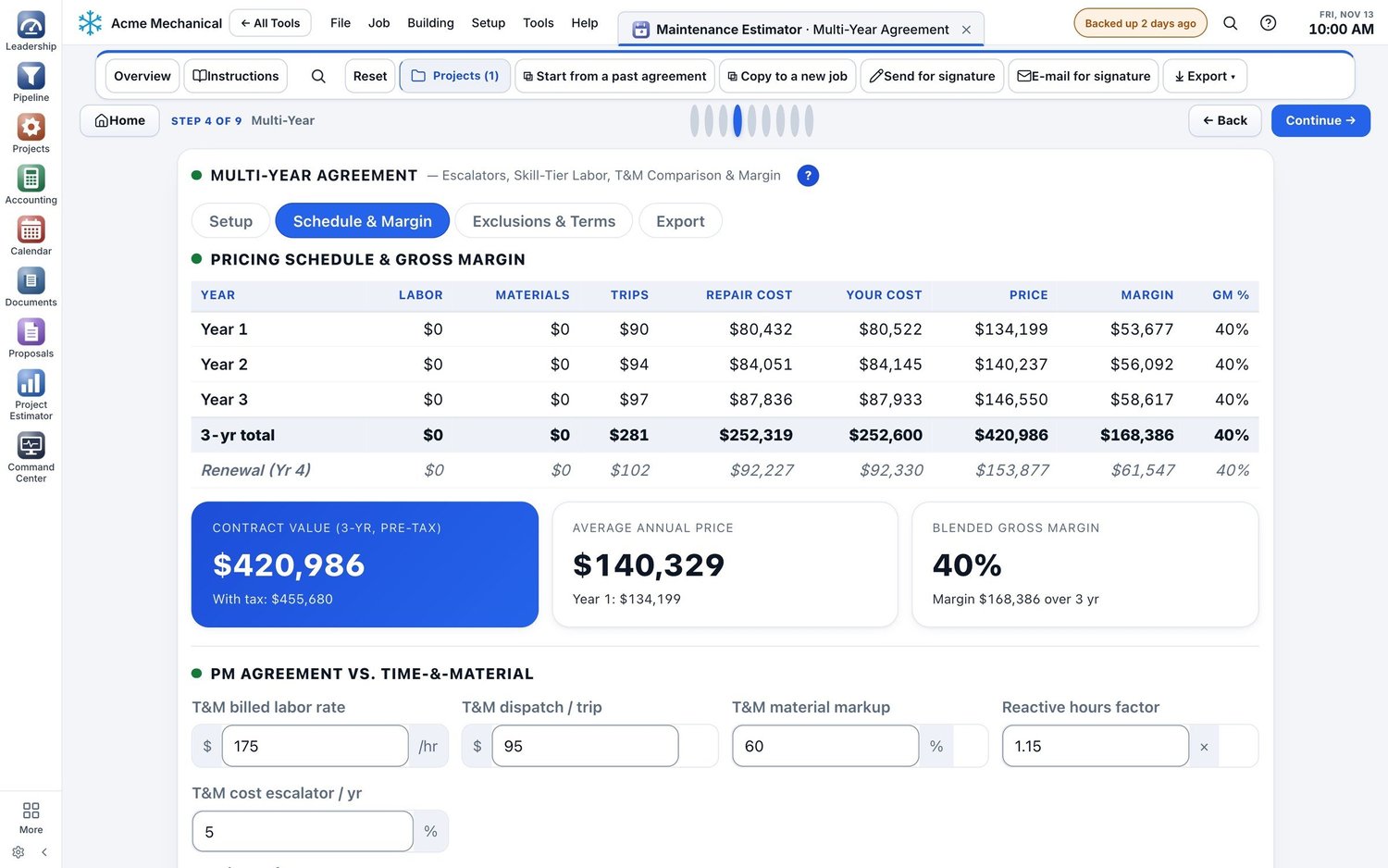
Agreements priced by guess lose money, so the Maintenance Estimator rolls tasks into a yearly price and margin.
One Company Rates & Labor Record
Labor rates by trade and tier, burden, material markup bands, trip charges, the standard markup on subcontract and your cost codes are set once in Company Setup. They can be entered by hand or read from one setup spreadsheet. Every field starts blank, the estimators will not price until your numbers are in, and a yearly reminder asks you to review labor rates before they change.
Learn More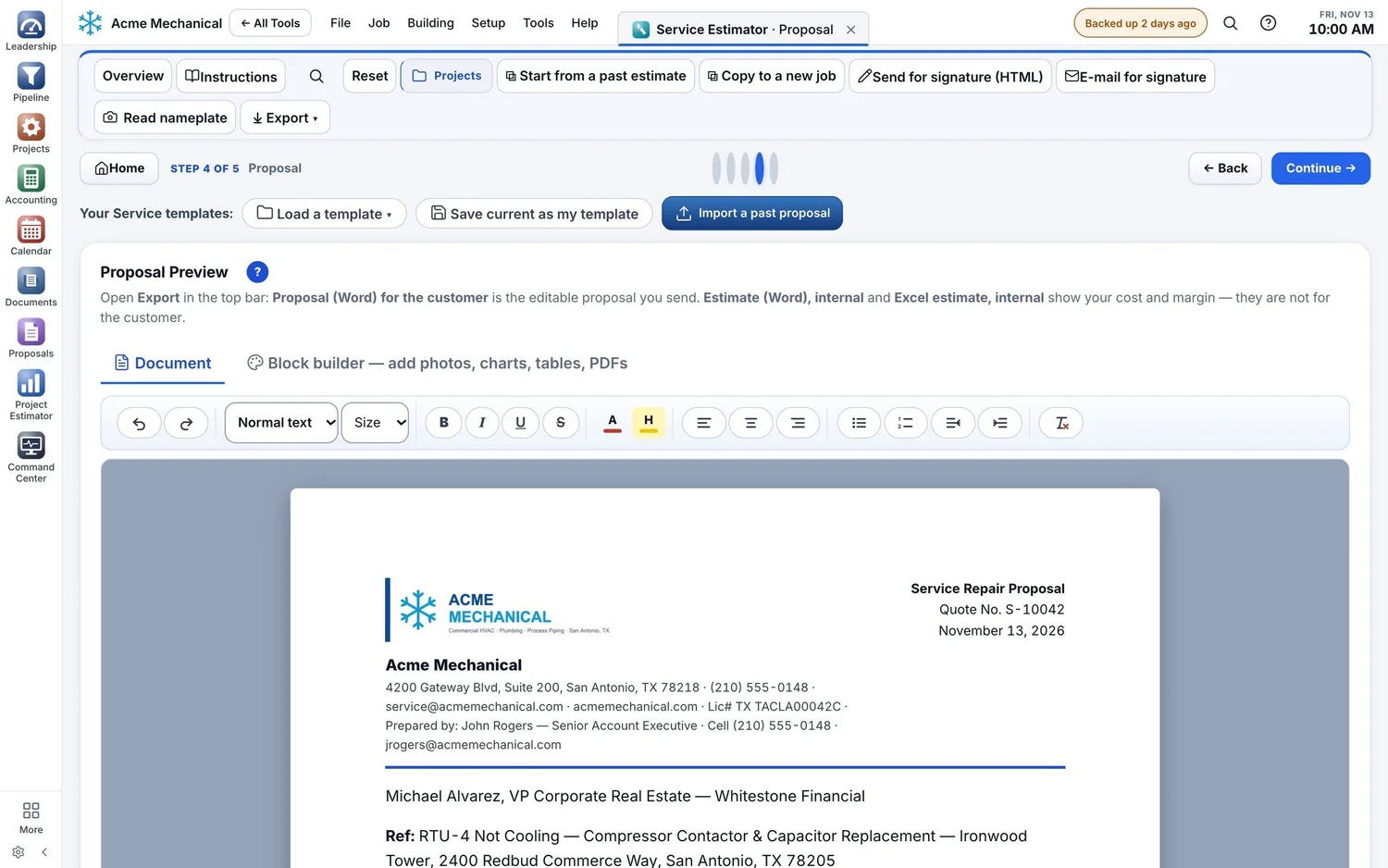
Customers want a clear quote fast, so the Service Estimator turns the same numbers into a branded proposal.
Labor You Can Measure Later
A labor line carries a quantity before its hours, such as 8 rooftop units or 12 VAV boxes, and shows the production rate it implies. Standard Breakdown lays out the twelve scopes a commercial mechanical job is made of, so the job can measure its own progress in delivery.
Learn MoreShow Less
Knowing a job is over budget is not enough; you need to know where, while there is still time to fix it. A labor quantity in the estimate lets the job measure itself instead of guessing percent complete.
- Labor is counted in each, shown as a rate such as 4 hours per unit.
- Production rate shows estimated and actual, as hours divided by quantity.
- Percent complete is installed quantity divided by estimated quantity.
- The job forecasts from measurement once measured codes cover 50% of the budget.
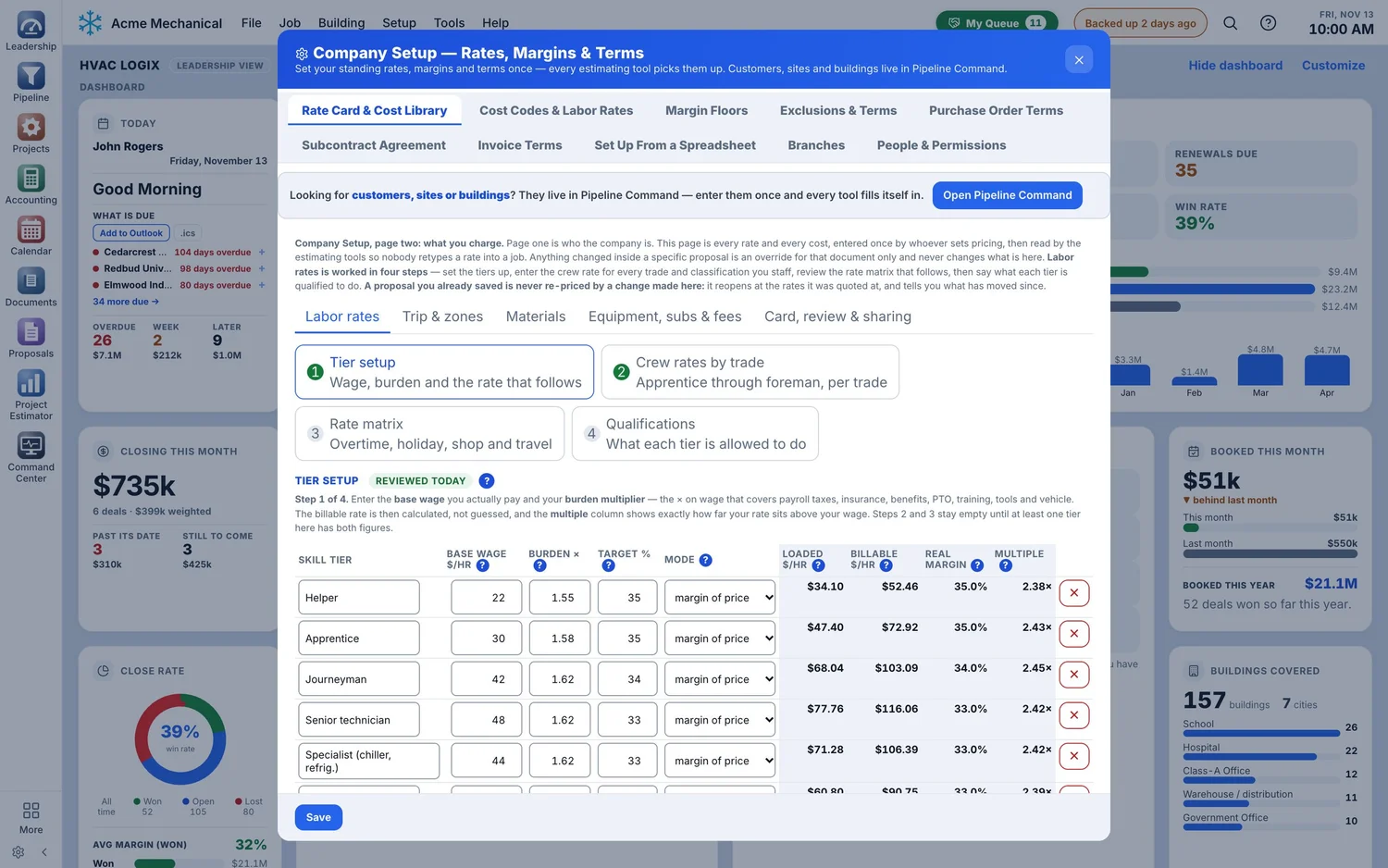
One Company Rates & Labor record and cost library that the project, service and maintenance estimators all price from.
Measure the Drawing Inside the Estimate
Open the drawing set as a PDF, or a CAD drawing saved as DXF, from the Project Estimator. Everything stays on your computer and is saved with the estimate.
A Scale for Every Sheet
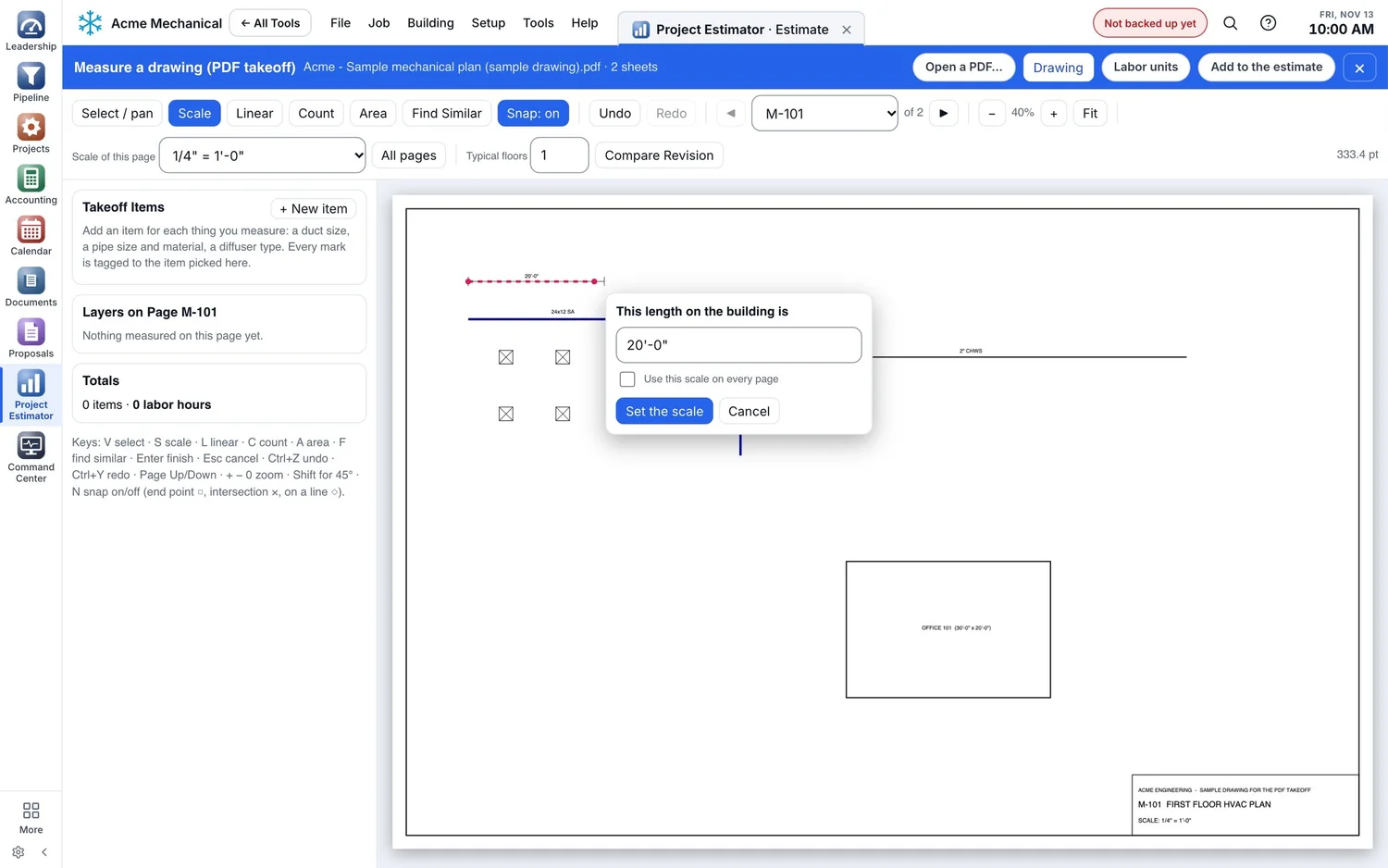
Pick an architectural, engineering or metric scale, or click both ends of a known dimension and type its length for a sheet printed fit-to-page. A set of 50 or more sheets stays quick because a sheet is drawn only when you look at it.
Runs, Counts and Areas by System
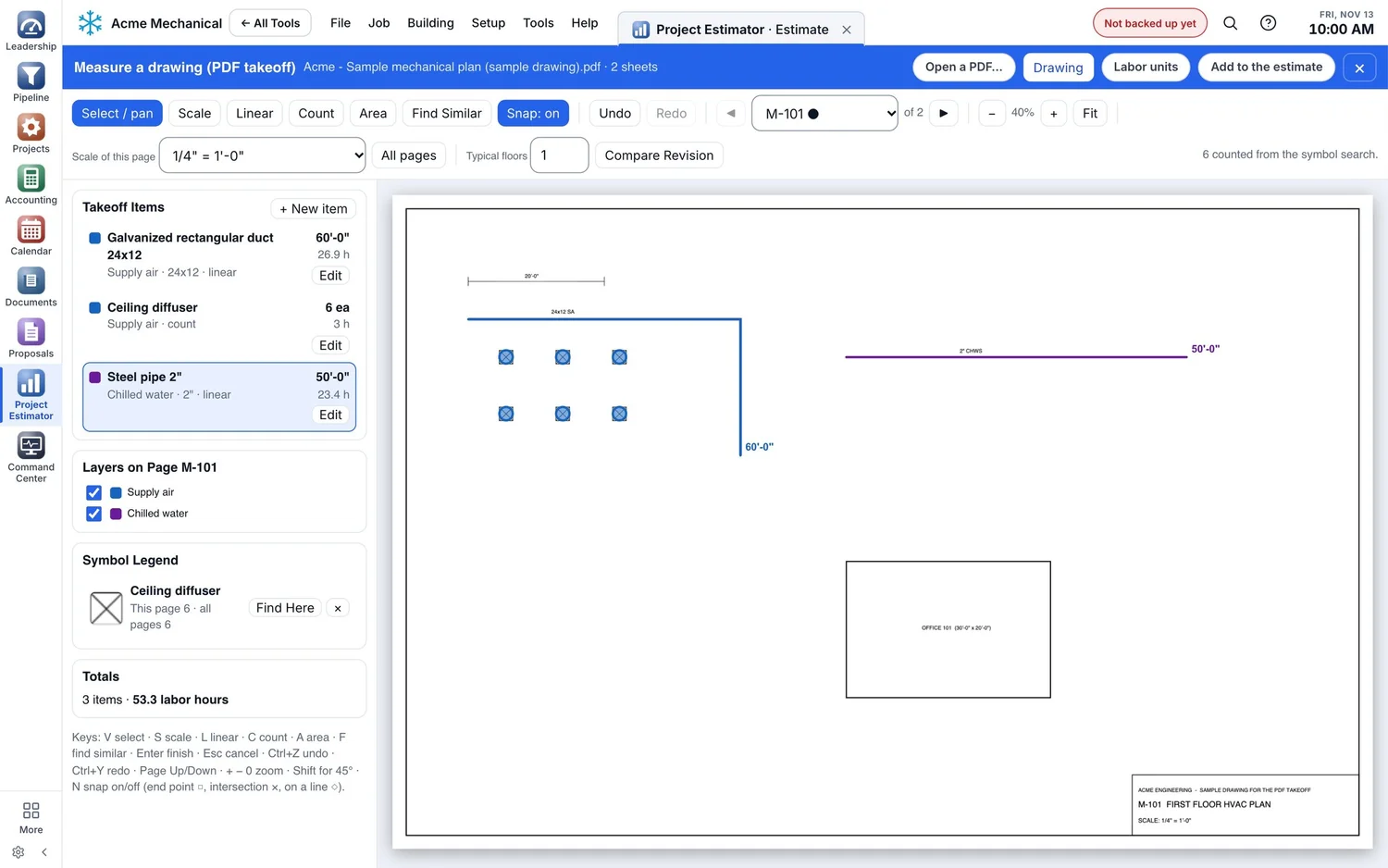
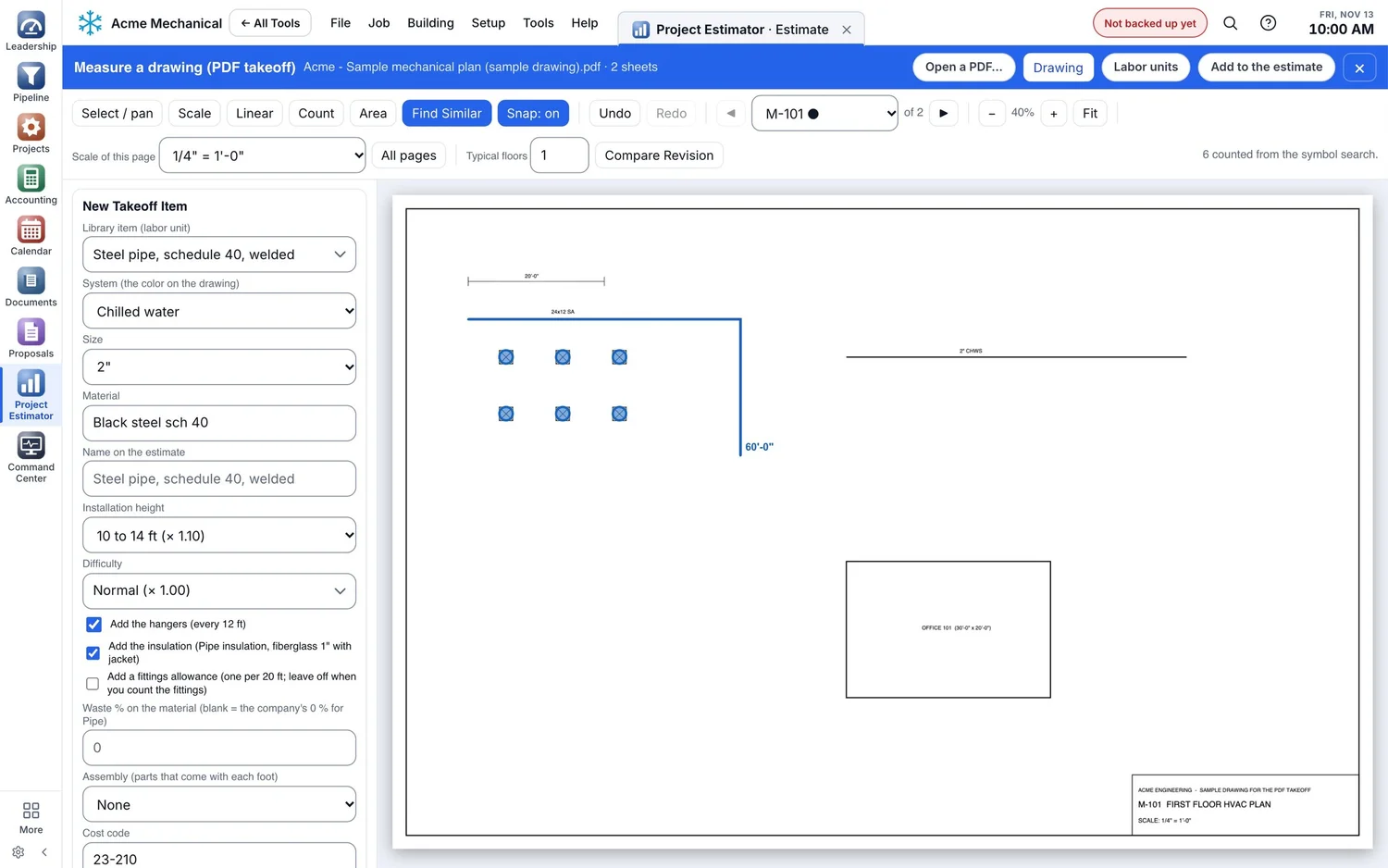
Each mark belongs to a takeoff item with its system color, size, material, installation height, difficulty and cost code. Snapping catches the drawing's own end points and intersections. A pipe or duct run can bring its hangers, insulation and a fittings allowance.
Typical Floors, Waste and Drops
Multiply a sheet that stands for several identical floors. Waste is added to material only, never to labor hours. Type the drops and rises the plan does not show and they are added to the run's length and hours.
Find Similar and Compare Revision
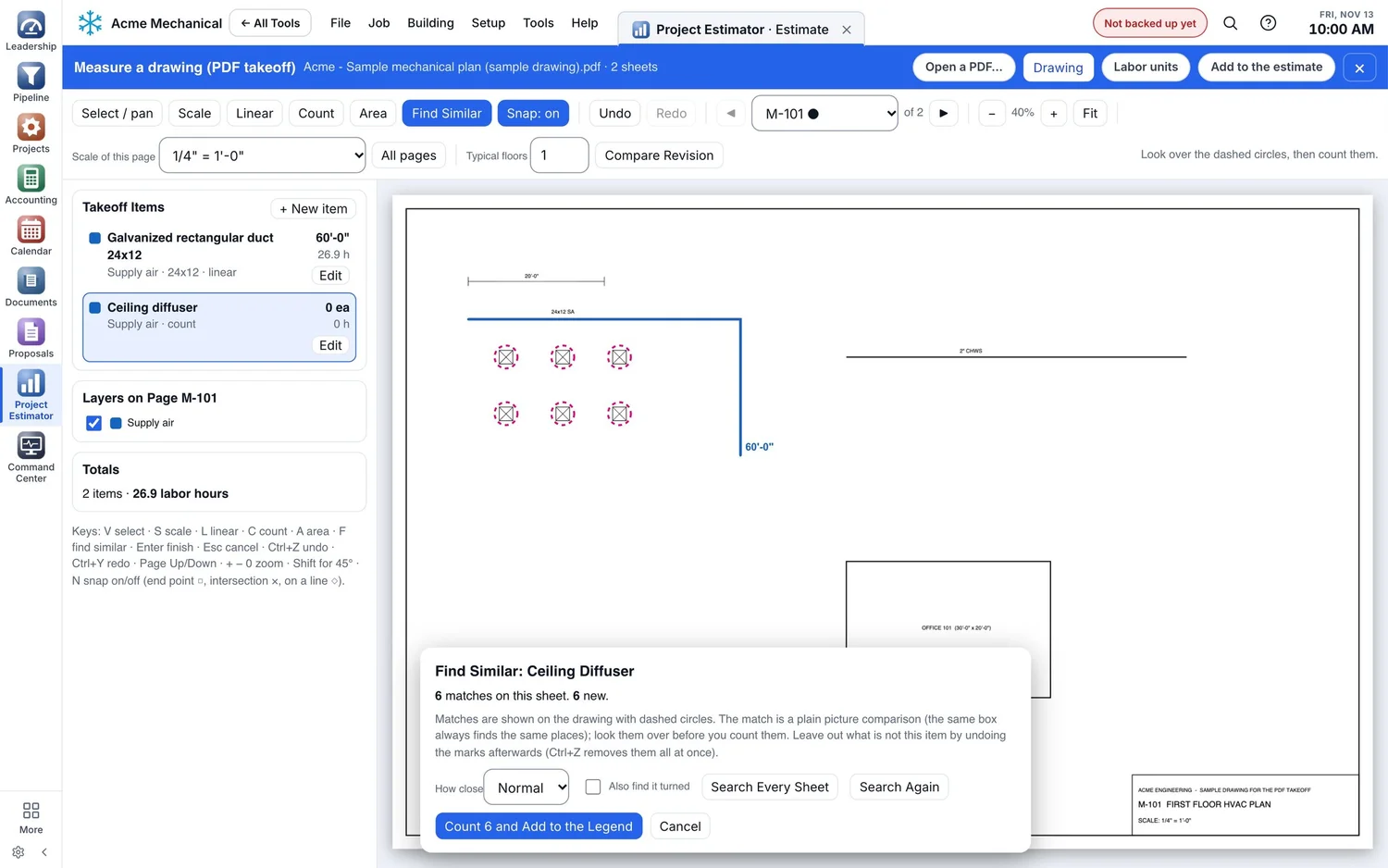
Box one symbol and Find Similar shows every matching place on the sheet for you to confirm before anything is counted. When a revised drawing arrives, Compare Revision overlays the old copy and outlines each of your marks that crosses a changed area.
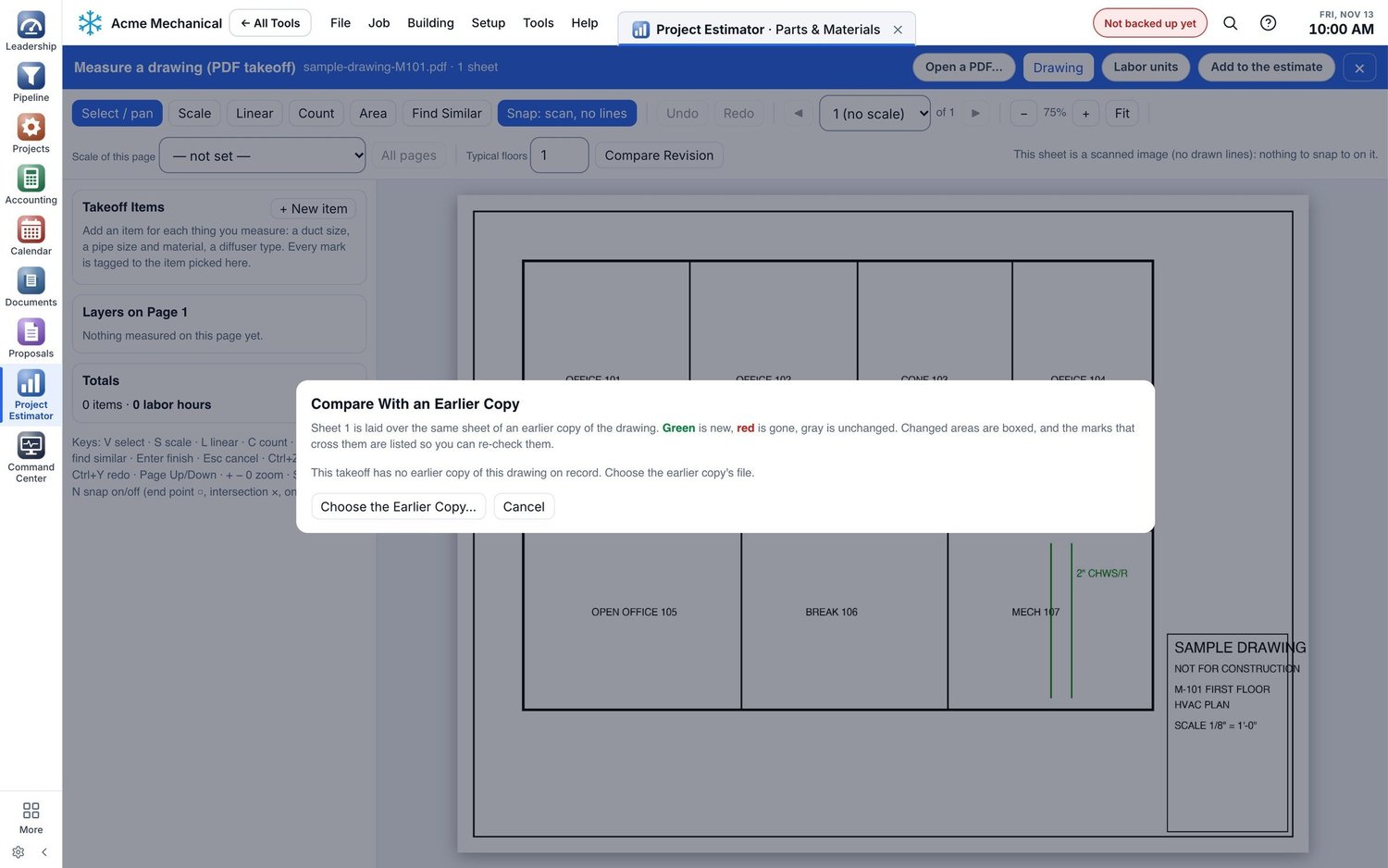
Revised drawings hide changes, so Compare Revision lays the new sheet over the old one.
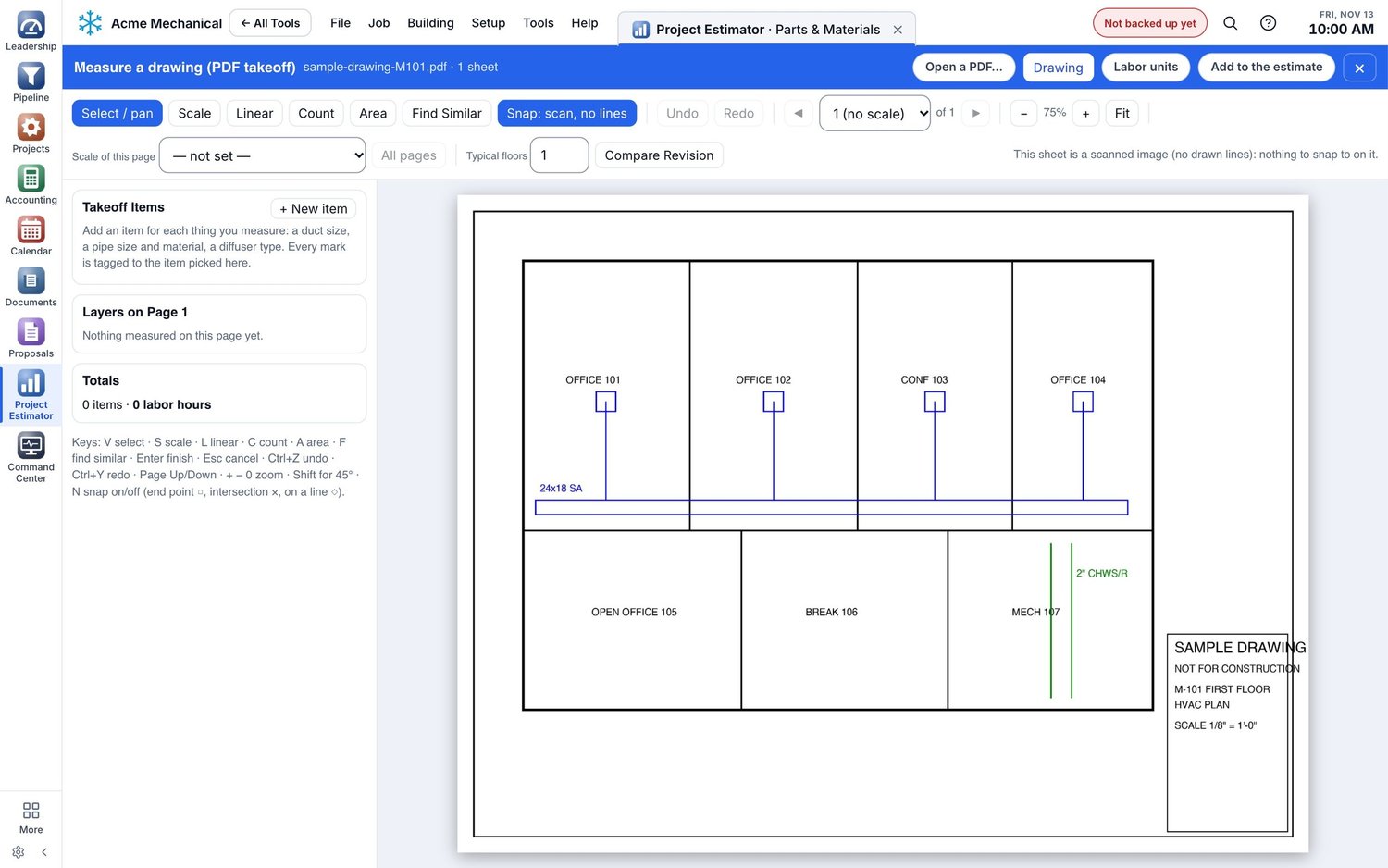
Switching between a takeoff program and the estimate invites mistakes, so the drawing opens and is measured right inside the estimate.
Or Import the Takeoff You Already Measured
Reads Excel and CSV Exports
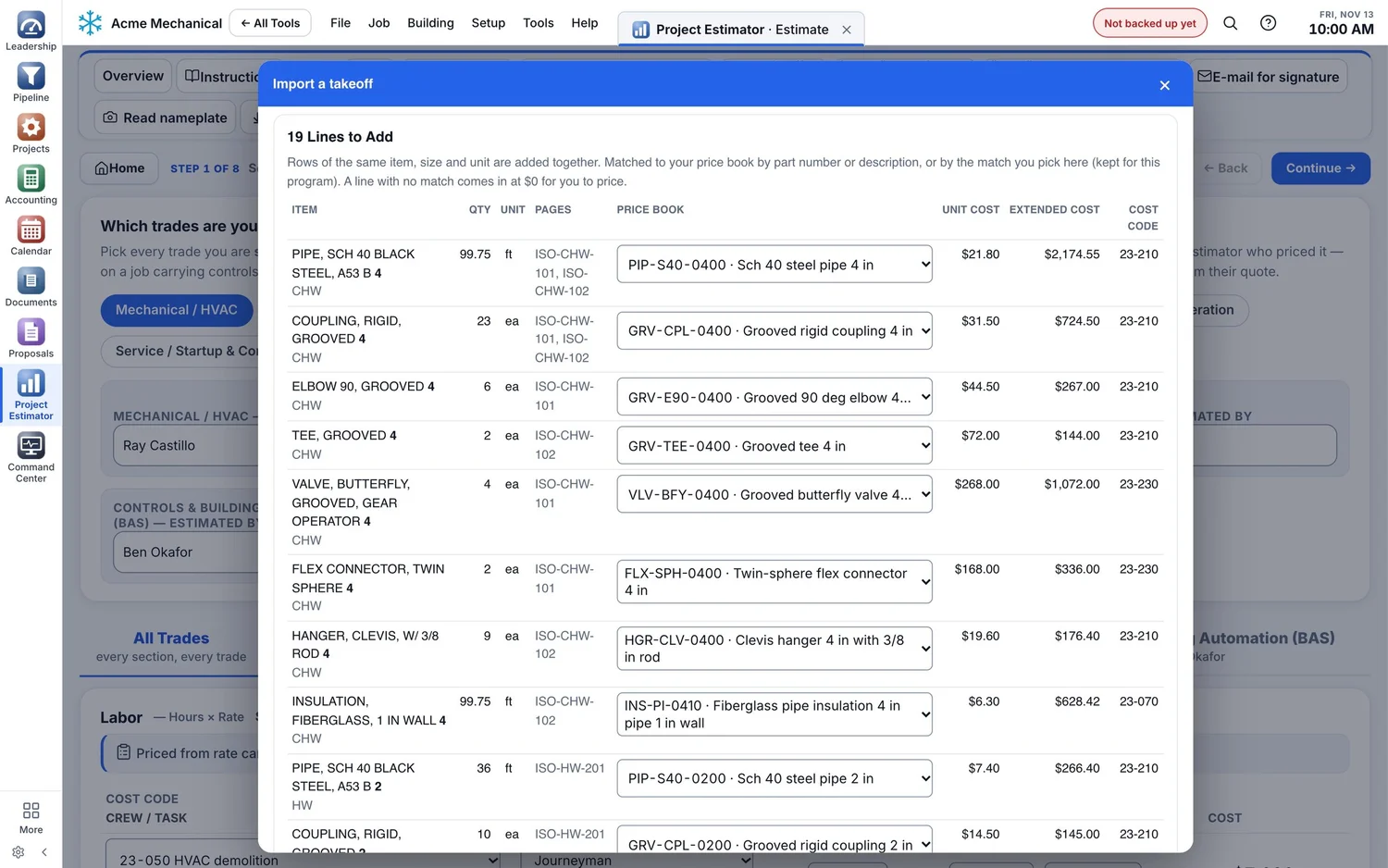
Bring in on-screen takeoff programs' Excel or CSV exports, a PDF markup summary, or a detailing program's bill of materials. Any file with an item column and a quantity column will work.
Learn MoreShow Less
Retyping a takeoff costs hours and invites the mistake that loses money on the job. Import brings quantities straight in, and reads units the way estimators actually write them.
- Reads "125.5 ft", "1,240.5" and 45' - 6" (45.5 ft) correctly.
- LF, ft and feet all read as feet; SF and sq ft as square feet.
- Rows of the same item, size and unit are combined, or kept one per group if you choose.
- Takeoffs measured on PDF drawings inside HVAC Logix land the same way.
Reads Your Takeoff File for You
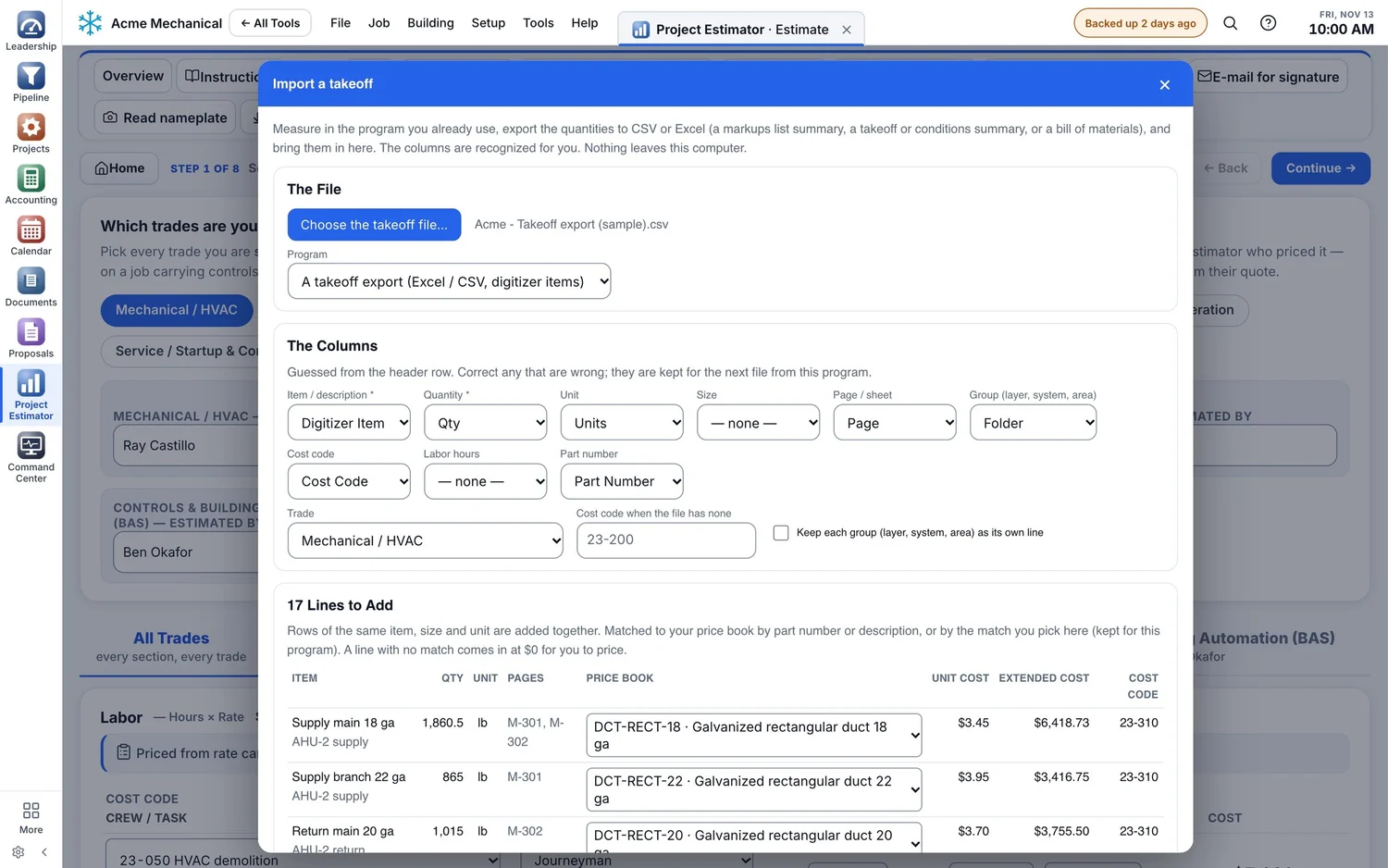
Save your takeoff as a spreadsheet from the program you already use, such as a PDF markup or takeoff program. HVAC Logix recognizes which program made the file and works out what each column holds: the item, quantity, unit, size, drawing page, group, cost code, labor hours and part number. If it gets a column wrong, you fix it once and it remembers for every file from that program after that.
Learn MoreShow Less
Every hour spent mapping spreadsheet columns is an hour not spent bidding. HVAC Logix sets up each program's layout once and remembers it.
- The program is recognized from the file's header row.
- Group can be a layer, system or area, so lines stay organized the way you measured them.
- Labor hours in the file come in as one labor line on the trade you pick.
- The file is read on your own computer; nothing is uploaded.
Matched to Your Price Book
Each line is matched to your price book by part number, then by description, then by a match you made before. A line with no match comes in unpriced for you to price. It is never guessed.
Learn MoreShow Less
A guessed price on an unmatched line is how a bid comes in low and loses money. Unmatched lines arrive at $0, in plain sight, so every number in the estimate is one you chose.
- Matching uses the materials on your Rate Card.
- Pick a match once from the list and it is kept for that program's next file.
- Imported lines are named "takeoff" in Parts and Materials, so they are easy to find.
- Pricing, overhead and markups then apply as for any line; the proposal never shows takeoff cost.
The File Against What Lands
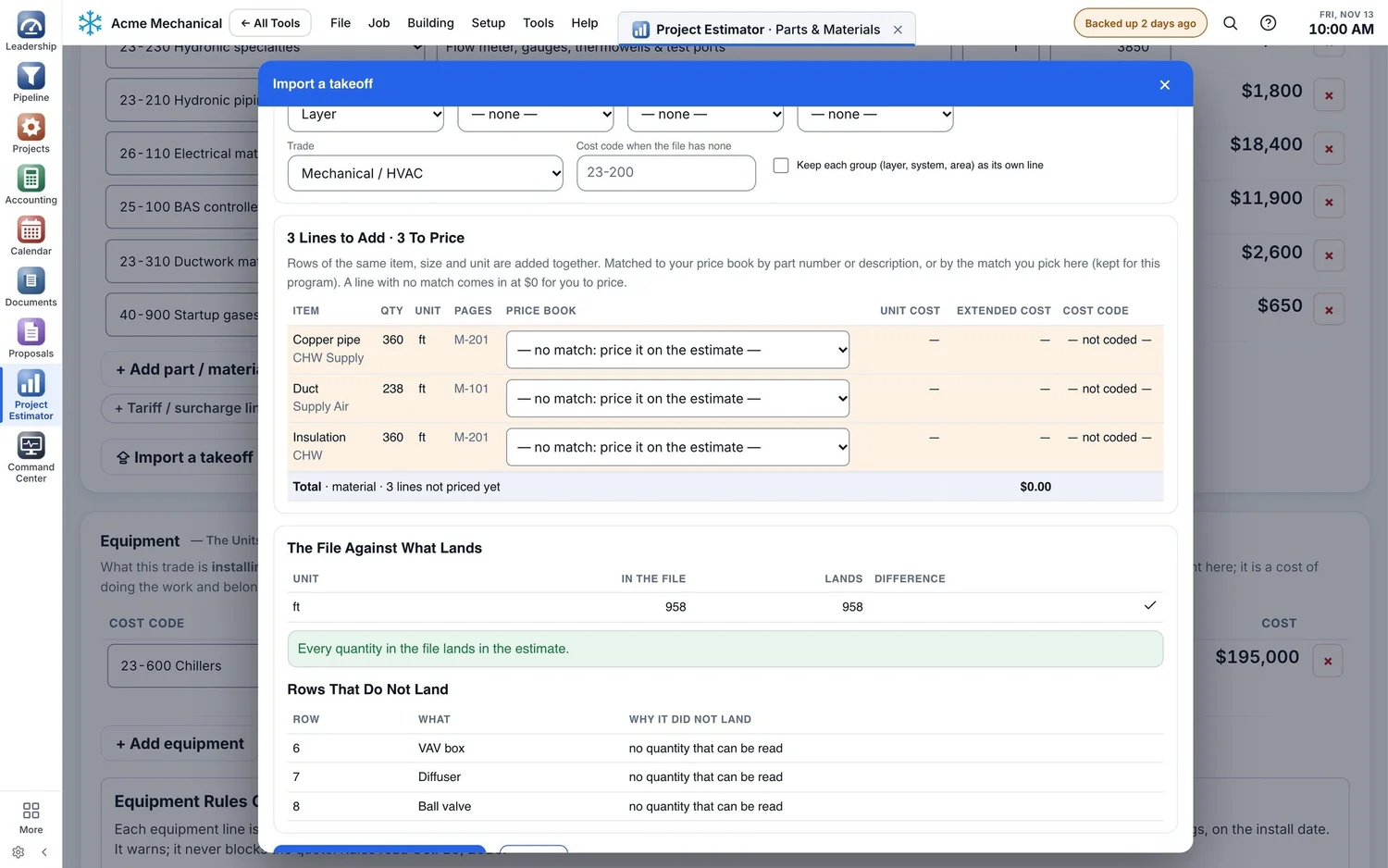
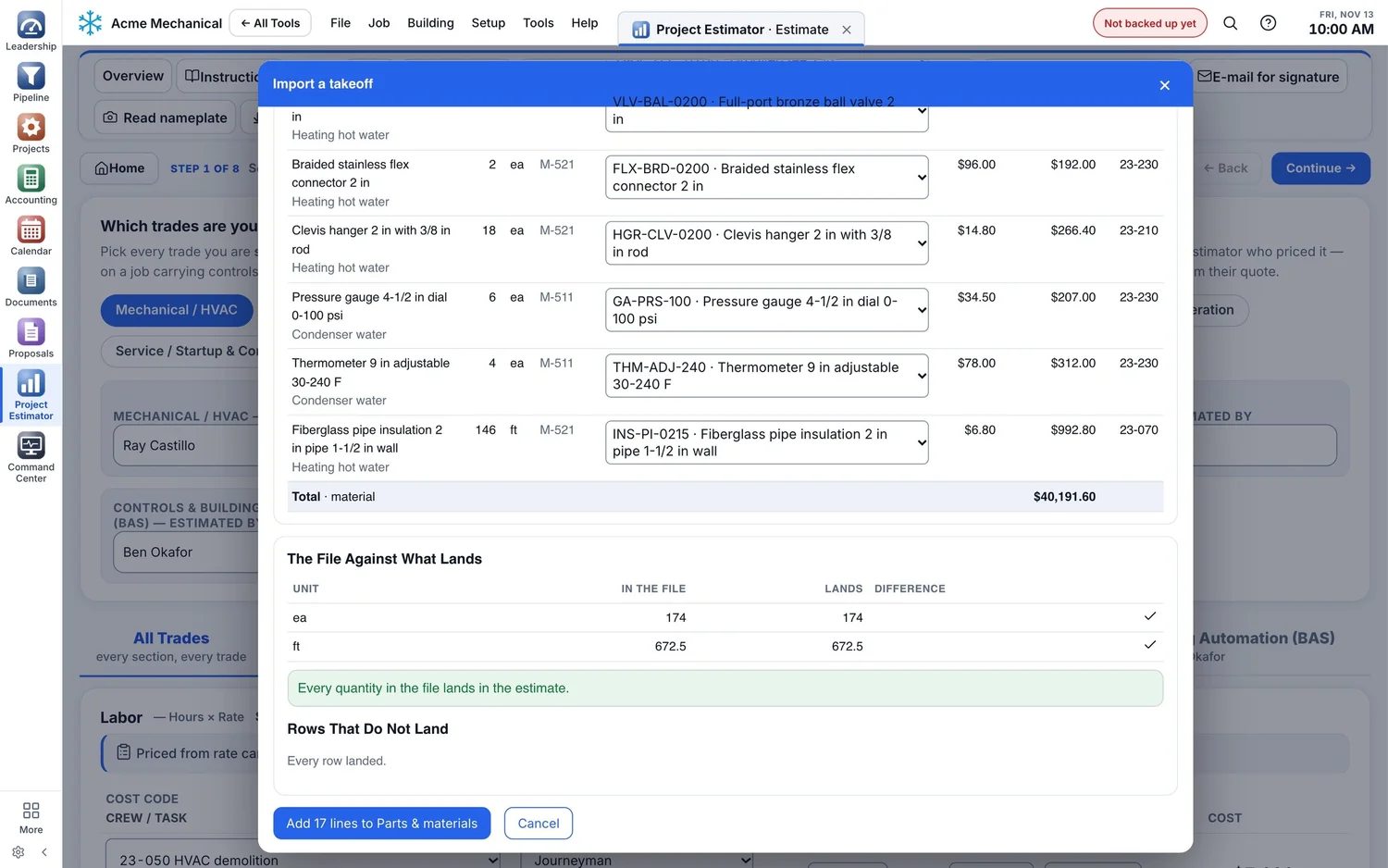
Before anything is added, a comparison shows the file's own totals by unit beside what will land in the estimate. Cost codes stay with their lines, and a code that is not on your list is flagged.
Learn MoreShow Less
A subtotal row counted twice can add thousands to a bid and lose the job. The check shows exactly what lands and what does not, before anything is added.
- Rows That Do Not Land lists each row left out and why.
- Reasons include a total or subtotal row, an unreadable quantity, no item name, or a zero quantity.
- A cost code marked inactive is flagged before it lands.
- Cost codes stay with their lines through save, reopen, save as a job and deleted rows above.
A Labor-Unit Library You Control
Hours per unit by item and size for pipe, duct, fittings, hangers, insulation, terminals, valves and equipment, with height and difficulty multipliers. The library starts empty. Enter your own hours per unit or import your spreadsheet; the estimator will not price labor until they are in. Every change is logged with who, when, and the old and new value.
Learn MoreShow Less
Your crews' real production is what makes a bid both competitive and profitable. The library holds your own hours, so labor is never priced from someone else's numbers.
- An item's hours = quantity × hours per unit × height × difficulty.
- An item without your hours is named in red, and Add to the Estimate stays off.
- Pipe hanger spacing ships from IMC and IPC 2021 tables; duct hanger spacing is yours.
- Changing it needs the Company Standards right; others can use it but not edit it.
- In a team folder every computer uses the same library.
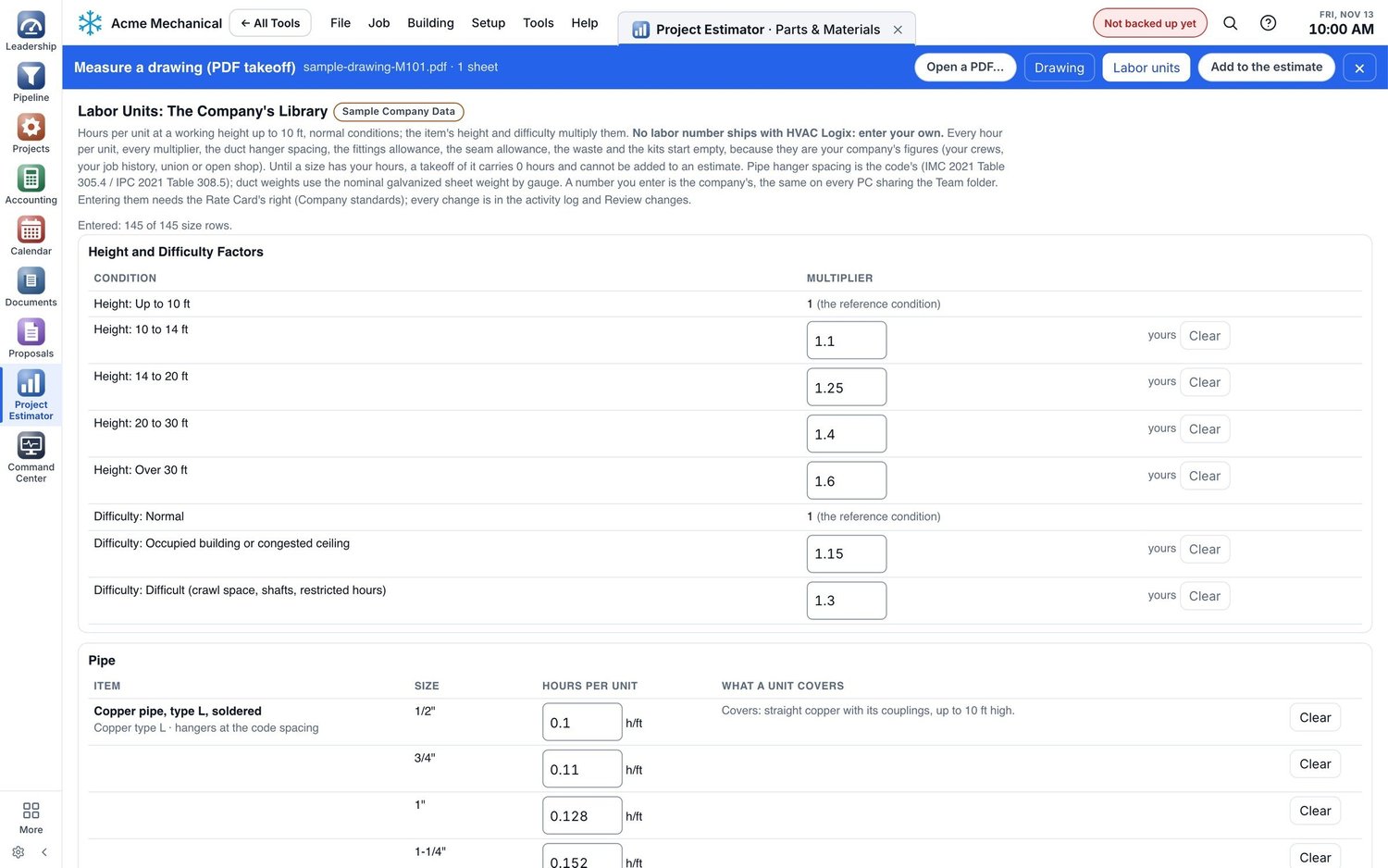
Labor hours should come from your own history, so the labor-unit library holds hours by item and size.
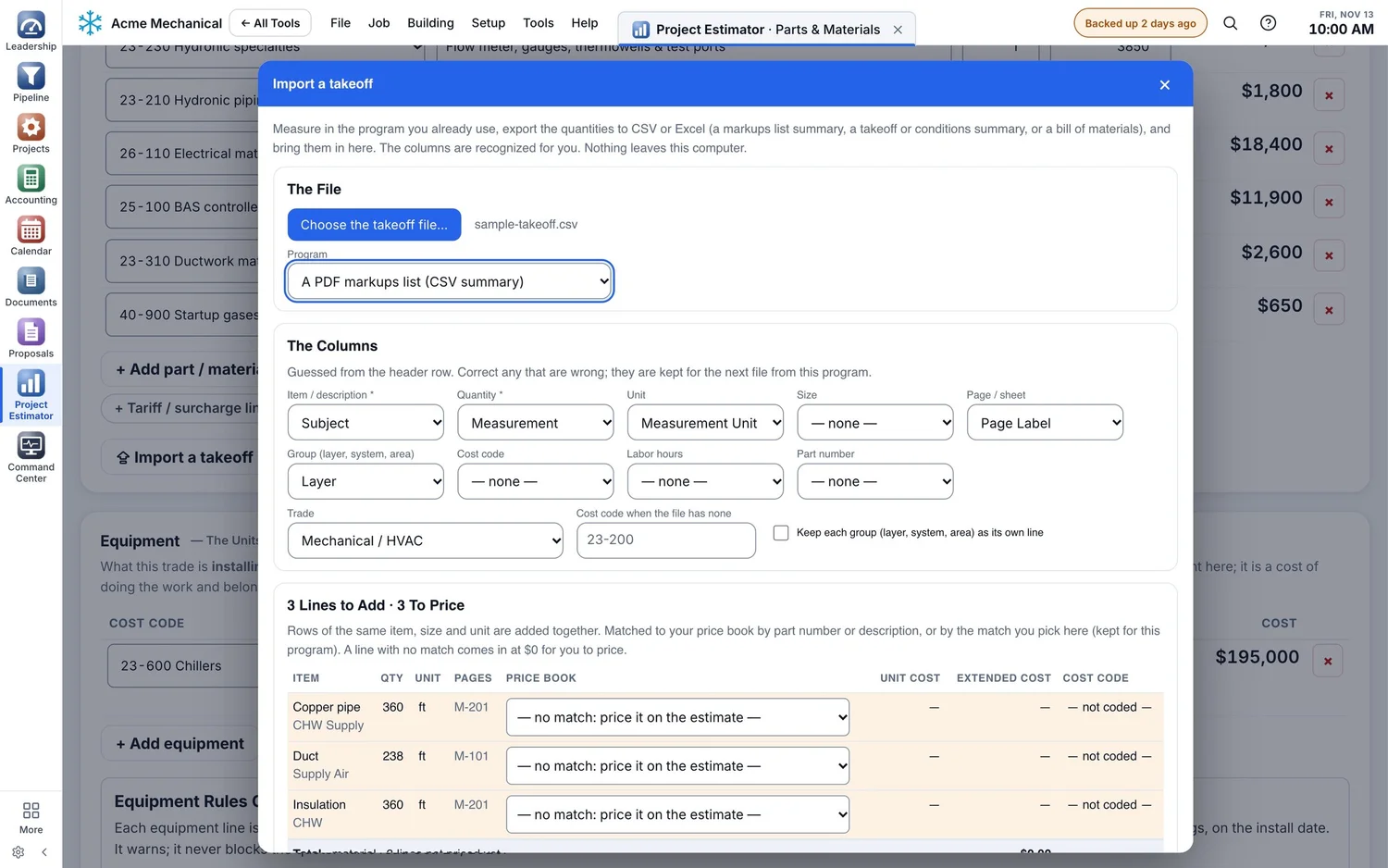
Retyping a measured takeoff wastes hours, so the import reads your file, guesses each column and shows the lines before they are added.
Price with Today's Costs and See the Margin as You Go
Supplier Prices
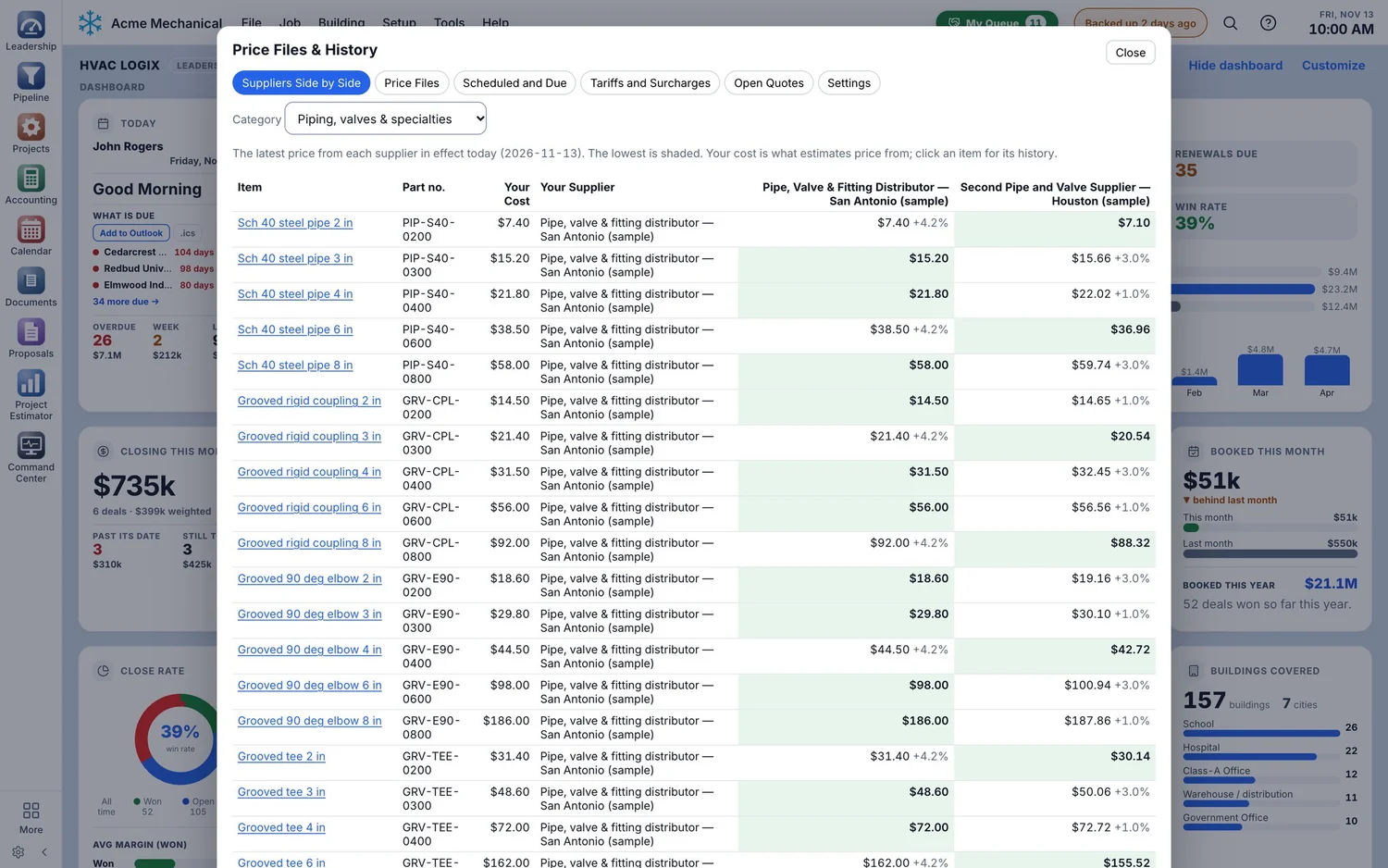
- Import supplier price sheets in CSV or Excel, or standard price catalog files, with no live feed required
- Suppliers side by side for each item, with the lowest price shaded and the full price history behind it
- Scheduled increases listed before they take effect, and applied only when you say so
- A price check under the materials table flags costs that have risen or gone stale. It never prints and never reaches a client document
- One-click lines for a supplier tariff surcharge or a material escalation allowance
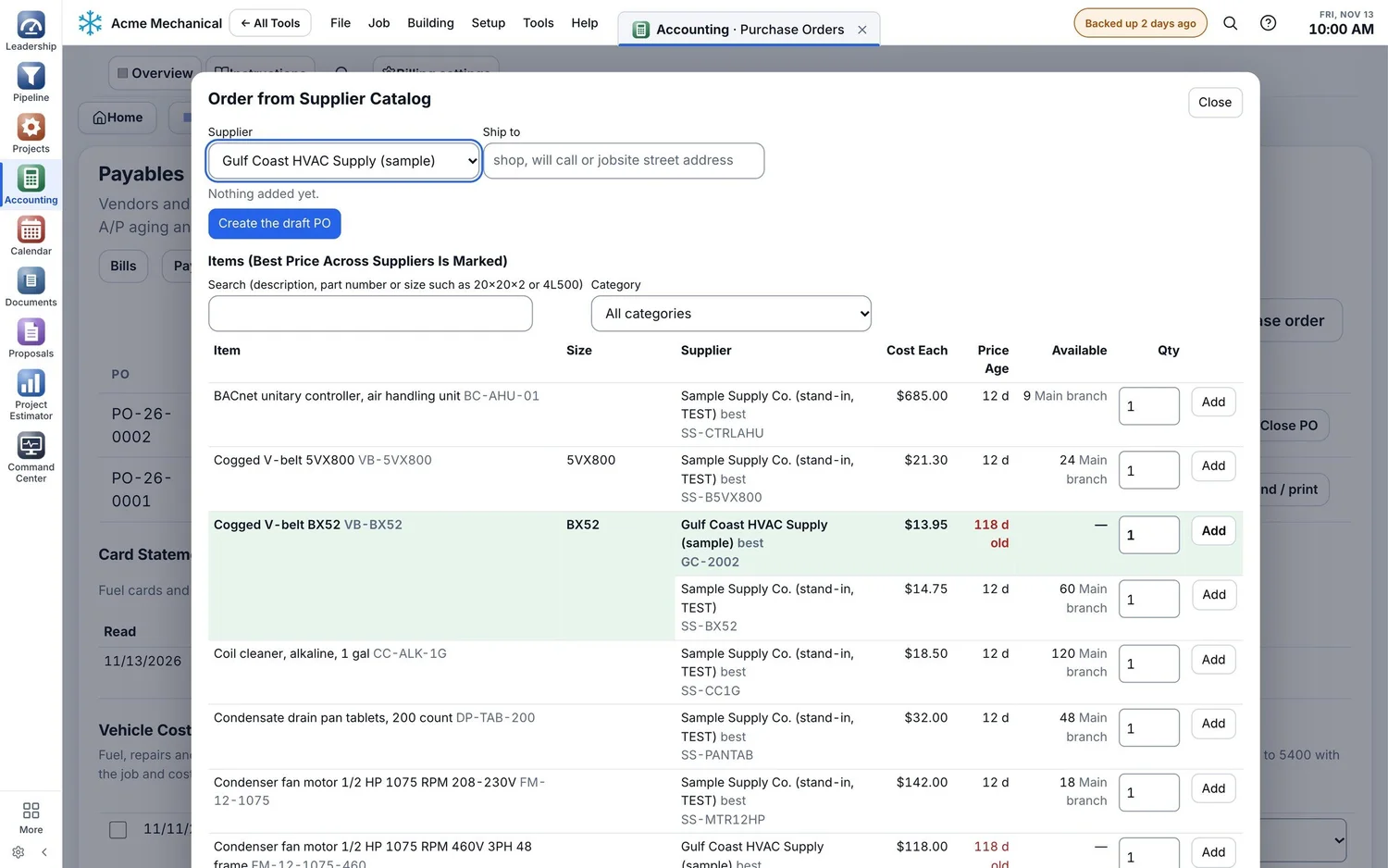
Prices from last month cost money today, so supplier catalog files show current prices item by item.
Equipment and Rules
- Keep every manufacturer's rep quote for major equipment with its price, freight, start-up and validity date
- The equipment rules check reads each equipment line against EPA refrigerant rules and DOE efficiency minimums at the jobsite on the install date
- State rules are checked for California, Washington and New York. For other states the panel says federal rules apply
- Incentive programs from your Rebate Tracker that fit the equipment are shown to you only
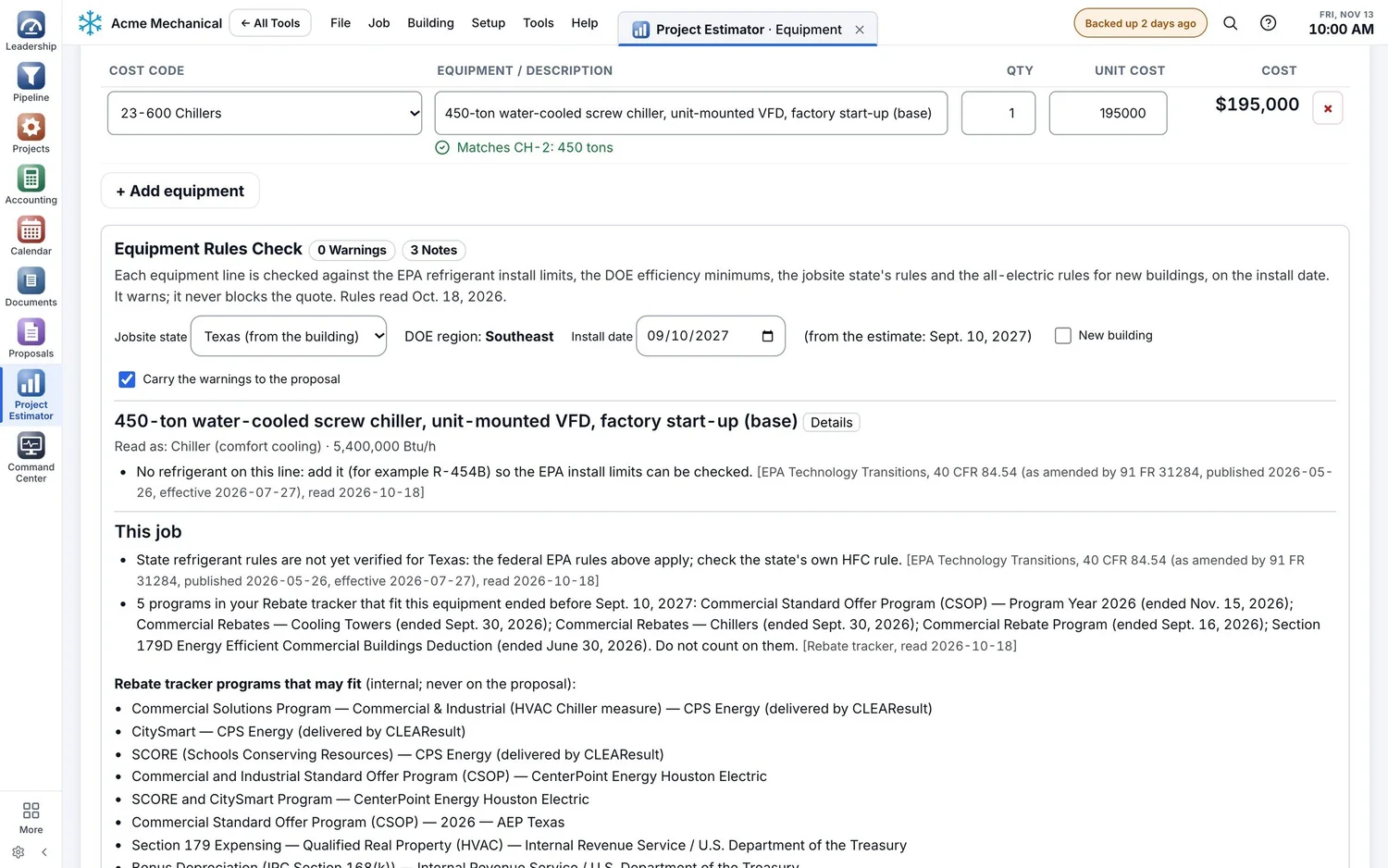
Quoting equipment that breaks a rule is a costly mistake, so each equipment line is checked as you type.
Margin Discipline
- Set a minimum gross margin by job type and contract size band
- A green, amber or red bar under the totals shows where the estimate stands, with the margin points of room left
- A below-floor proposal asks for a reason and the name of whoever approved it, stored on the internal estimate only
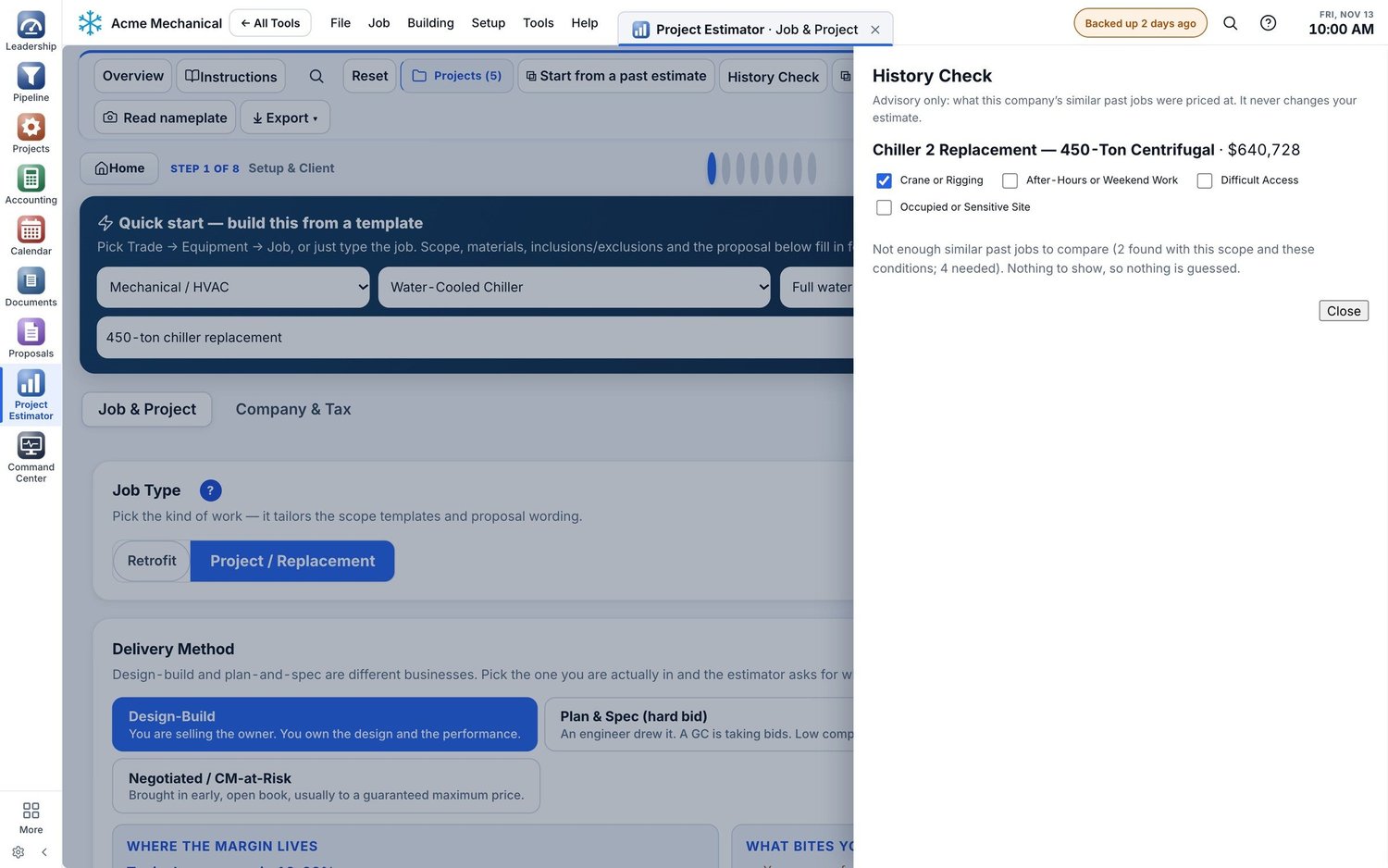
- History Check shows what similar past jobs were priced at and whether they were won or lost
- The internal estimate lists every markup that differs from your standard rates, with its dollar impact
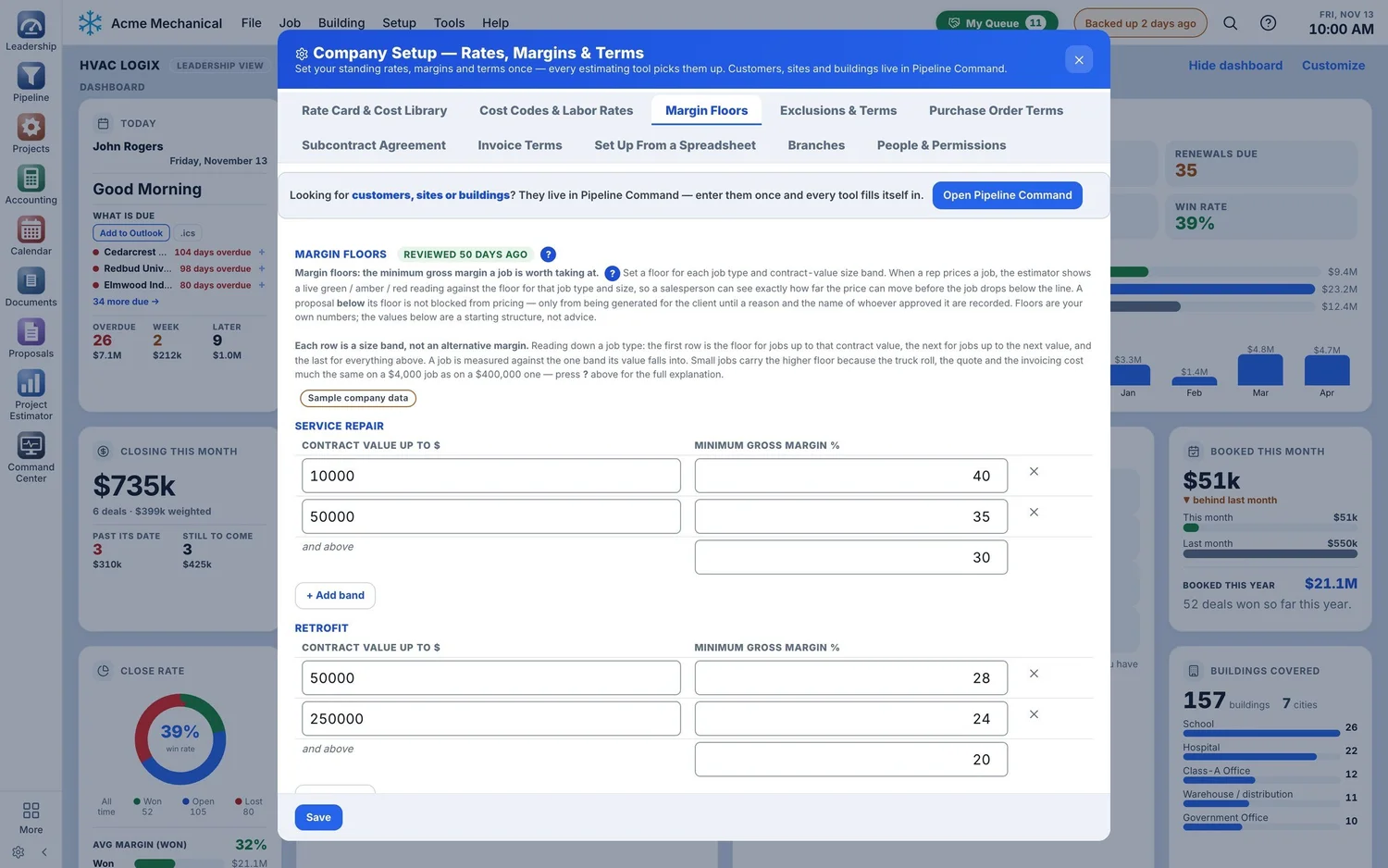
Bids priced below a safe margin hurt the company, so you set your own minimum margins by job type and size.
Everything Behind the Number on Bid Day
The Bid and Procurement tab organizes the quotes you rely on, the scope nobody has claimed and the schedule that long-lead equipment forces. It never changes the price build-up.
Quotes by Package
Add a package for each thing you buy out, then every quote under it with its amount, validity, lead time, freight, tax and bond terms. Mark the one quote per package that you carry.
Learn MoreShow Less
A quote that lapses before award, or carries freight you did not see, comes straight out of your margin. Every quote is kept with the terms that decide what it really costs.
- Expiry date is worked out from the date received and the validity days.
- Records whether a price is held firm or subject to escalation, and to what index.
- Records payment terms and whether a bond is included.
- Inert until you add a package, so existing estimates price exactly as before.
- The Excel estimate gains a Bid Register sheet.
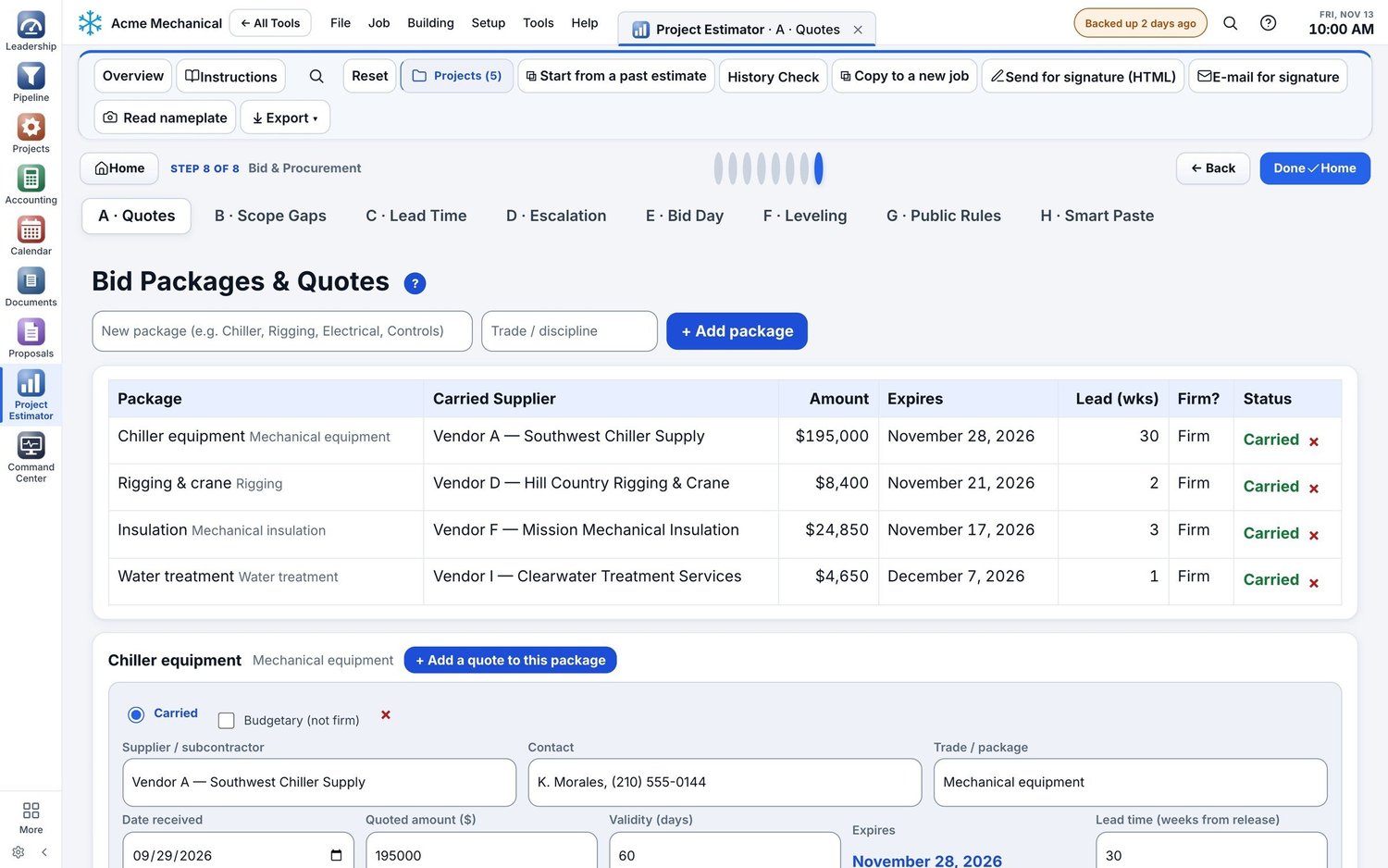
Quotes scattered in e-mail get missed, so each package holds its quotes with validity and lead time.
Scope Gaps and Leveling
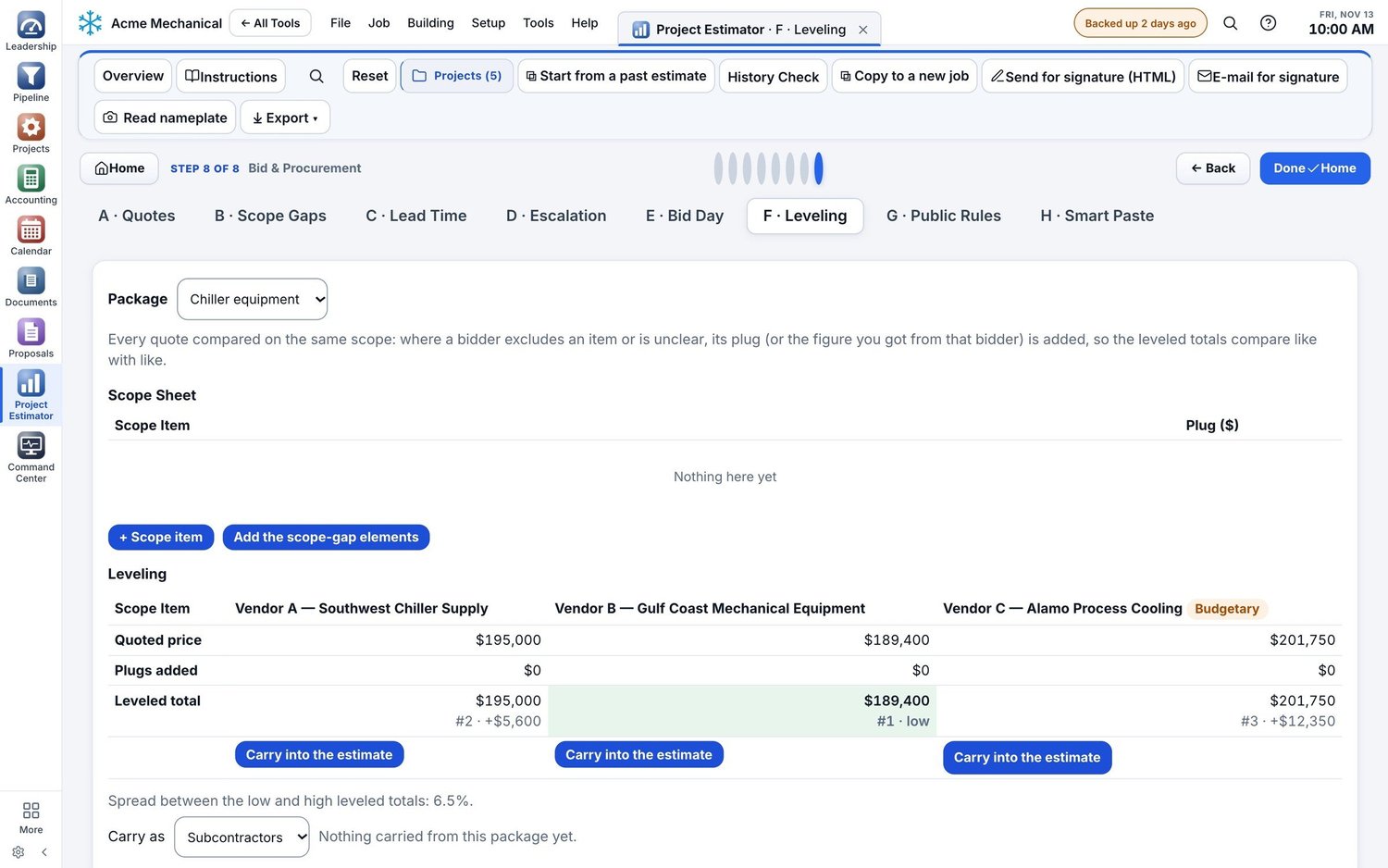
A matrix of scope elements against packages flags anything unclear or excluded by everyone. Leveling compares quotes on the same scope with a plug for each uncovered item, and notes when the lowest quoted price is not the lowest leveled total.
Learn MoreShow Less
Scope nobody priced becomes a change order after award, or a loss you absorb. Leveling finds the holes and prices them before bid day.
- Each cell cycles Included, Excluded, Unclear or Not Applicable.
- Load the typical scope list for the job type, then edit it to how you buy work.
- Each scope item carries a plug, the amount you would carry if nobody covered it.
- Carry Into the Estimate adds the chosen quote plus a Plug row for each uncovered item.
- The Excel estimate gains a Scope Gap sheet.
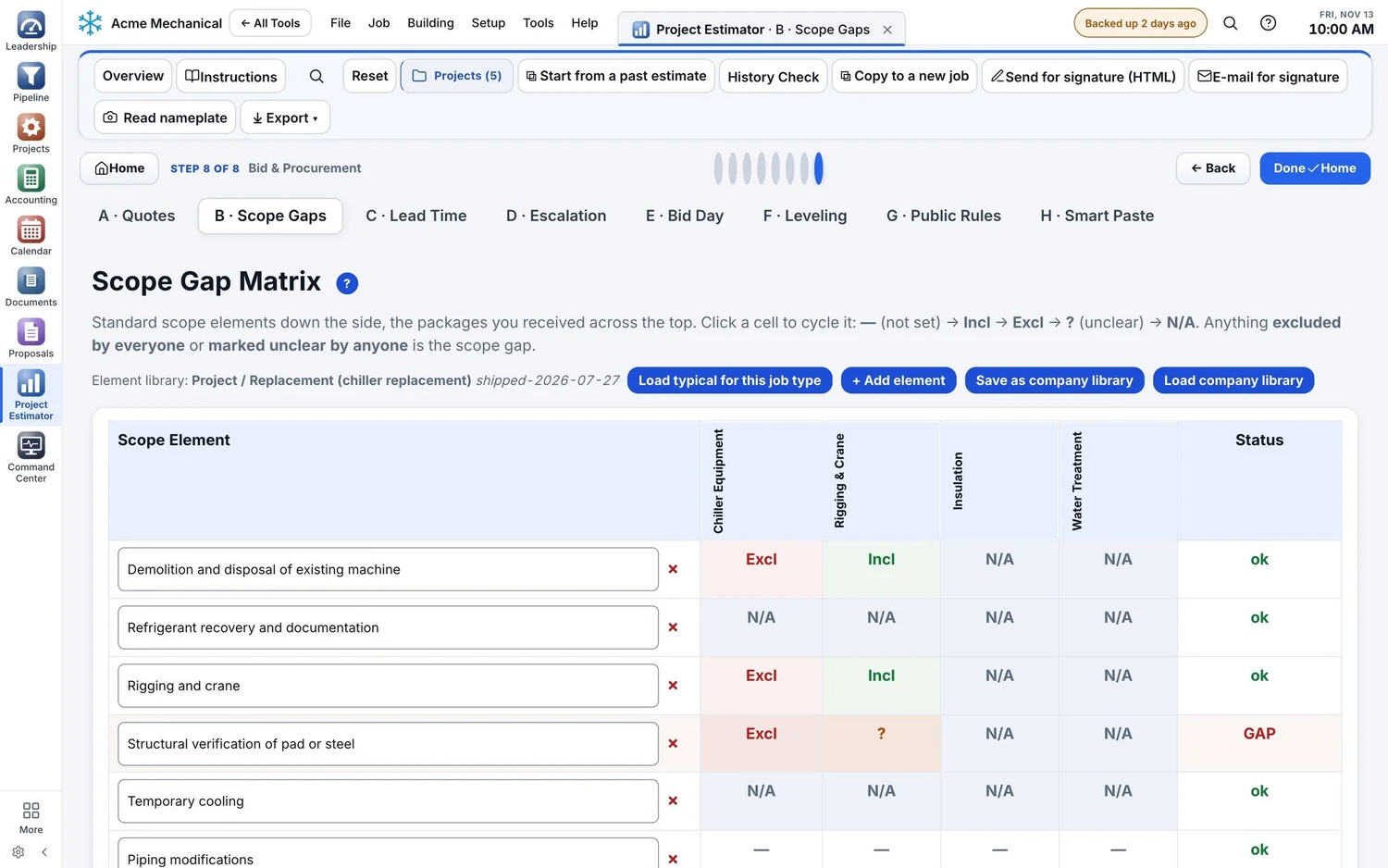
Scope nobody priced becomes your cost, so the scope gap matrix flags what every quote leaves out.
Lead Time
Works backward from the required on-line date through install and submittals to the date each package must be ordered, and names the governing package that must be ordered first.
Learn More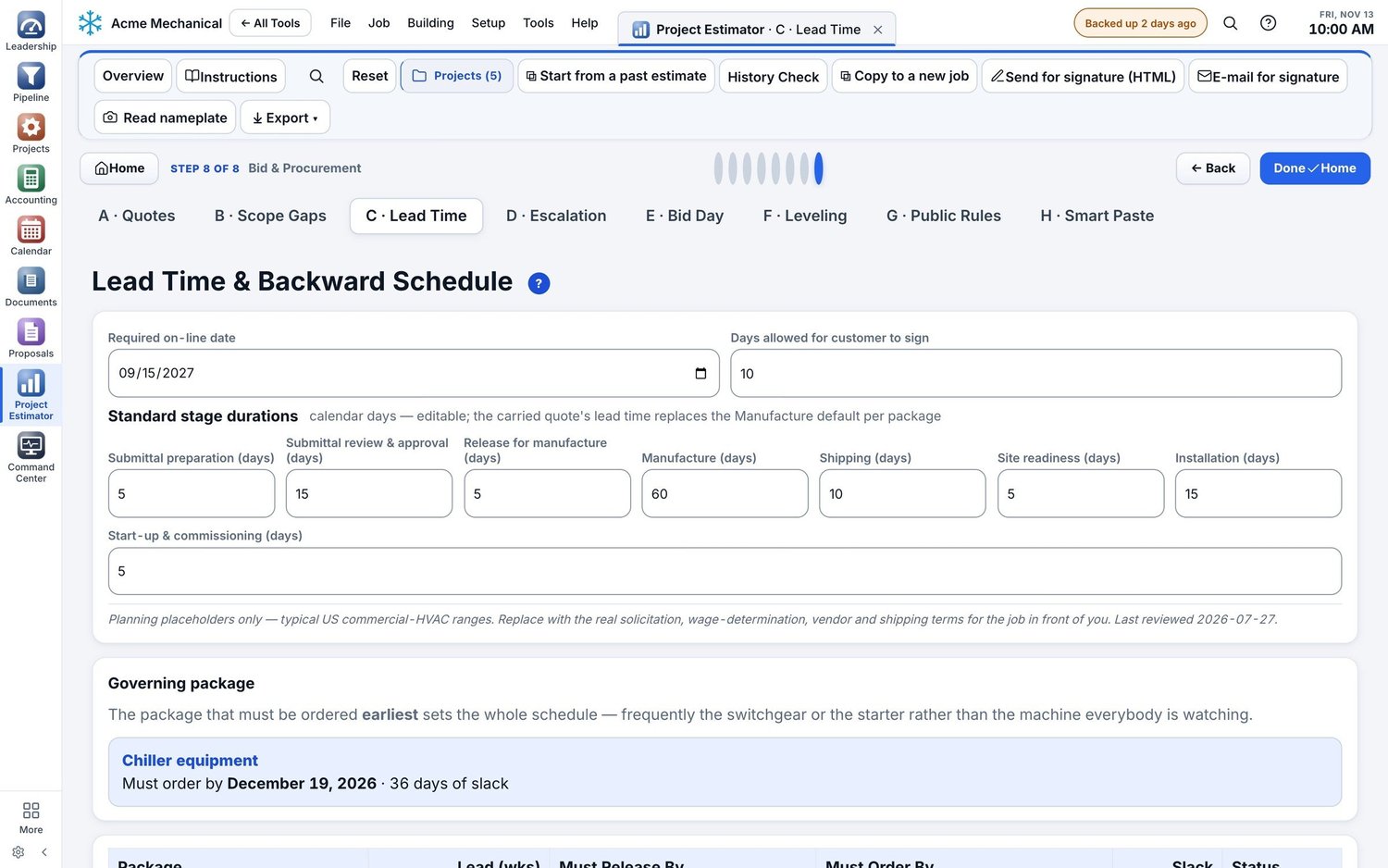
A late order can stall a job, so lead time works back to the date each package must be ordered.
Escalation and Validity
Shows the carried value that will have expired by the award date and generates the matching proposal language, so the estimate and the proposal cannot disagree.
Learn MoreShow Less
A price that expires before the owner decides is margin given away. This tab puts that exposure in dollars and lets you choose how to protect it.
- Shows the carried value expired by the award date and by the customer's decision date.
- Absorb it, add an escalation contingency line, or state a price-validity clause.
- The clause goes into the client proposal ahead of the acceptance block.
- Lead Time works back from the on-line date to the date each package must be ordered.
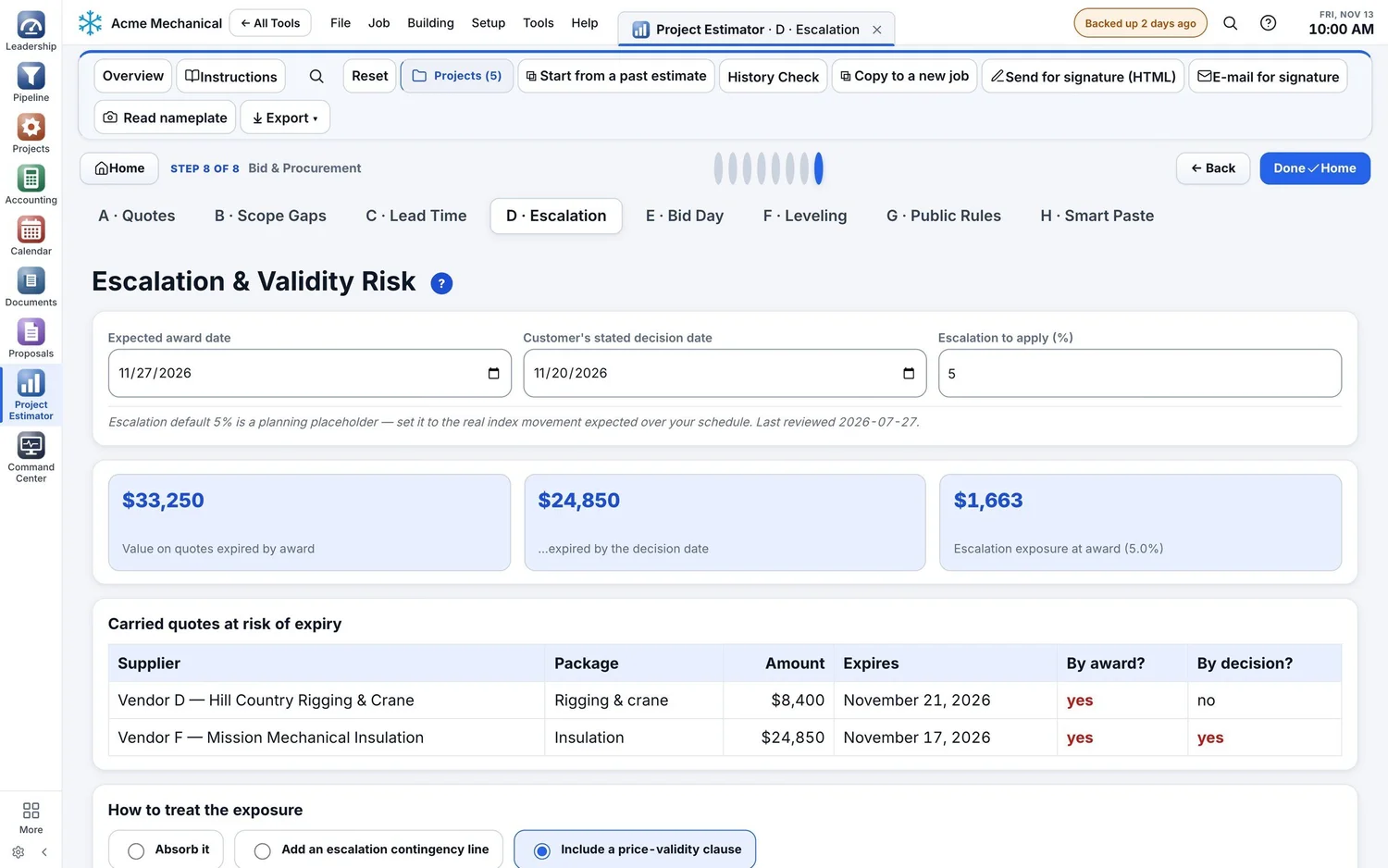
Quotes that expire before award leave exposure, so escalation shows the value at risk and the proposal wording.
Public Rules and Smart Paste
For a public customer, the tab shows the purchasing method required at the bid value, with federal and Texas levels built in and other customers' levels typed from their own rules. Smart Paste reads a pasted supplier quote into base bid, alternates, lead time and exclusions by fixed rules for you to check.
Learn MoreBid Day
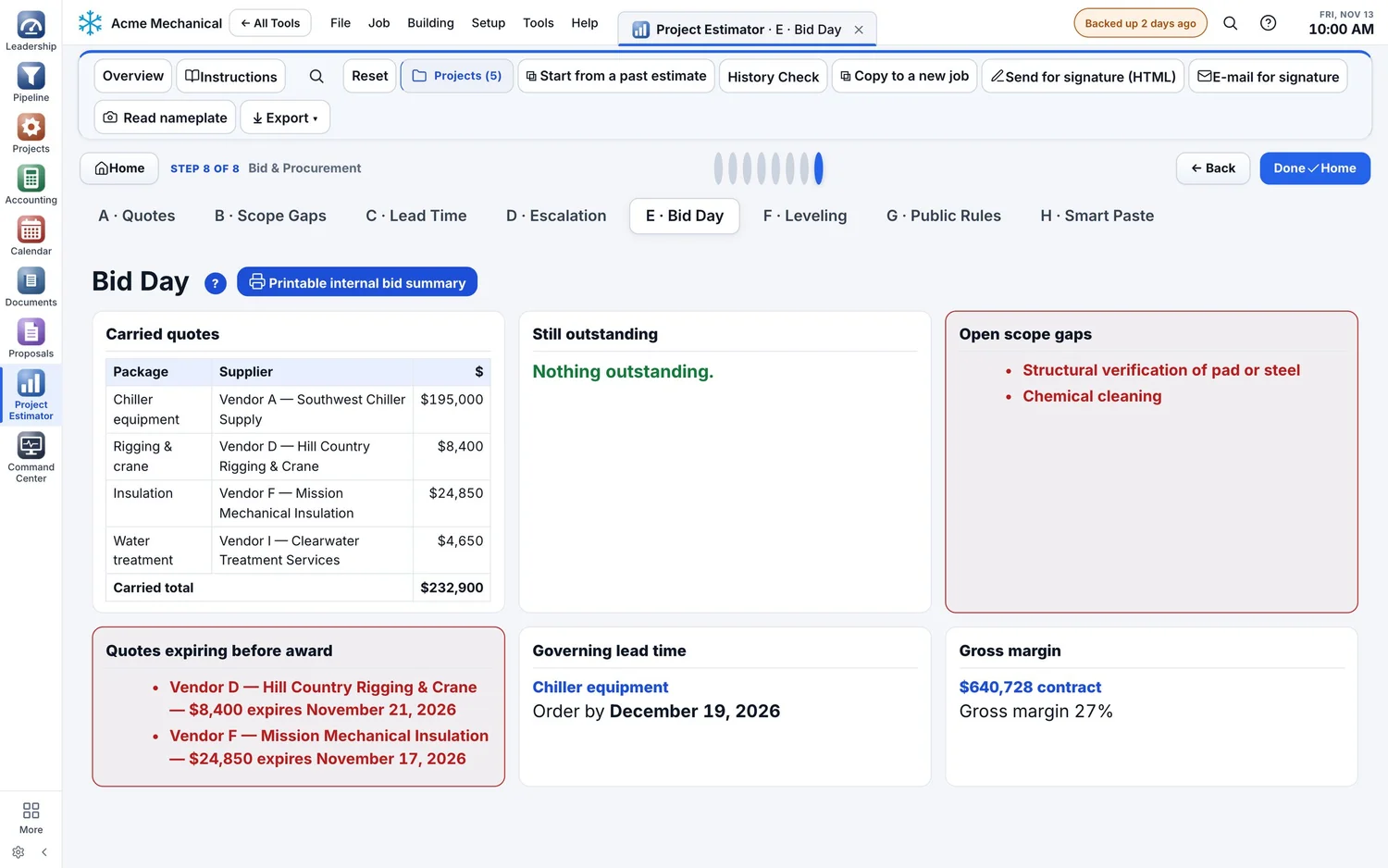
The last hour on one screen: carried quotes and their total, packages still outstanding, open scope gaps, quotes expiring before award, the governing lead time and your live gross margin.
Learn MoreShow Less
The last hour before a bid is where costly mistakes slip through. Bid Day puts every open risk on one screen, so the go or no-go call is made on facts.
- Reads the other four sub-tabs; anything wrong is fixed at its source.
- Names the governing package, the one that must be ordered earliest.
- A printable internal bid summary supports the go or no-go conversation.
- The internal Word estimate gains a Bid Summary after the price build-up.
Start from What You Have Priced Before, Then Hand It On
Start from a Past Estimate
Search past estimates by customer, building or equipment words, pick one, and choose the new building. A red box lists every rate figure that has moved since it was quoted, and you choose to keep the quoted prices or update to today's.
Learn MoreShow Less
Repeat work should take minutes to price, not a fresh start. A past estimate becomes a new one with the old customer's details stripped out, so nothing embarrassing goes out.
- Keeps scope, options, labor, materials, markups, exclusions, bid packages and proposal wording.
- Replaces every mention of the old customer, address, contacts, e-mails and phone numbers.
- Takes a new quote number, starts at revision R1 and works out sales tax for the new building.
- History Check shows where this price sits against your similar past jobs and their results.
A Template Library That Files Itself
Every saved or sent estimate and proposal is in the library, with near-identical ones grouped as one template. Leadership, the Sales Manager and estimators can pin a company template. From a new deal, a template opens as a priced estimate in two clicks.
Learn MoreShow Less
Your best past estimates are your fastest path to the next win. The library files them for you, so nobody rebuilds what the company has already priced.
- Each card shows job type, equipment, size, customer type, total, salesperson and won or lost.
- Filter by quote type, job type, equipment words, a size range or Won Only.
- Earlier versions of a template stay listed under it.
- Load past Excel, CSV and Word proposals on your own computer to fill the library from day one.
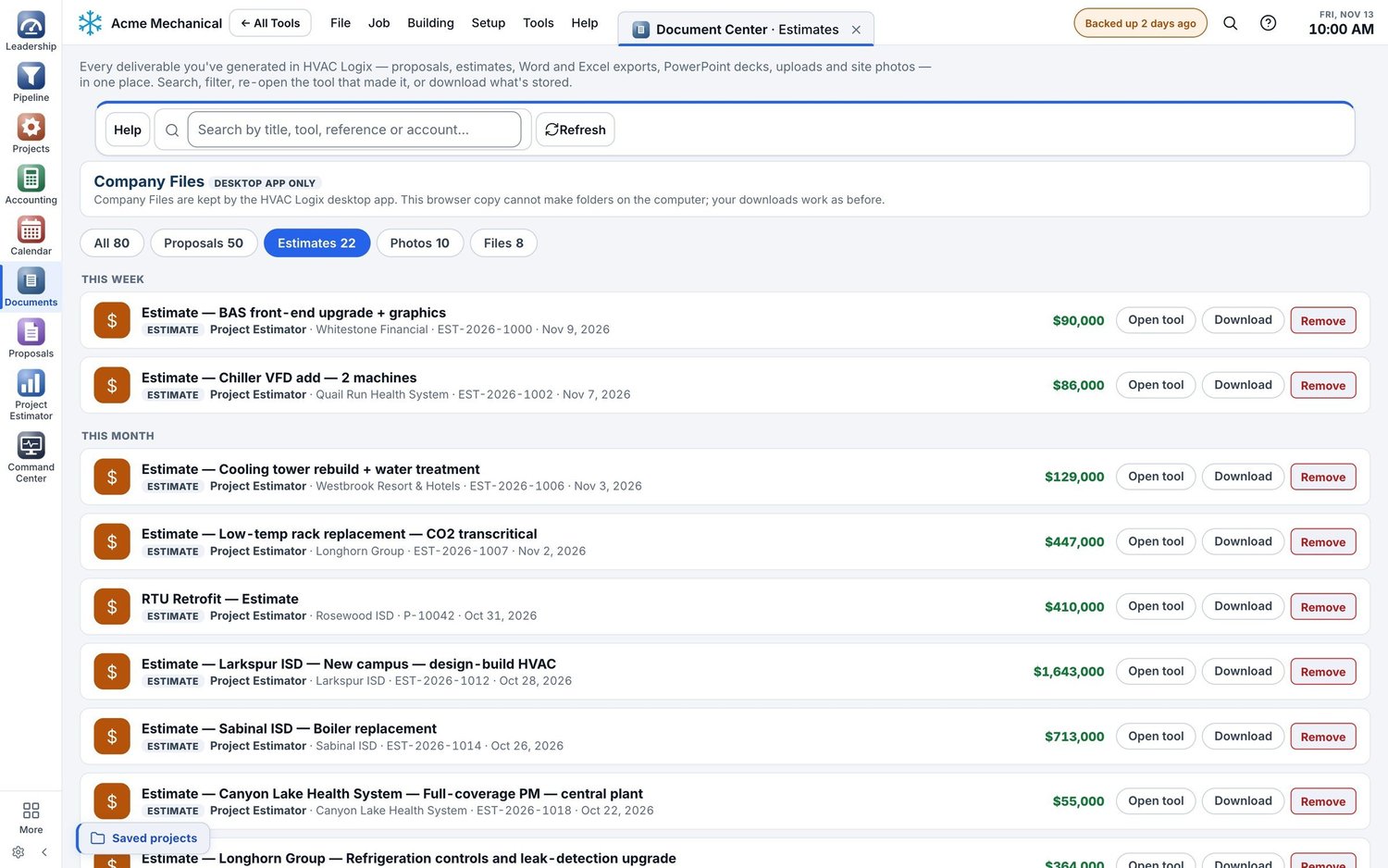
Good past estimates are hard to find, so every saved estimate is filed in one library.
Budgets Before Drawings
Budget Builder produces a conceptual budget from building and equipment cost rates with a regional index and contingency, expressed as a range. It is a planning-grade figure, not a quote.
Learn MoreShow Less
Owners want a number before there are drawings, and a guess can lose the project or your credibility. Budget Builder gives a defensible range without a full takeoff.
- More than 150 equipment types across all 14 trades, each priced low, typical and high.
- Eleven U.S. regional cost indexes and an Economy, Standard or Premium tier.
- Escalation runs to the midpoint of construction.
- Use Your Own Price saves your installed price and uses it from then on.
- An editable Word proposal and an Excel workbook; the figure feeds the ROI Analyzer.
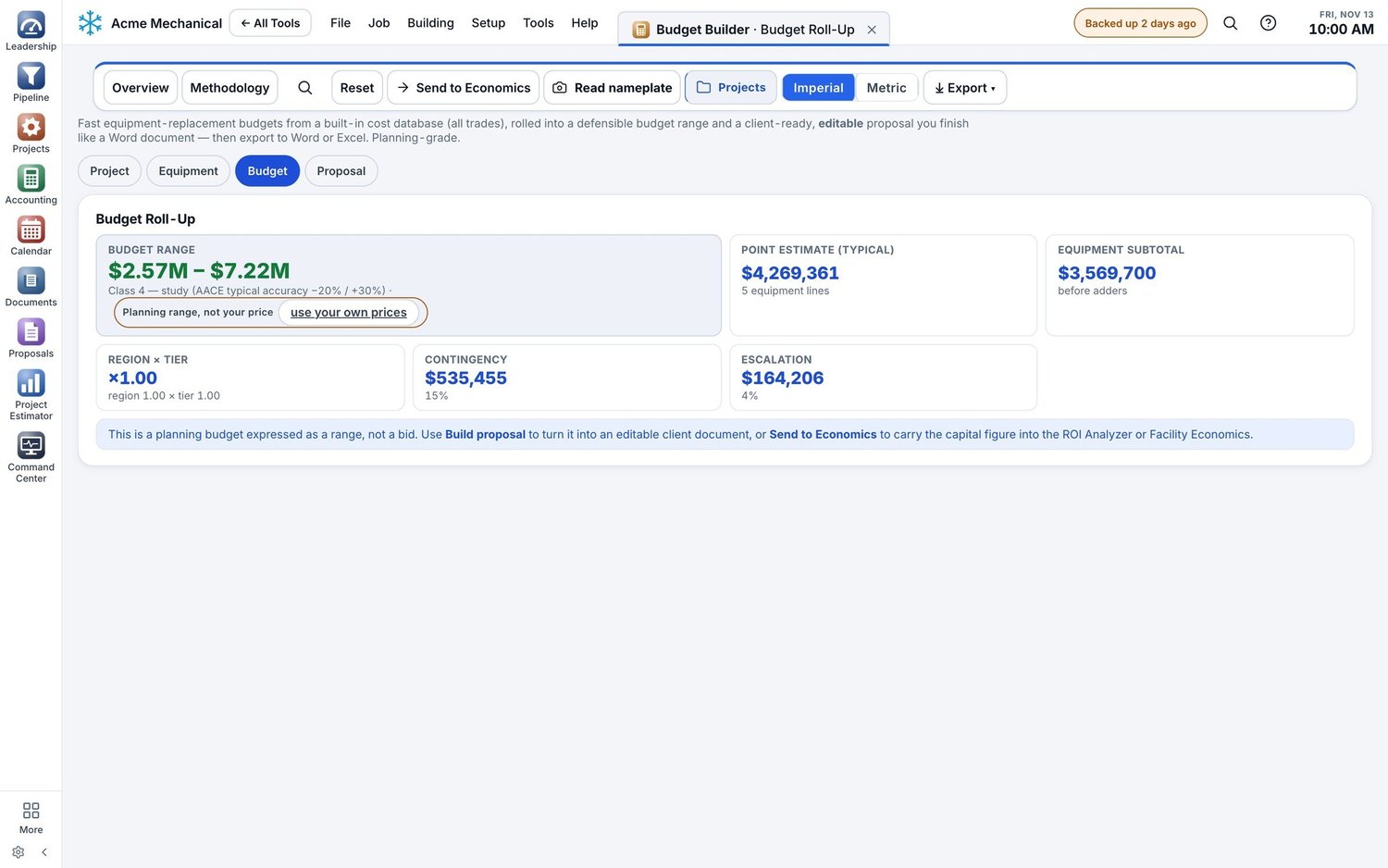
Owners want a number before drawings, so Budget Builder gives a range with contingency.
Reviewed Before It Returns to Sales
A second person checks the estimate against a 13-item checklist. The approved version is fingerprinted, and the proposal must match it.
Learn MoreShow Less
One missed addendum or stale quote can turn a won job into a loss. A second set of eyes checks the estimate before it goes back to sales.
- Checks addenda, takeoff, labor rates, quotes within 30 days, leveled subs, lead times, tax, bonds and margin floor.
- Every item must be Yes or N/A to approve; Return names the items marked No.
- An estimate changed after it was sent for review cannot be approved.
- The reviewer is never the estimator, unless leadership allows it in a one-estimator shop.
- Leadership sets the deal size that needs review.
Into the Proposal and the Job
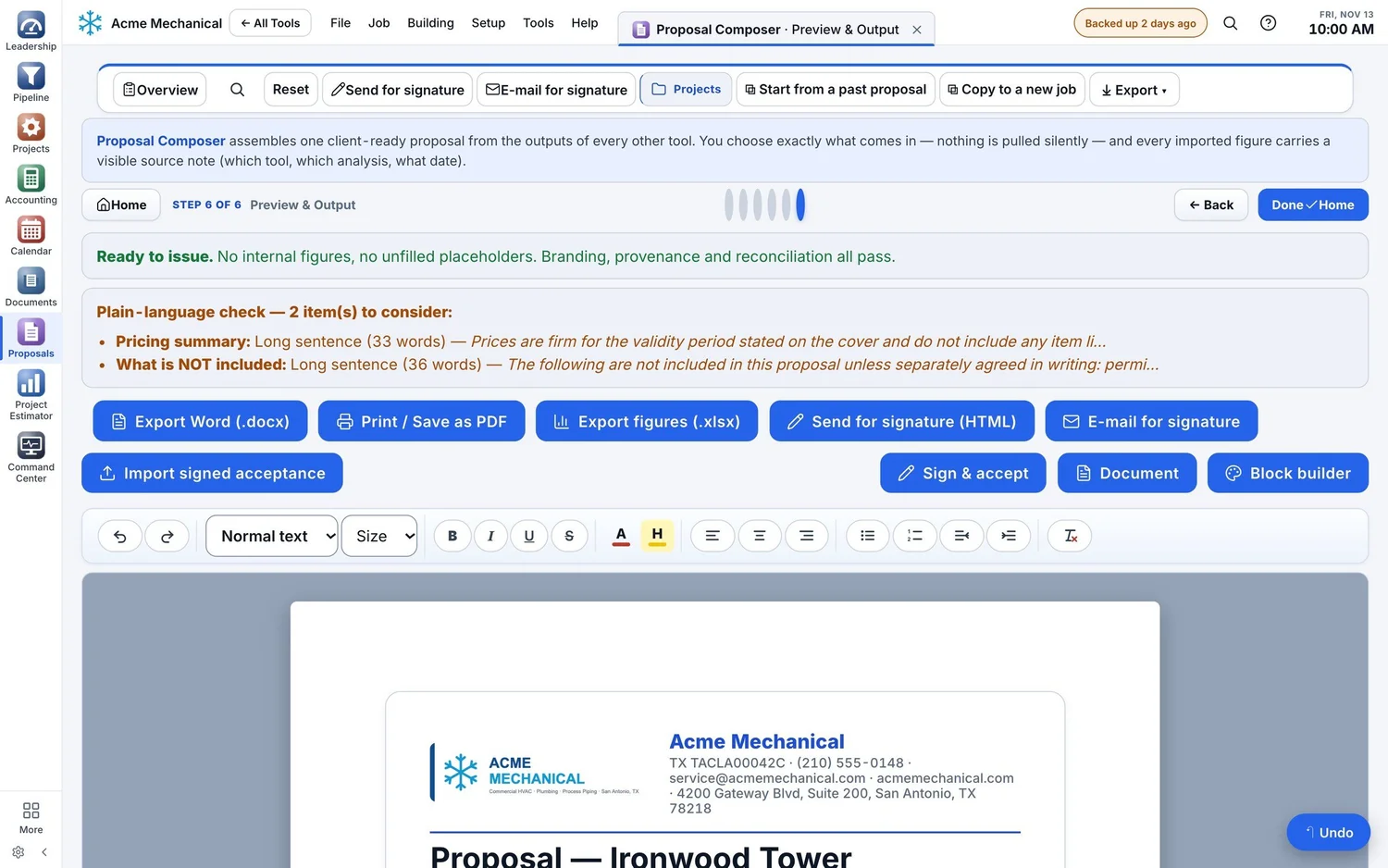
The client proposal comes from the same numbers. Once the deal is awarded, the job is booked into Project Command, where the schedule can be built from the estimate with one phase per cost code, and delivery tracks phase gates and a change-order log that re-prices the contract.
Learn More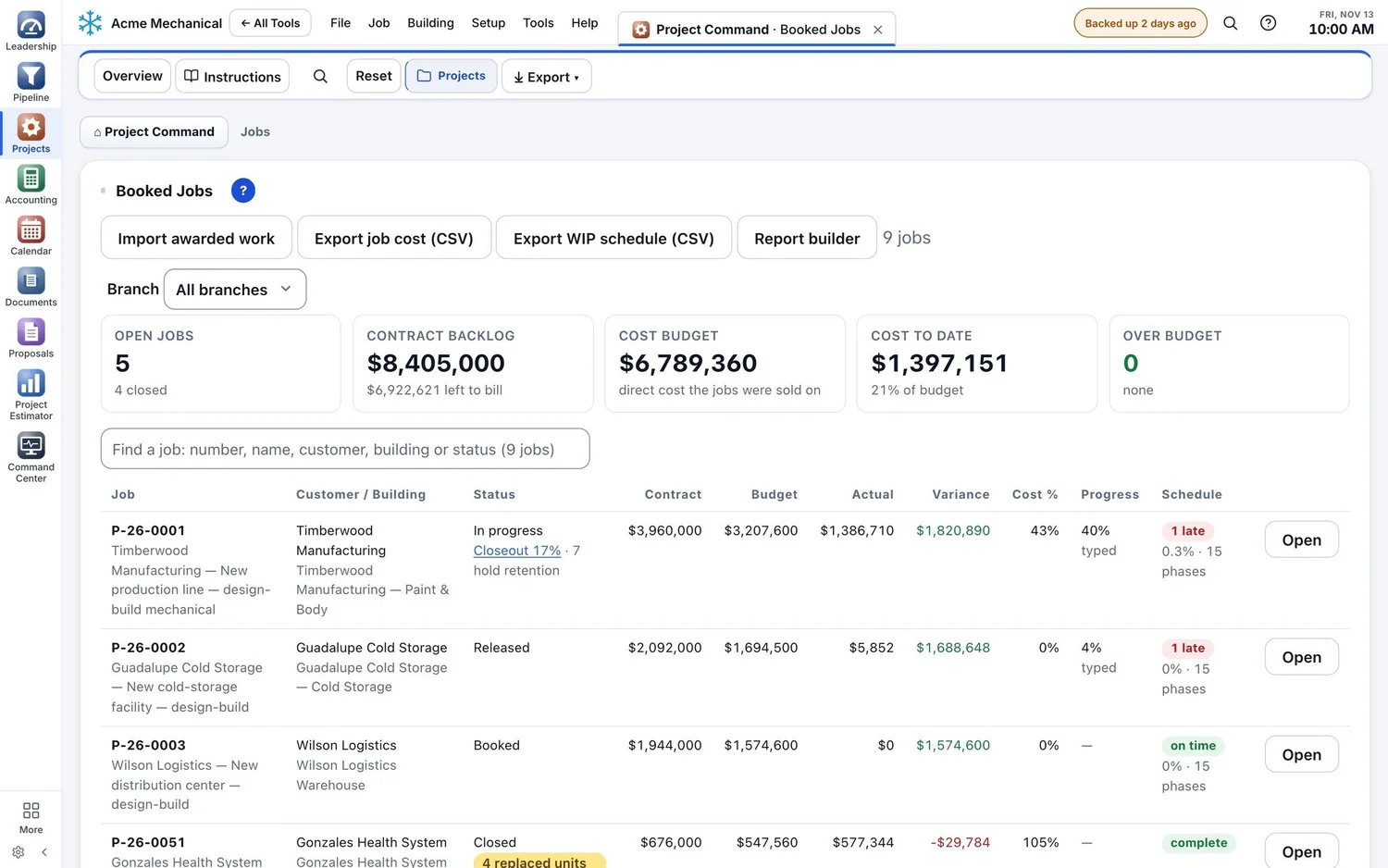
Retyping an awarded estimate wastes a day, so the job opens in Project Command with the estimate's budget.
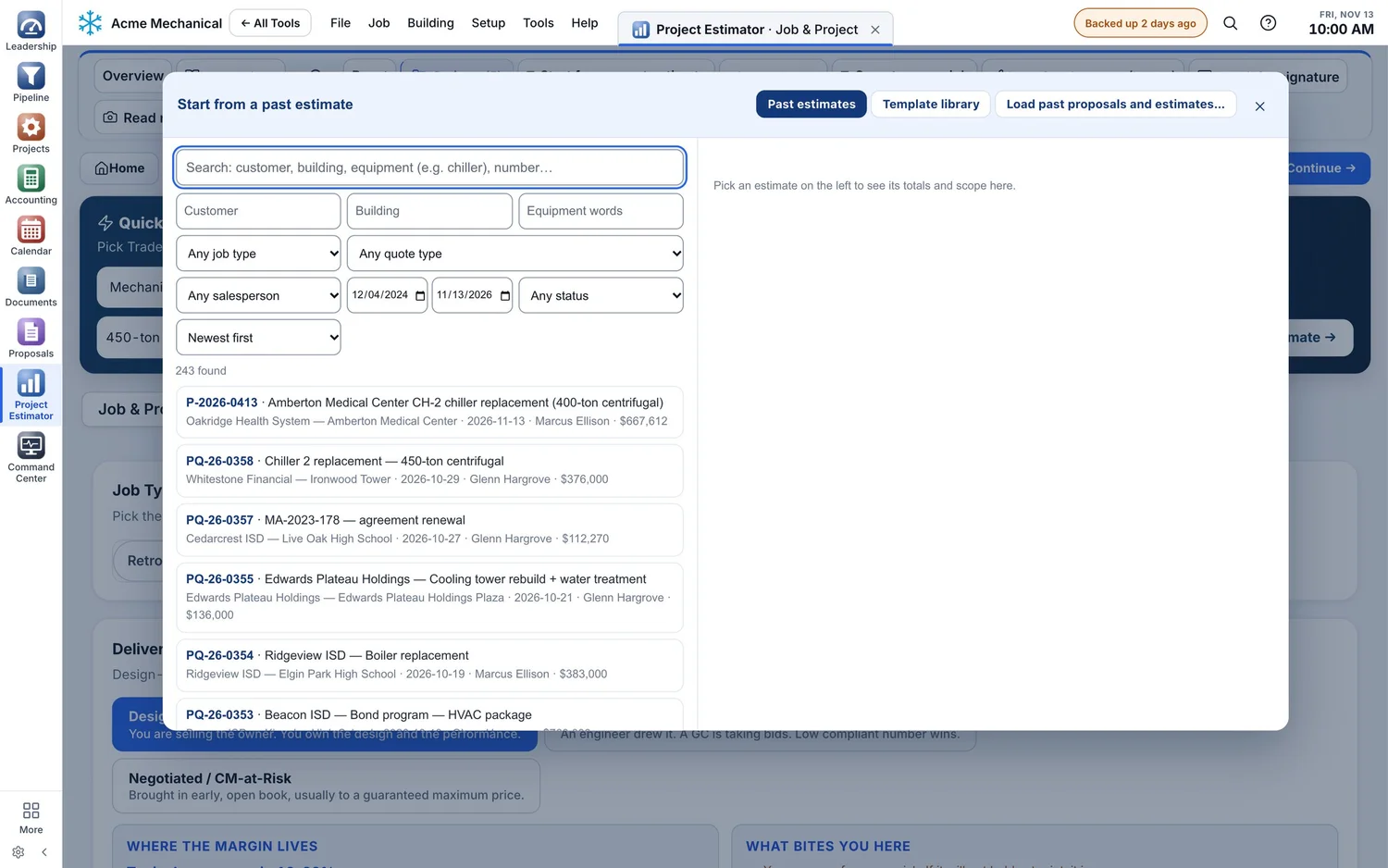
Start a new estimate from one you priced before, instead of from a blank page.
Frequently Asked Questions
Which takeoff files can HVAC Logix import?
Can it open CAD drawings?
Where do the labor units come from?
Do material prices update from a live feed?
Will the program stop a job priced below our margin floor?
Be First When HVAC Logix Opens
Stop paying people to copy numbers between programs. Join the list and we will tell you the day downloads open, with setup guides ready.
Launching early 2027 for HVAC Logix. Nothing to buy today, and no sales calls.
