
The Right View for Every Role, and One Place for the Team to Talk.
Facilities Logix is used by leadership, management and operations, and each sees the platform through a view made for their work. People & Roles sets who may change what. Messages, company alerts and shift handoffs keep the team in step without an outside chat service, and Workplace tools manage the space people actually use.
Launching Early 2027 · Join the Early-Access List
Five Roles, Set from Each Person's Position
The Roles
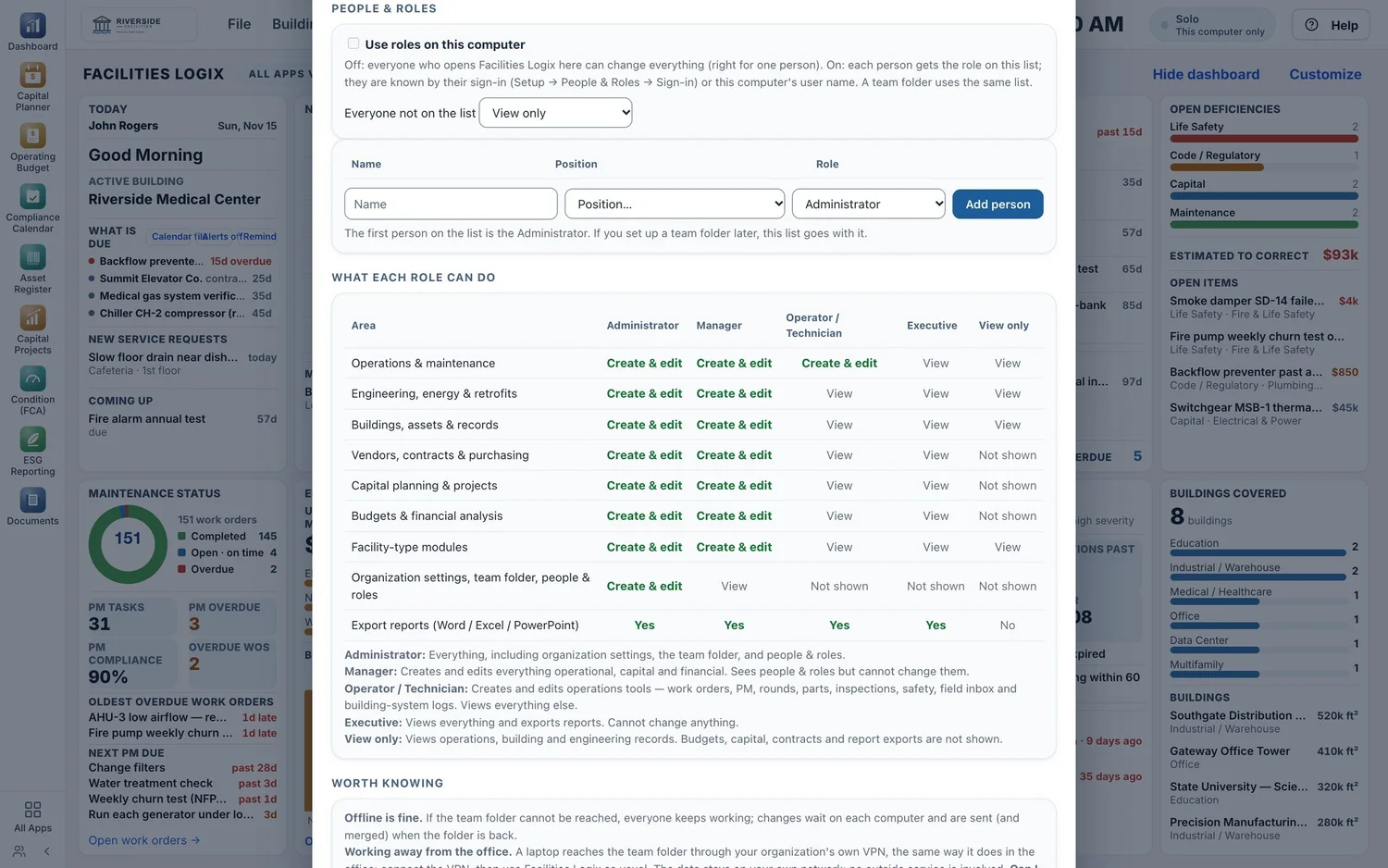
- Administrator: organization settings, the team, people and roles, and everything else
- Manager: runs the buildings, vendors, budgets and projects
- Operator / Technician: edits operations and maintenance; views the rest
- Executive: views the portfolio, capital, finance and risk; exports reports
- View Only: for auditors and consultants; no vendor, capital or budget data shown
Role Views
- A role view on the home screen shows the apps and Dashboard cards for an operator, a manager or an executive
- It is a lens, not a lock: every app stays reachable through Search
- Customize the Dashboard's cards and their order; your choice is remembered on your computer
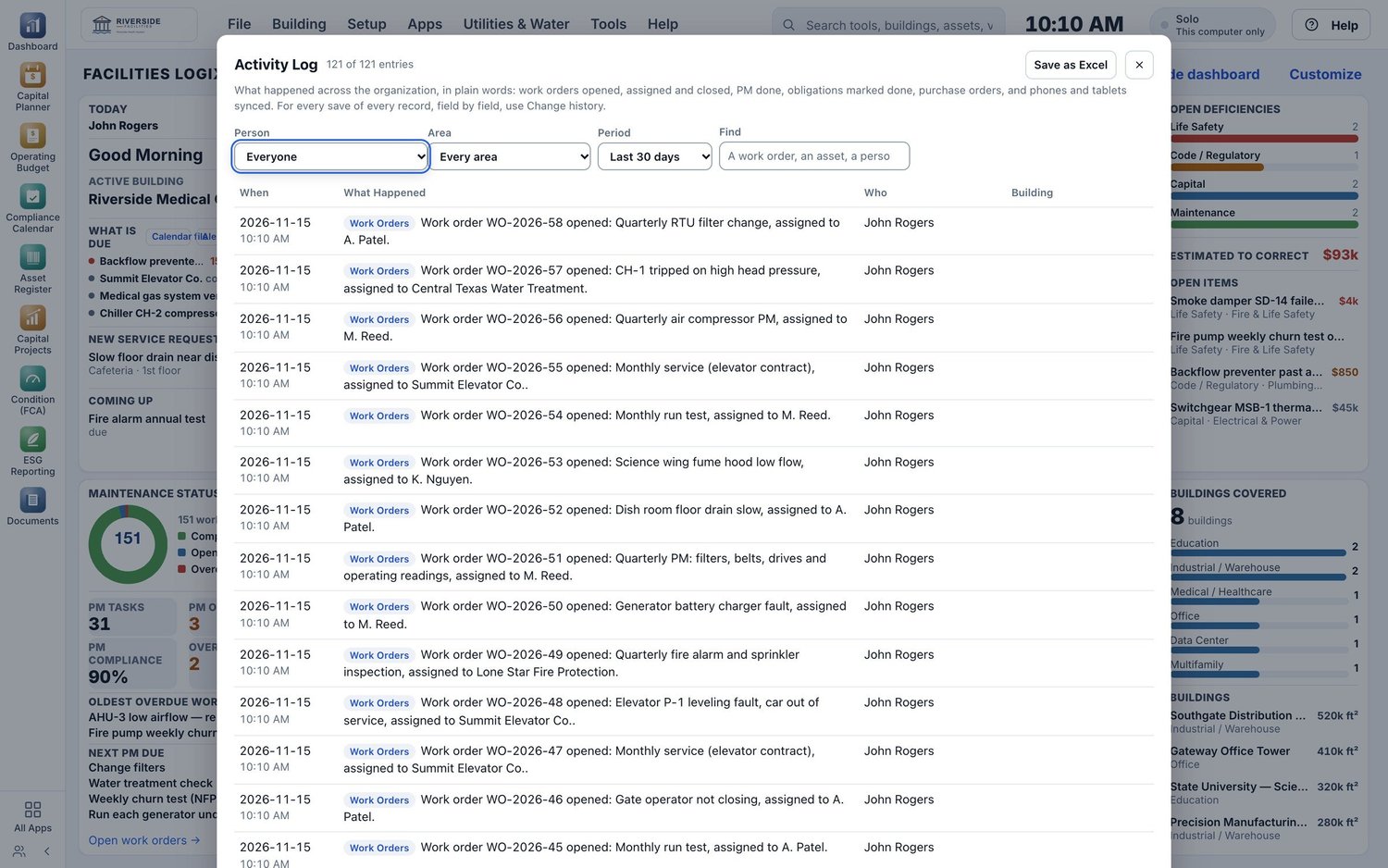
Change history: who changed what and when, kept with the record.
Accountability
- Optional sign-in with a PIN for each person, with an automatic lock after a period you choose
- Everything saved is credited to the person who saved it
- A change history shows who saved what and when, and can check that no entry is missing or was altered

The Team screen: one shared folder on your own network, people and roles, and who may change what.
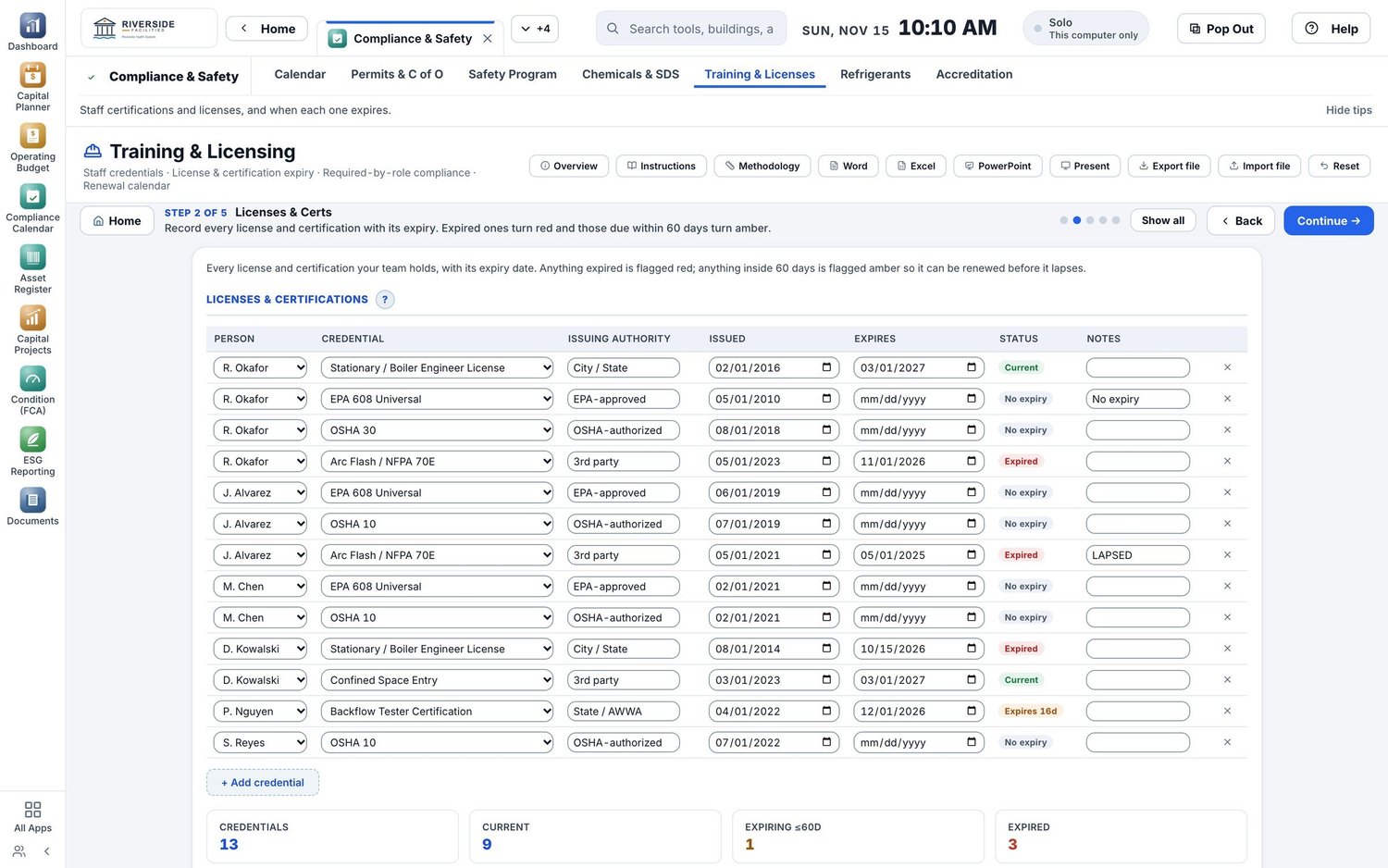
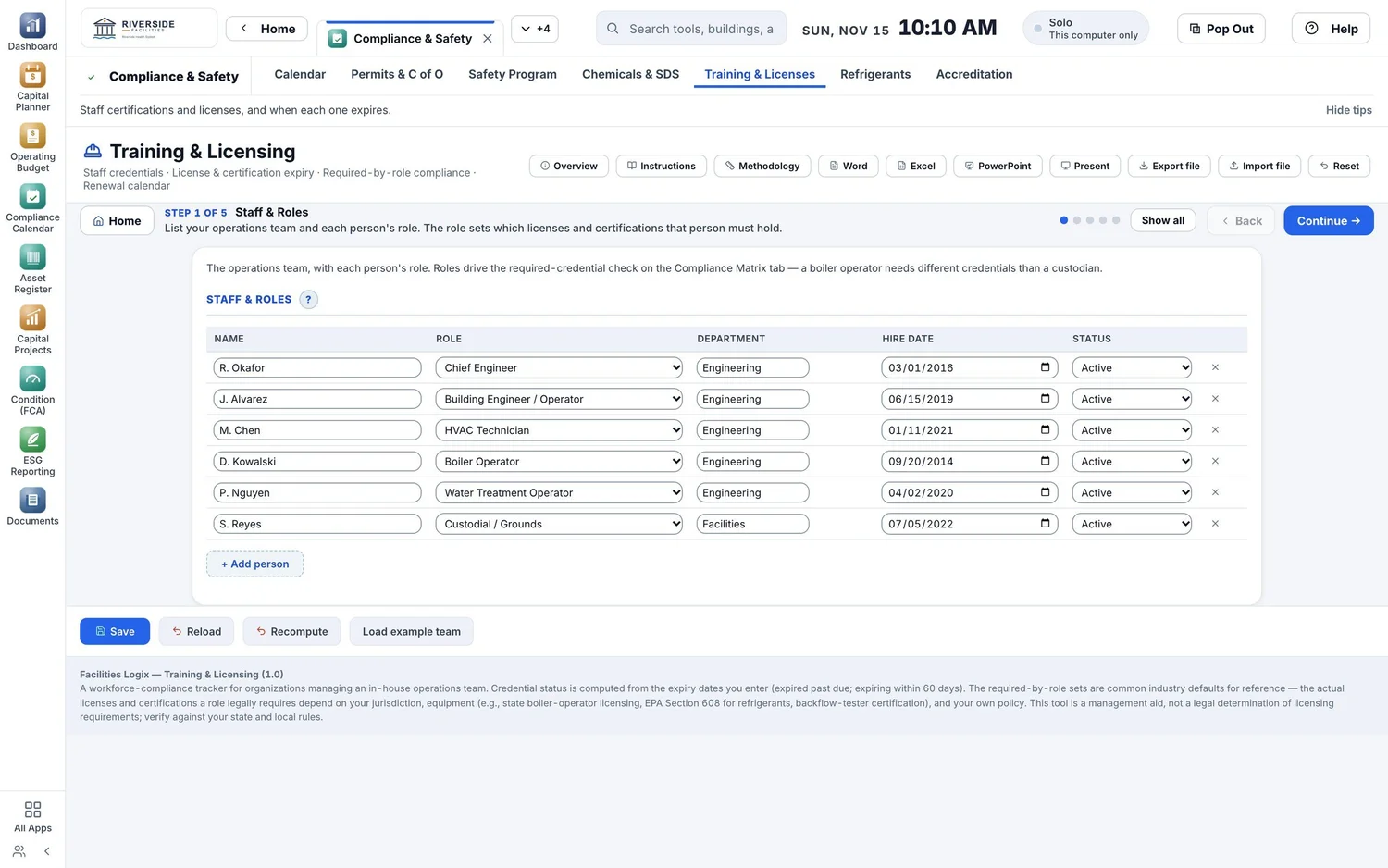
Licenses & Certs in Training & Licensing: record every license and certification with its expiry. Expired ones turn red and those due within 60 days turn amber.
Internal Conversations That Travel with Your Data
Conversations
Write to a person, a group or a team such as a crew, a department or a building. Messages travel the way your data already does: through your Team folder and to paired phones. There is no outside server and no text-message service.
Learn MoreShow Less
Calls and texts about work get lost and cost time to chase. Messages keep the conversation inside the system, with no outside service to pay for.
- No server and no text-message service
- Offline, a message waits as Waiting to Send and goes by itself later
- Internal only; vendors are reached through Logix Exchange, marked External
- Teams such as a crew or a building are set up by an Administrator or Manager
Private Channels
Leadership-only channels hold Administrators and Executives. An HR-private channel is read by its members only.
Learn MoreShow Less
Sensitive personnel matters in the wrong hands can become legal costs. Private channels limit who can read them, by design.
- An Administrator who is not a member cannot read an HR-private channel
- Both kinds are set up by an Administrator
- Legal hold stops anything being removed while it is on
- The history shows who wrote to whom, never the words
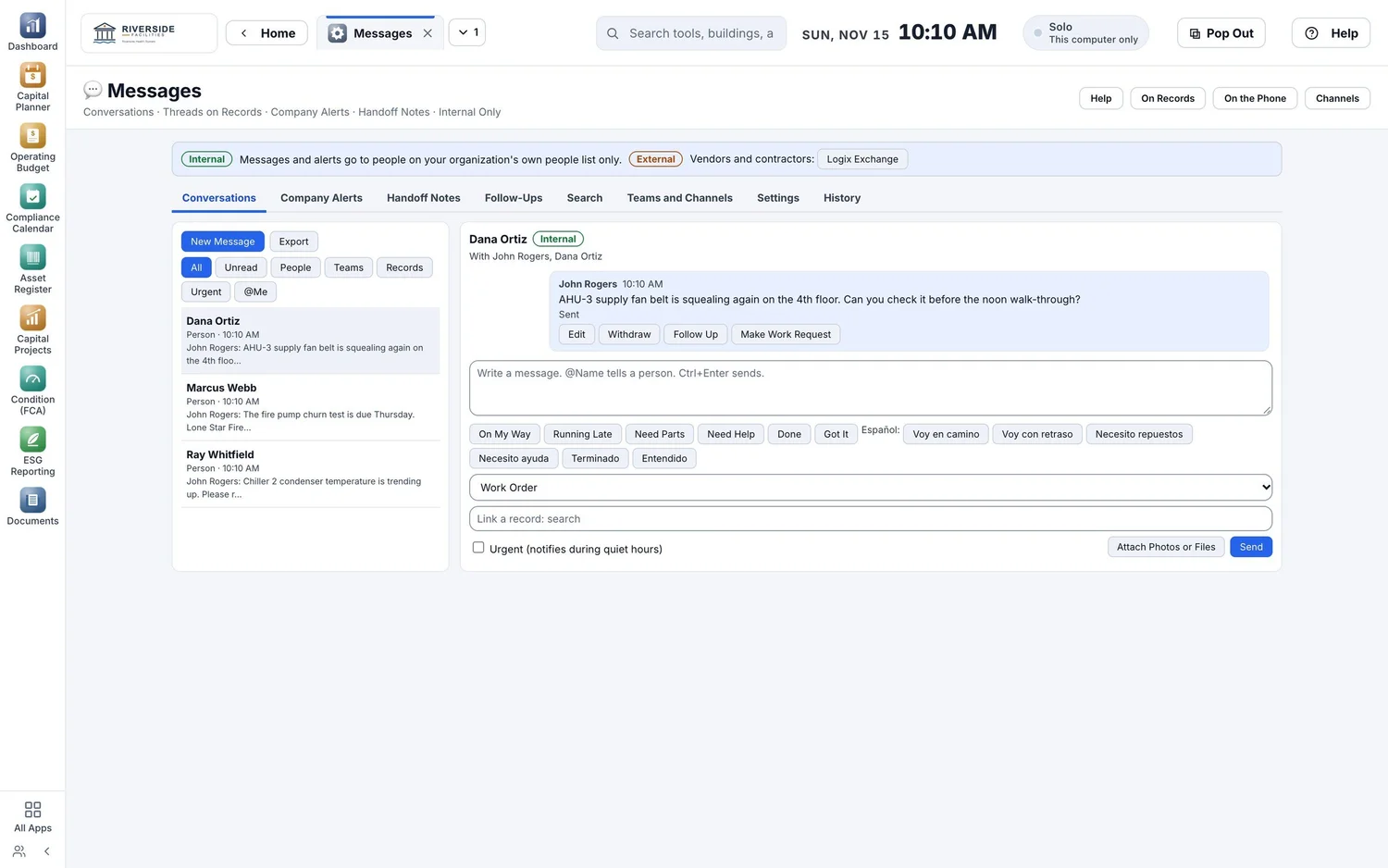
Internal messages between your people, kept with your data.
A Thread on Every Record
Work orders, buildings, assets, leases, invoices, purchase orders, inspections and incidents each have their own thread. Costs stay private: a technician never opens an invoice from a message.
Learn MoreShow Less
Questions about a job scattered across e-mail waste time. Each record keeps its own thread, and costs stay private.
- Everyone who may open the record reads its thread
- Operators and View-only staff never open an invoice, bill or PO from a message
- A record's name in a message never shows an amount
- The thread button can be switched off per computer
Built for Operations
Mark a message urgent, mention a person by name, attach photos and files, and use quick replies in English and Spanish: On My Way, Running Late, Need Parts, Need Help, Done, Got It.
Learn MoreShow Less
Messages to hourly staff after their shift can count as paid time in some states. Quiet hours limit after-hours notices to what is urgent.
- Quiet hours set by role or by name
- Off shift, only urgent messages and alerts notify, and the sender is told
- Company alerts ask each person to acknowledge, and show who has not
- Alerts in English and Spanish, with on-call numbers to call
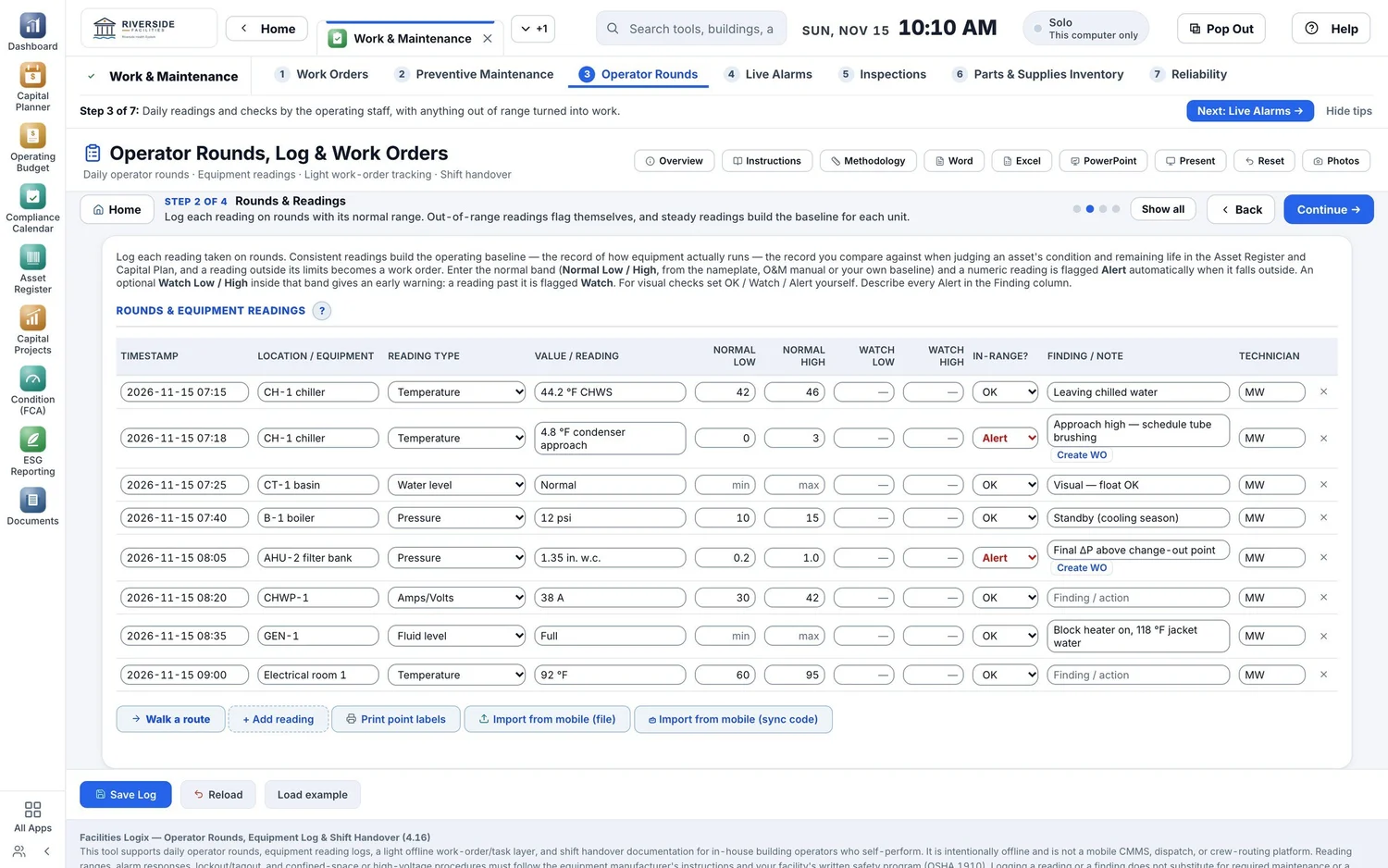
Rounds & Readings in Operator Rounds, Log & Work Orders: log each reading on rounds with its normal range. Out-of-range readings flag themselves.
Nothing Deleted Silently
Editing keeps every earlier wording, and withdrawing a message keeps the words for the record. Sent, delivered and read are shown under your own messages.
Learn MoreShow Less
A message changed or removed after a dispute weakens your position. Every earlier wording is kept for the record.
- Export All Messages includes every earlier version and withdrawn message
- Retention from 90 days to 7 years, or no limit
- Apply Retention Now asks for confirmation; export first
- Alerts and the history are kept whatever the retention
From Message to Work
Make Work Request turns a message into a request on Work Orders. Follow Up sets a date for yourself, and Search finds words in everything you may see.
Learn MoreShow Less
A request mentioned in a message and then forgotten becomes a complaint. One click turns it into tracked work.
- Make Work Request sends it to Work Orders for triage
- Follow Up sets a reminder date for yourself
- Search with from:name, urgent or @me
- Export a conversation as a CSV file
Gmail, Google Calendar and Contacts
For an organization on Google Workspace, e-mail drafts go to each person's Gmail Drafts with the file attached and are never sent for them. Every date the Reminder Center shows a person goes to a Facilities Logix calendar in their Google account, with changes made in Google held for a person to decide, and vendors and customer contacts are kept in a contact group with a duplicate check both ways. Off until Leadership turns it on; desktop app only.
Learn MoreShow Less
Copying dates and contacts between programs by hand costs time and causes missed items. The optional Google connection keeps them in step with least access.
- Gmail access only makes drafts; it cannot read your mail
- A Facilities Logix calendar syncs both ways every two minutes
- A duplicate catch stops a vendor being added to contacts twice
- Your sign-in is sealed by the computer's own key store
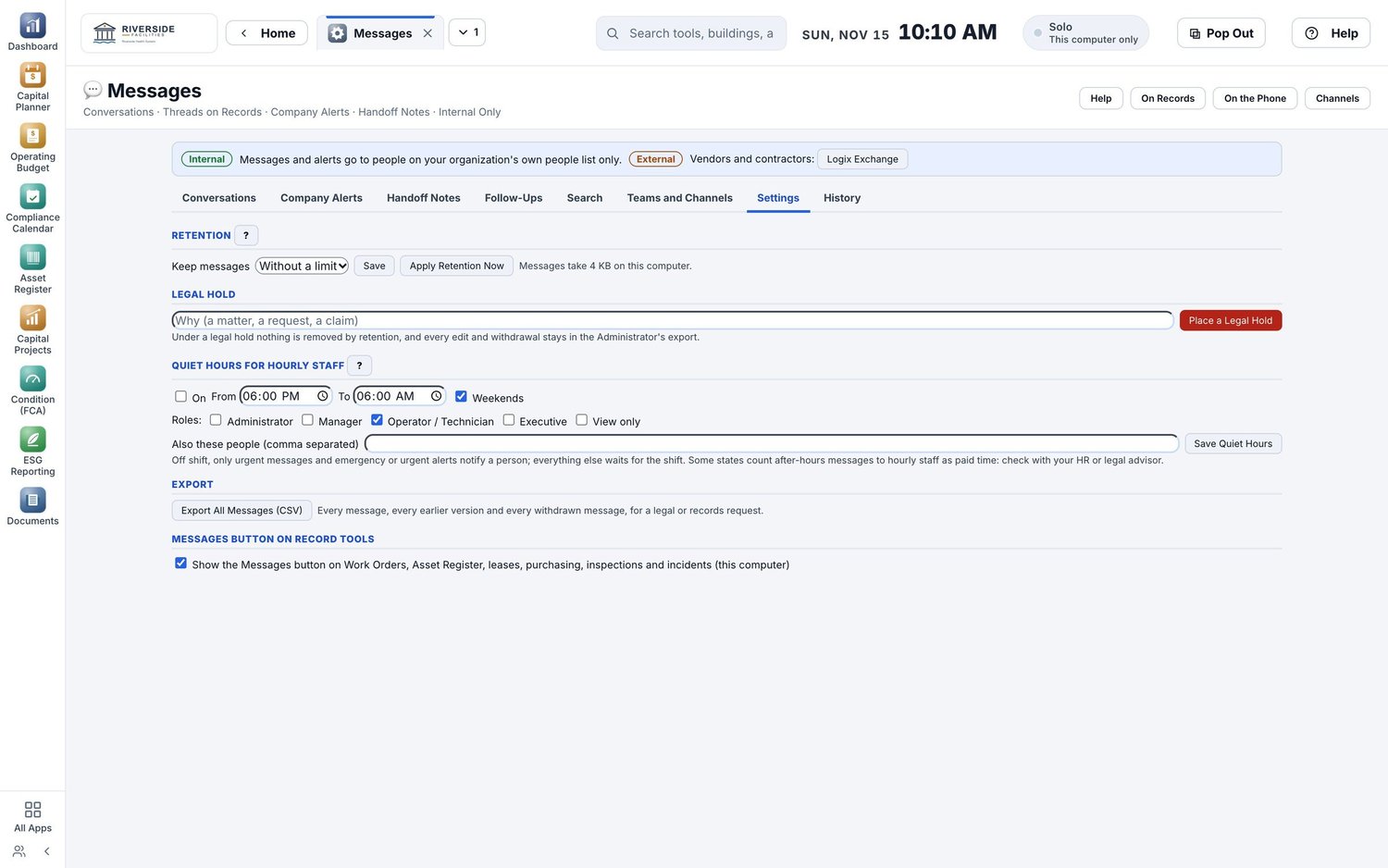
Message settings for the Administrator: retention, legal hold and export of every message.
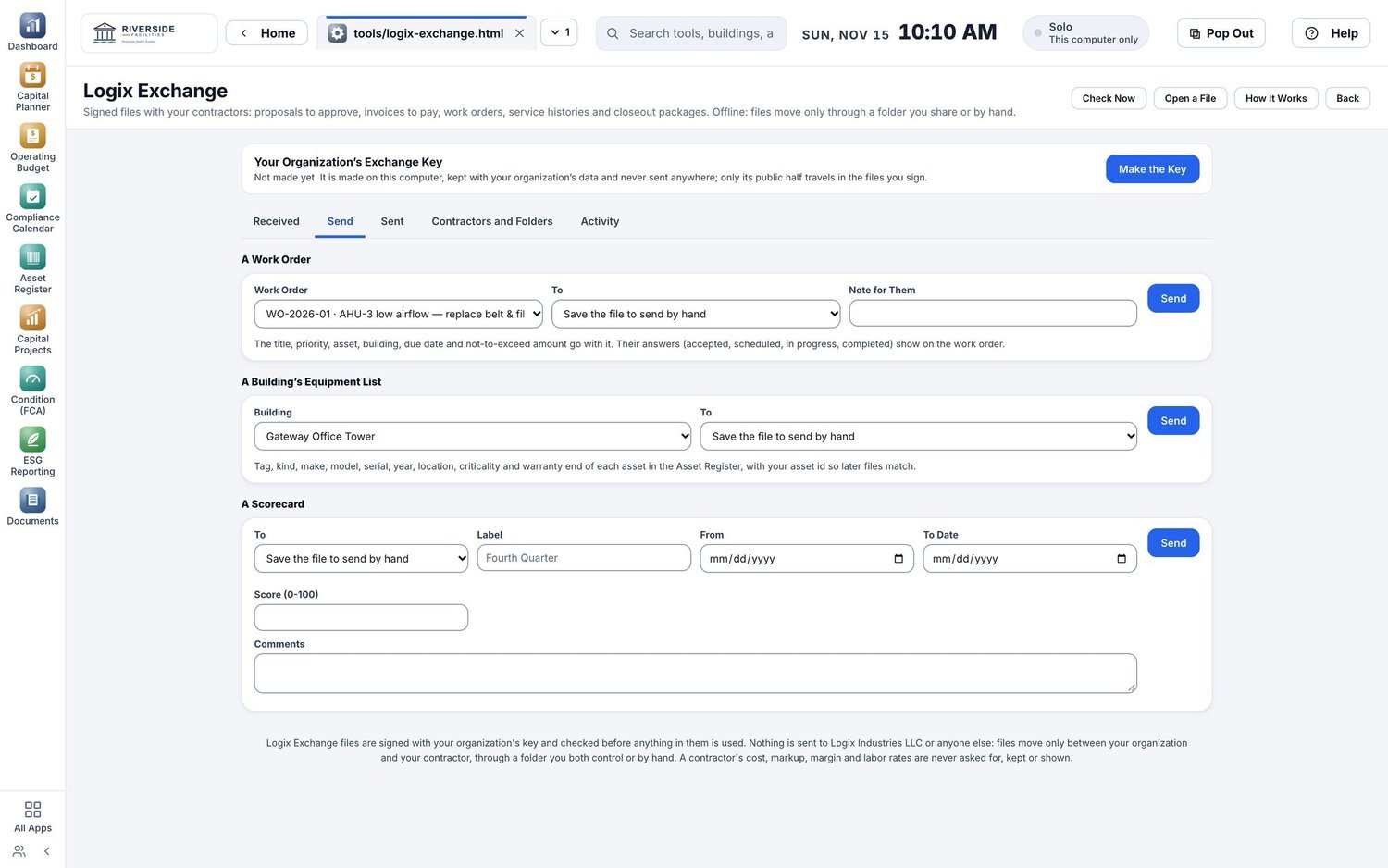
Know Who Has Seen It and What Was Handed Over
Company Alerts with Read and Acknowledge
Send an emergency, urgent or general alert to everyone, a building's staff, a role, a team or the people on call now. Emergency and urgent alerts ask each person to acknowledge, in the program or on the phone, and the sender sees who has and who has not, with the on-call numbers to call. An occupant or tenant notice prints for posting.
Handoff Notes and on Call
Handoff Notes pass the shift on with the building and the open items, and the person taking over accepts the handoff. The on-call roster with rotation and an escalation plan decides who an alarm alert reaches first and who is next if no one acknowledges.
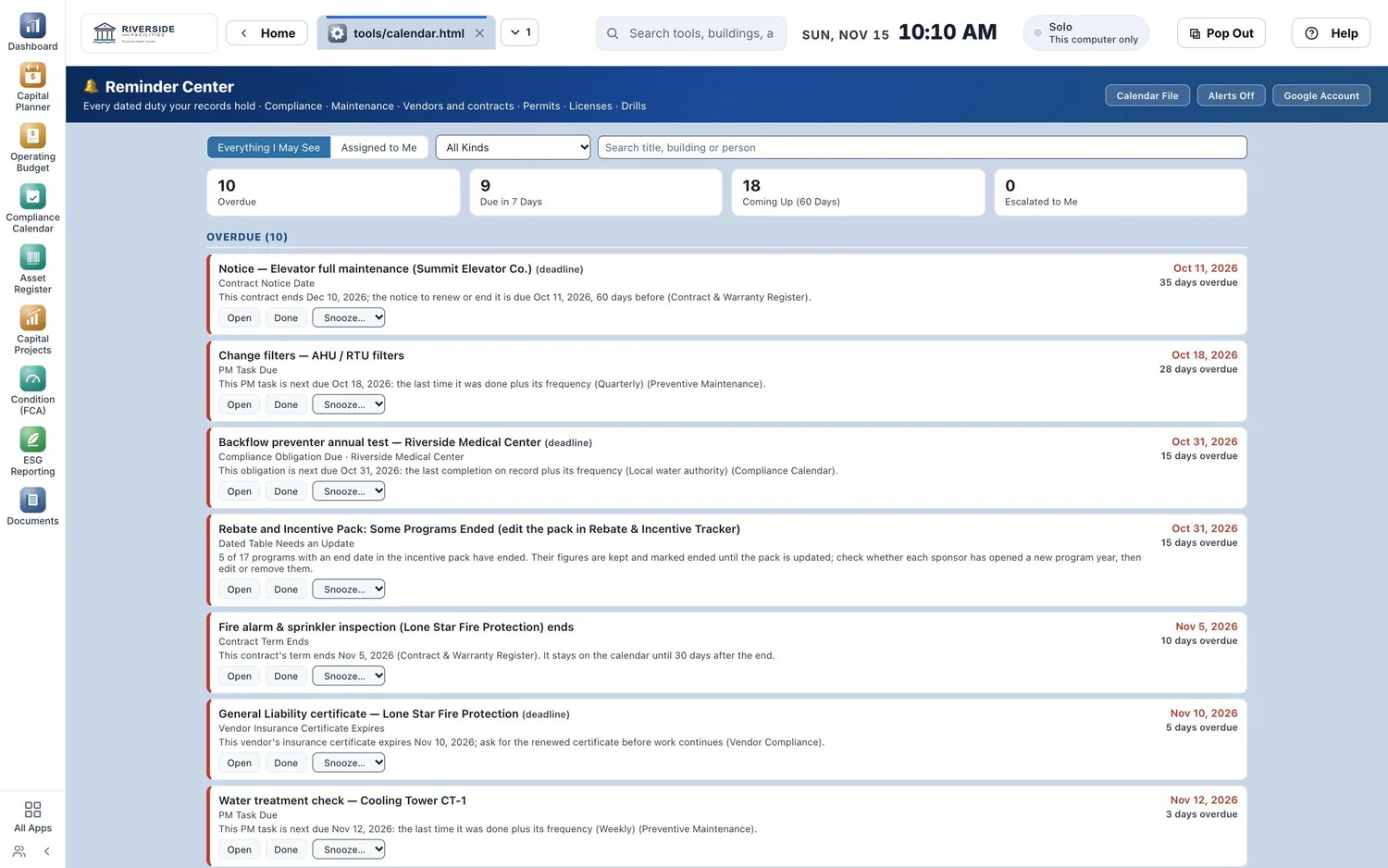
The calendar and Reminder Center: every due date across the portfolio in one place.
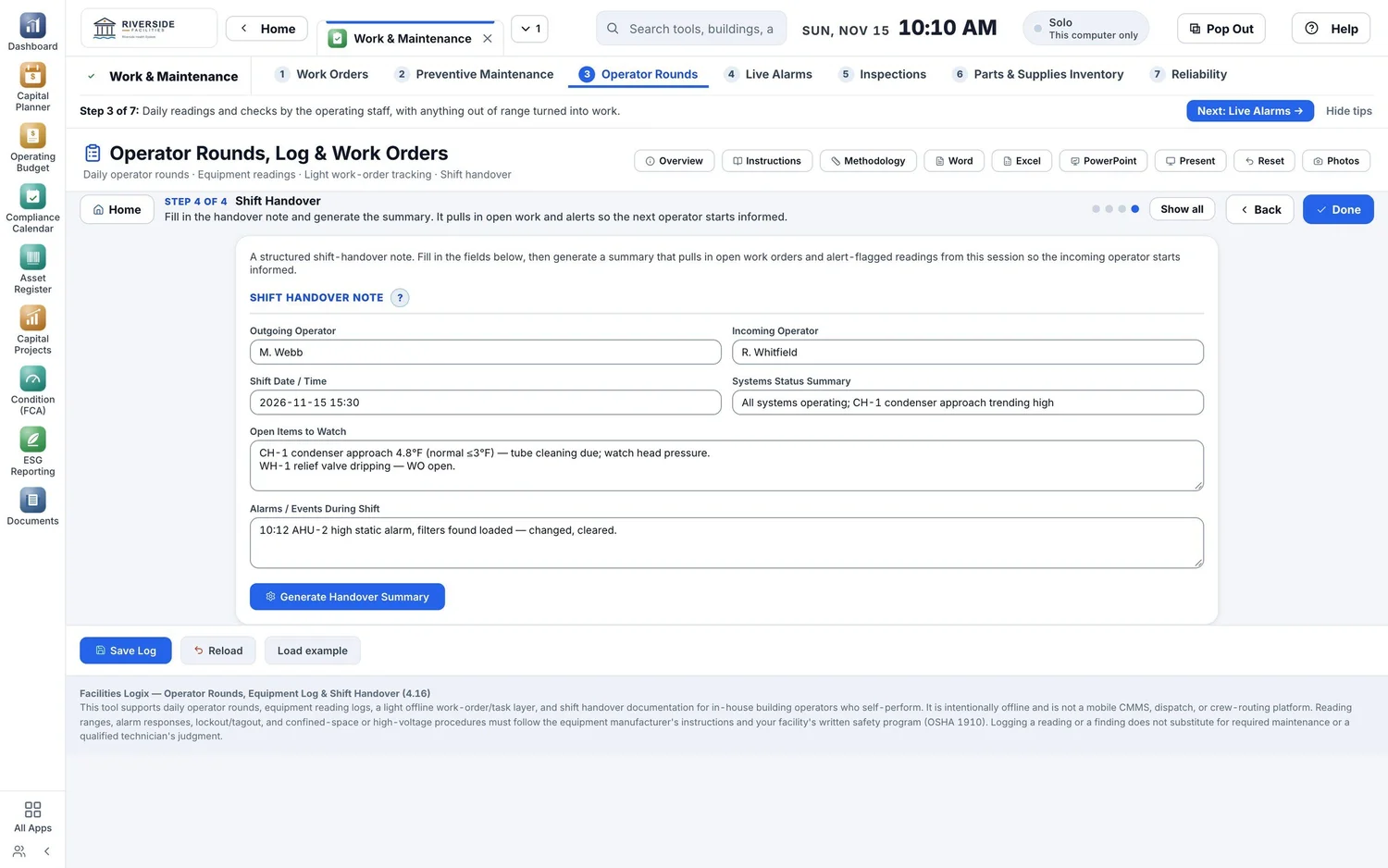
Problems handed over by word of mouth get lost, so each shift hands over in writing.
Controls Your HR and Legal Teams Will Ask About
For the Administrator
- Retention: keep messages without a limit, or from 90 days to 7 years
- Legal hold with its reason: nothing is removed while it is on
- Export All Messages gives every message, every earlier version and every withdrawn message
- Quiet hours for hourly staff by role or by name: off shift, only urgent messages and emergency alerts notify
- A history of who wrote to whom, edits, withdrawals and exports, never the words
Staff Records That Matter to Operations
- Training & Licenses: certifications with expiry dates and a required-by-role matrix
- Staff & Service Rates: each role's fully loaded hourly cost, used by work orders, budgets and make-or-buy analysis
- In-house and contracted trades, so work orders know what your own staff perform
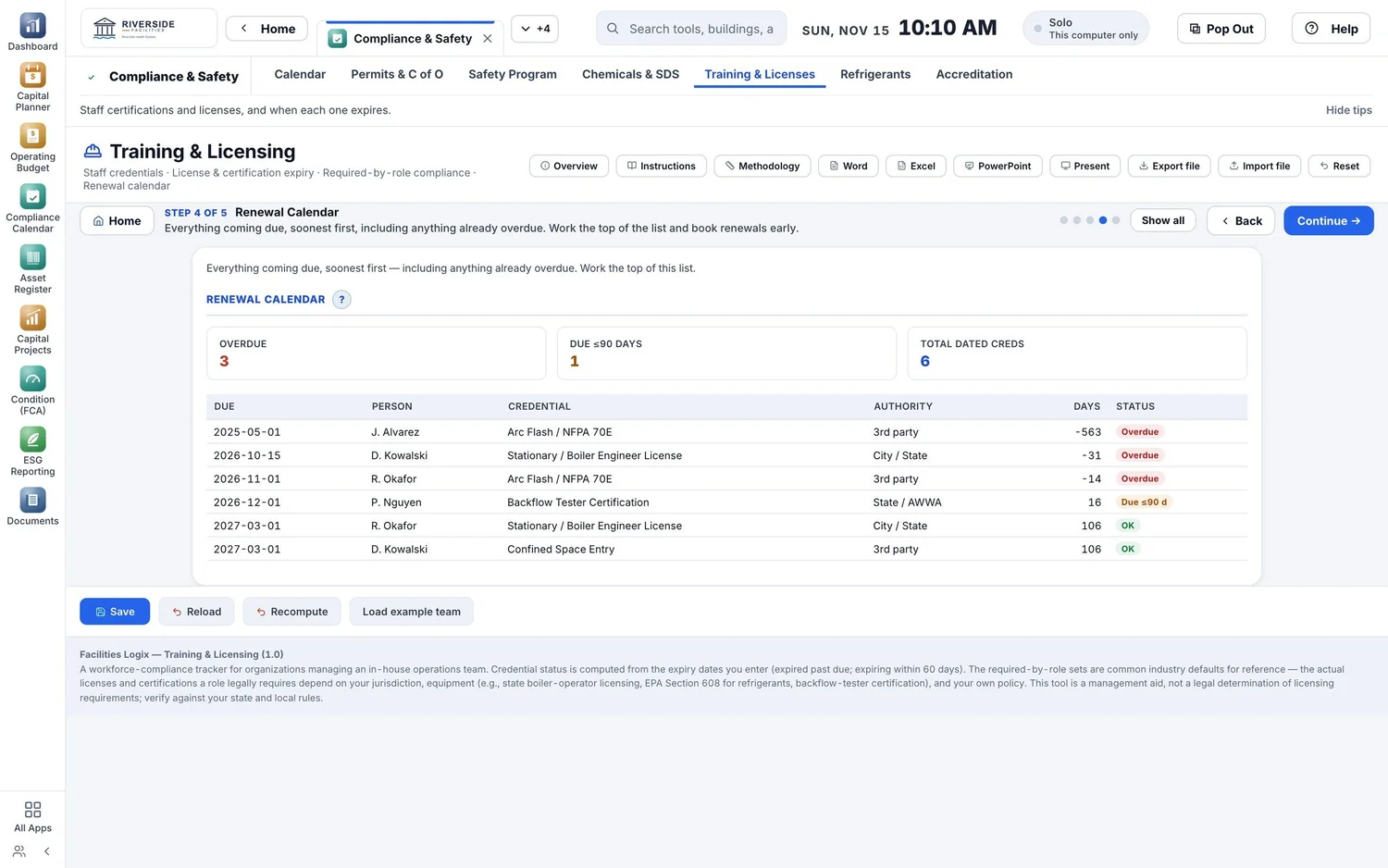
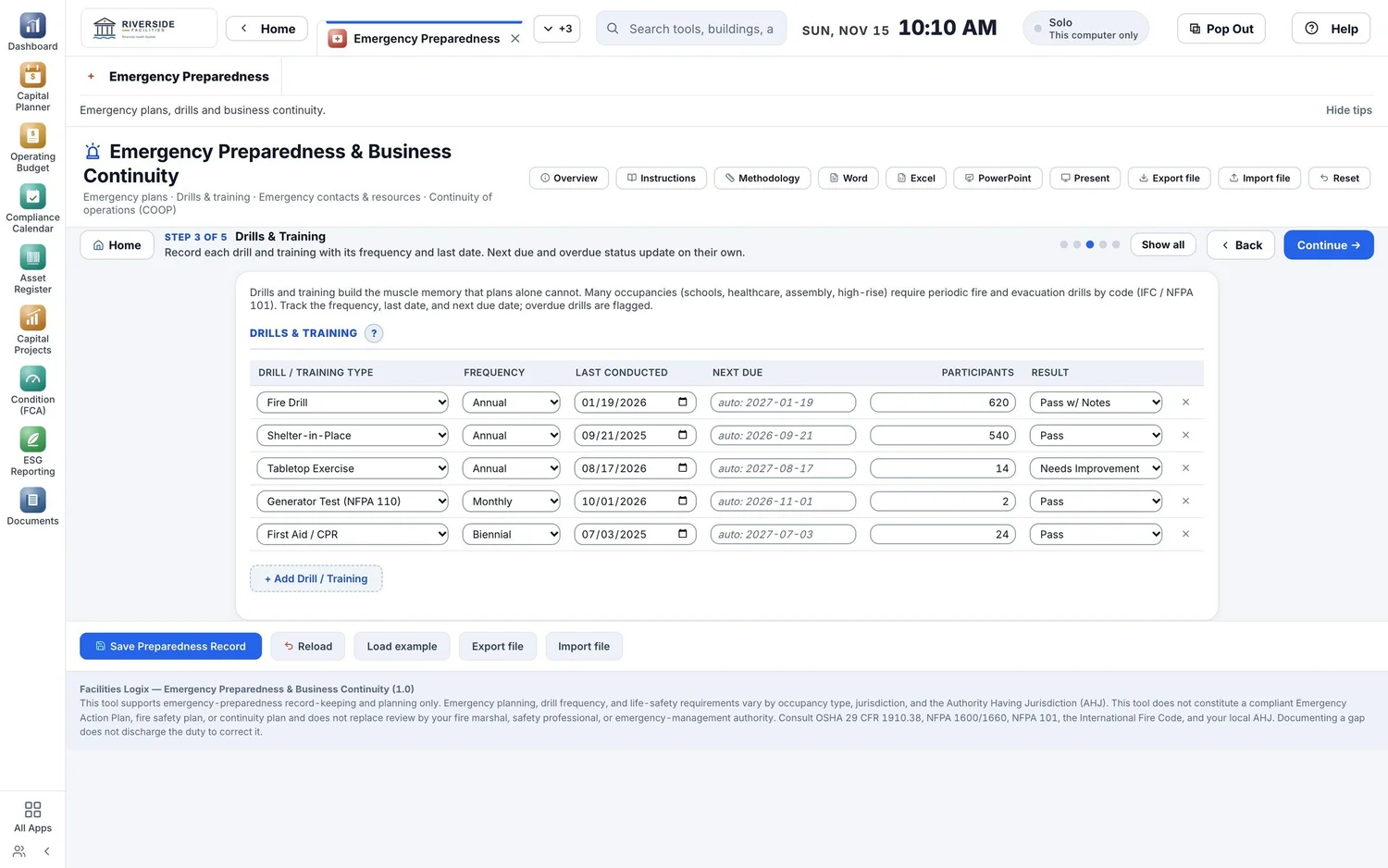
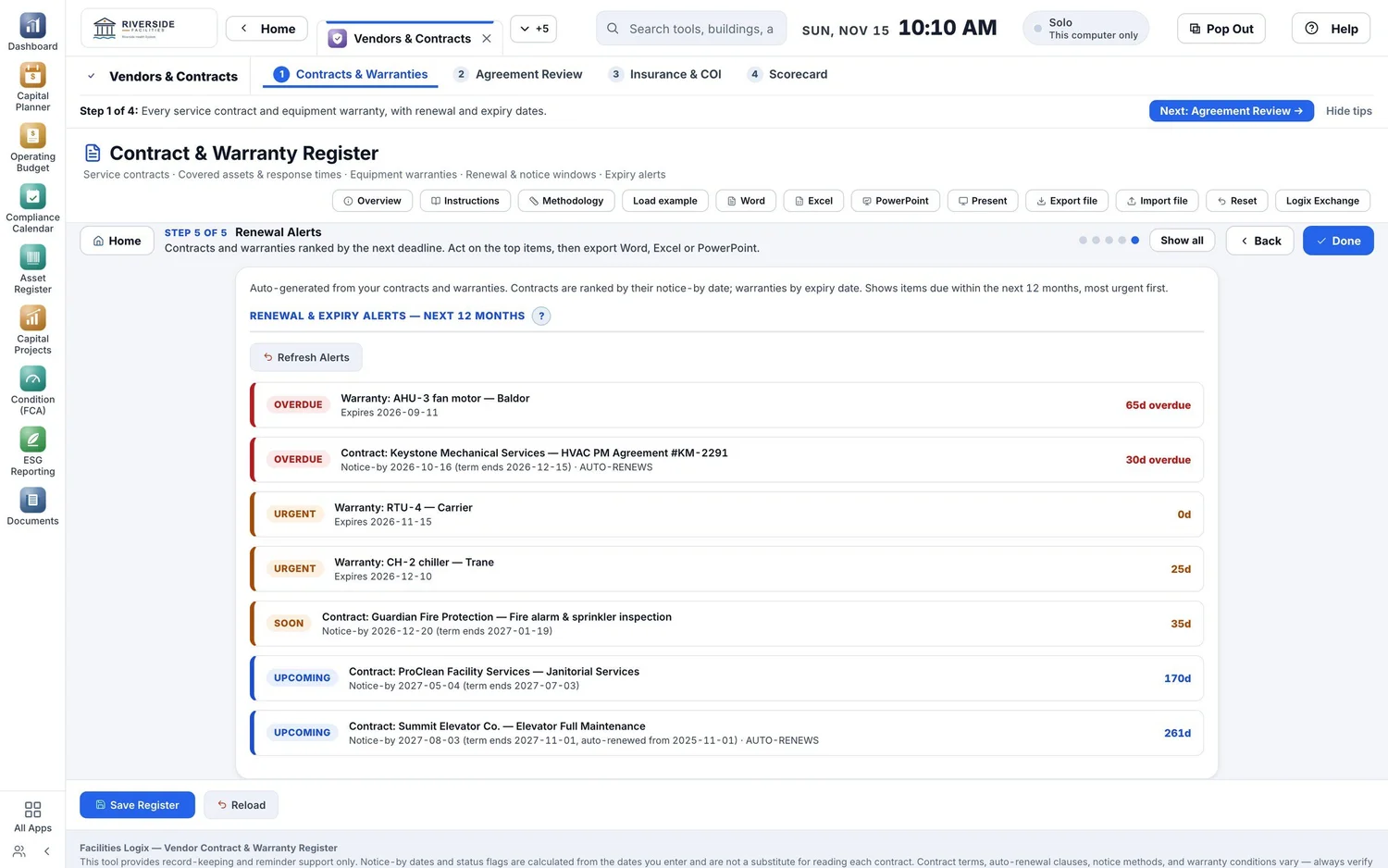
Renewal Calendar in Training & Licensing: everything coming due, soonest first, including anything already overdue. Work the top of the list and book renewals early.
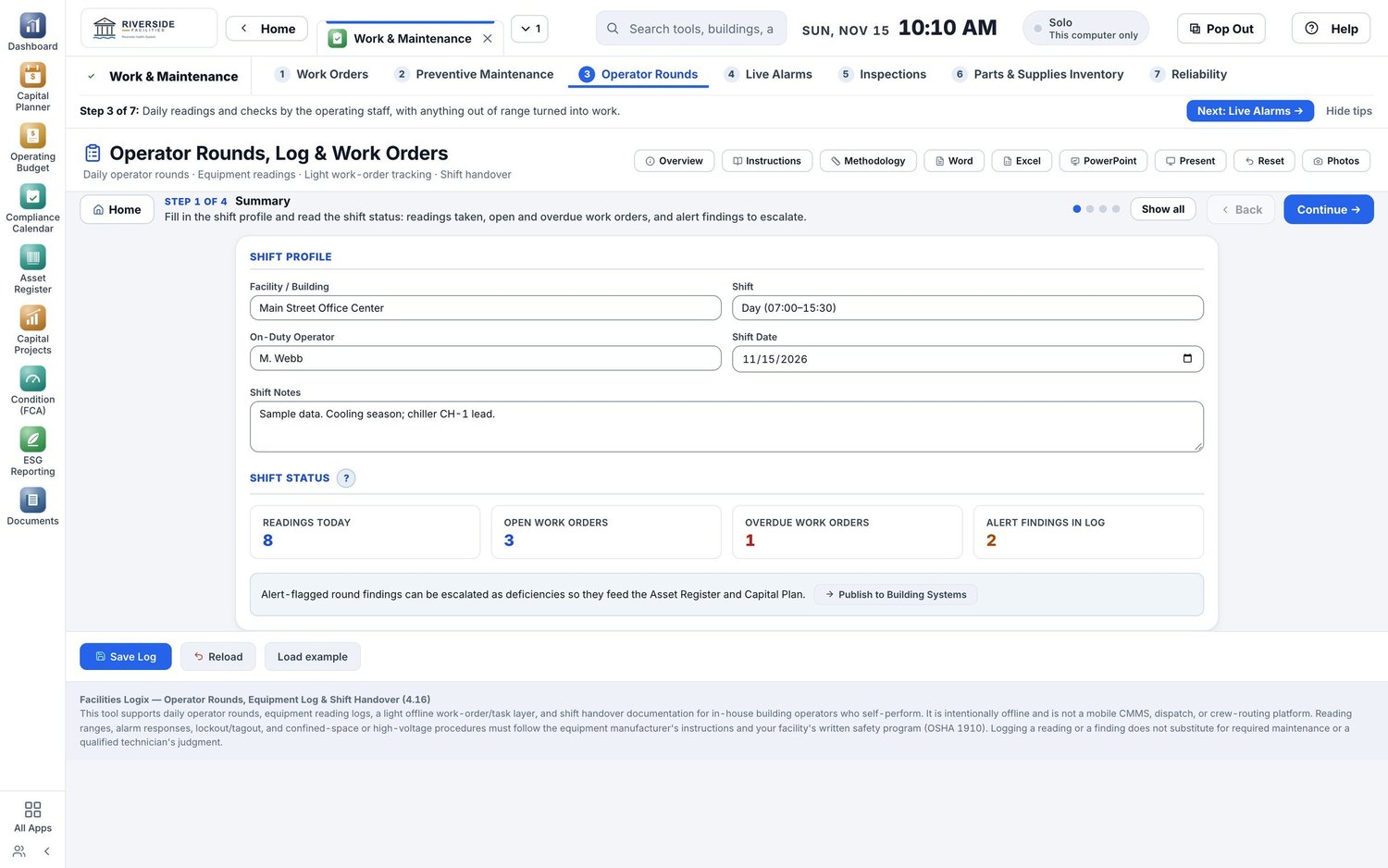
Leaders need to know what each shift recorded, so the summary shows rounds, readings and open work.
The Space People Use, Measured and Managed
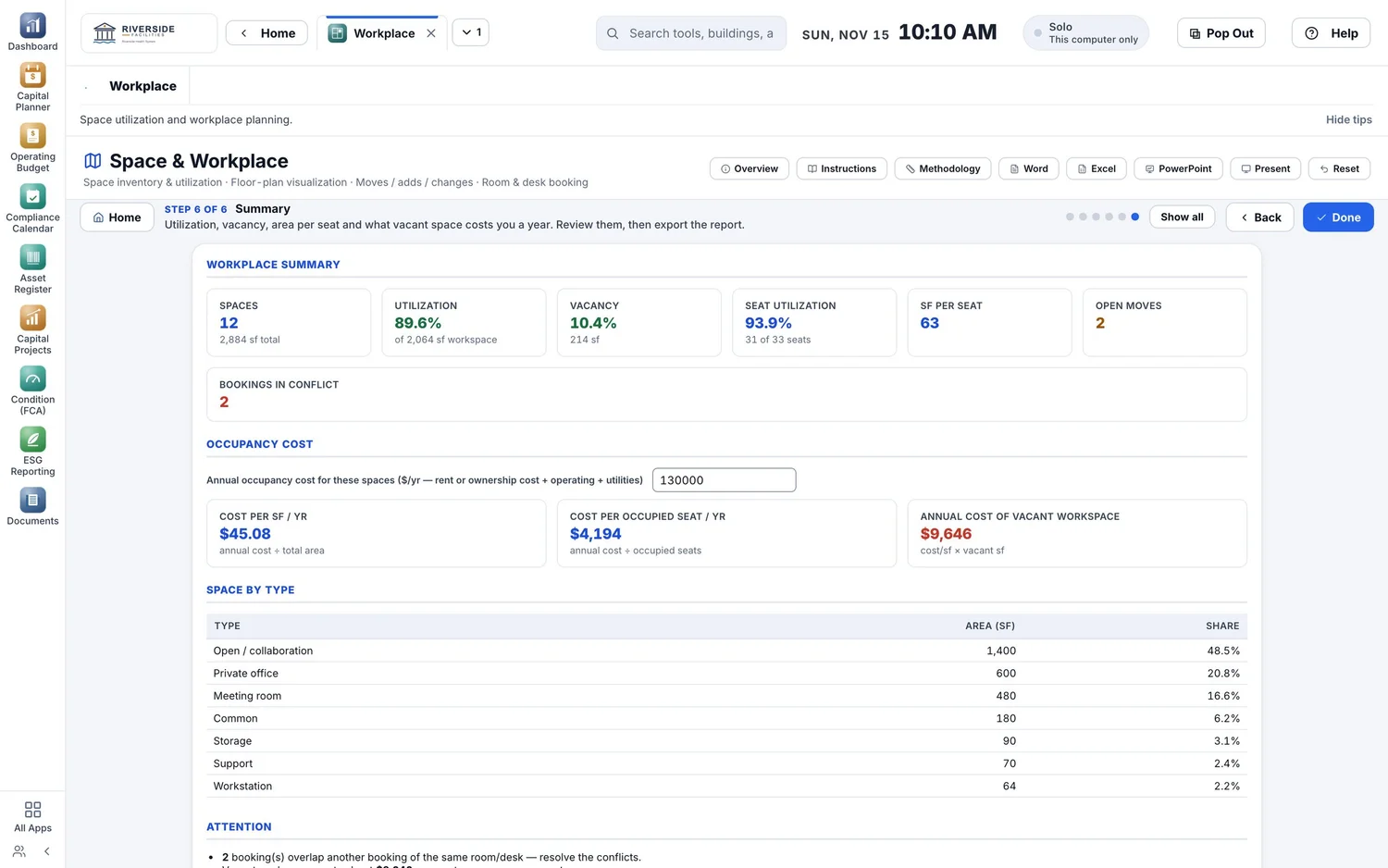
Space Inventory and Utilization
Rooms, floors, uses, departments and seats, with utilization measured against capacity. Import a room list from a space program or a drawing's room schedule.
Learn MoreFloor-Plan Occupancy View
A schematic floor-plan view shows who occupies what.
Learn MoreShow Less
Space is one of the largest costs an organization carries, and empty seats are hard to see in a spreadsheet. The floor-plan view shows occupancy at a glance.
- Each space drawn to its position and size, colored by occupancy
- Click a space to see who is in it
- Built from the space inventory with area, seats and department
- A stacking view, not a CAD drawing
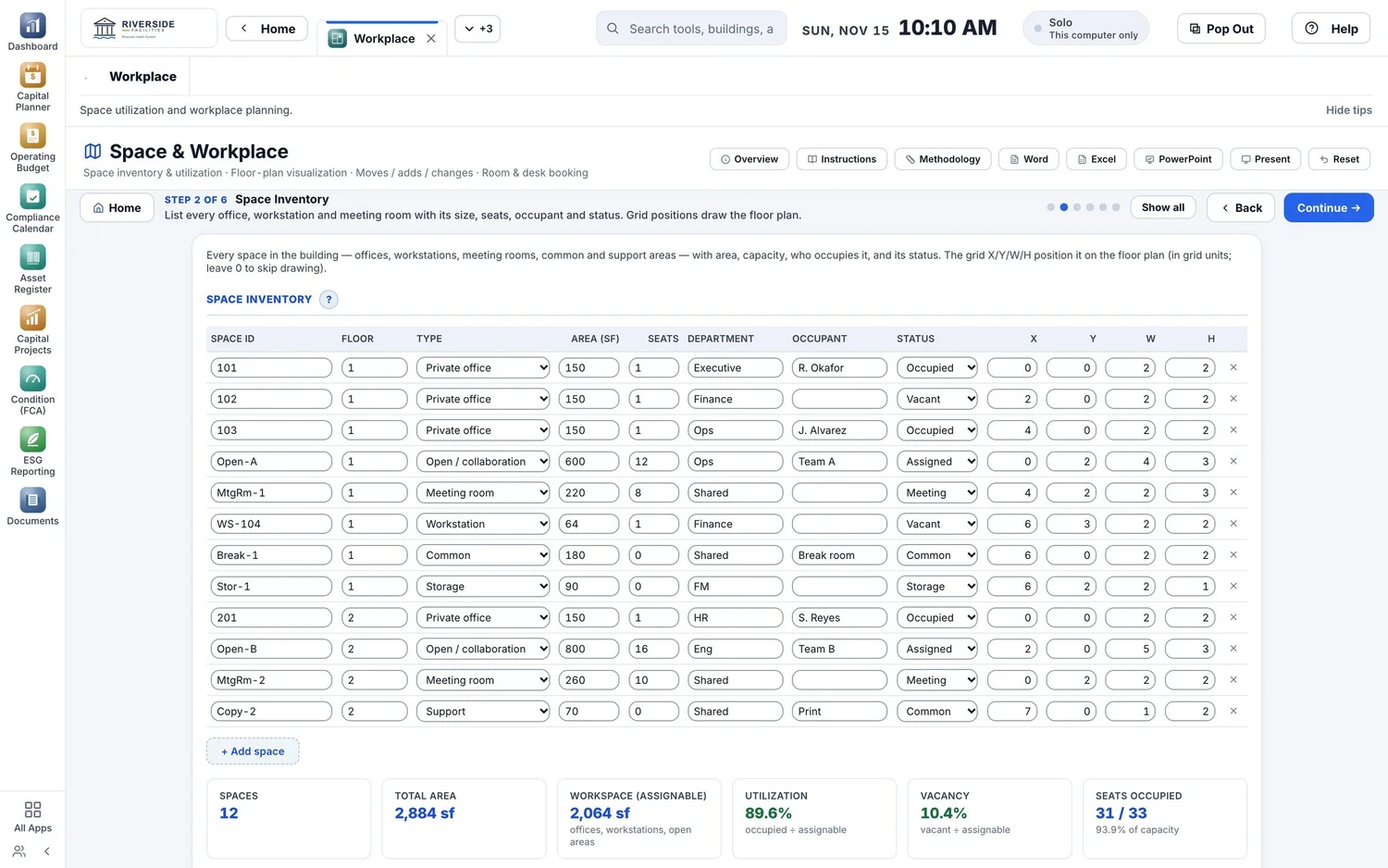
Space Inventory in Space & Workplace: list every office, workstation and meeting room with its size, seats, occupant and status. Grid positions draw the floor plan.
Moves, Adds and Changes
Moves, adds and changes logged and tracked in one list.
Learn MoreShow Less
Moves that are not recorded leave the space list wrong, and the next plan is built on bad data. Completing a move updates the assignments.
- A person or an asset, from one space to another
- Requested date and status for each move
- Space assignments change when the move is completed
- The floor plan reflects the result
Room and Desk Booking
Book rooms and desks, with double-booking detection.
Learn MoreShow Less
Double-booked rooms waste meeting time for everyone in them. Conflicts are flagged when the booking is made.
- Meeting rooms and hot desks as bookable resources
- A conflict = the same resource at an overlapping time on the same day
- Each booking records who reserved it
- Bookings sit beside the space inventory
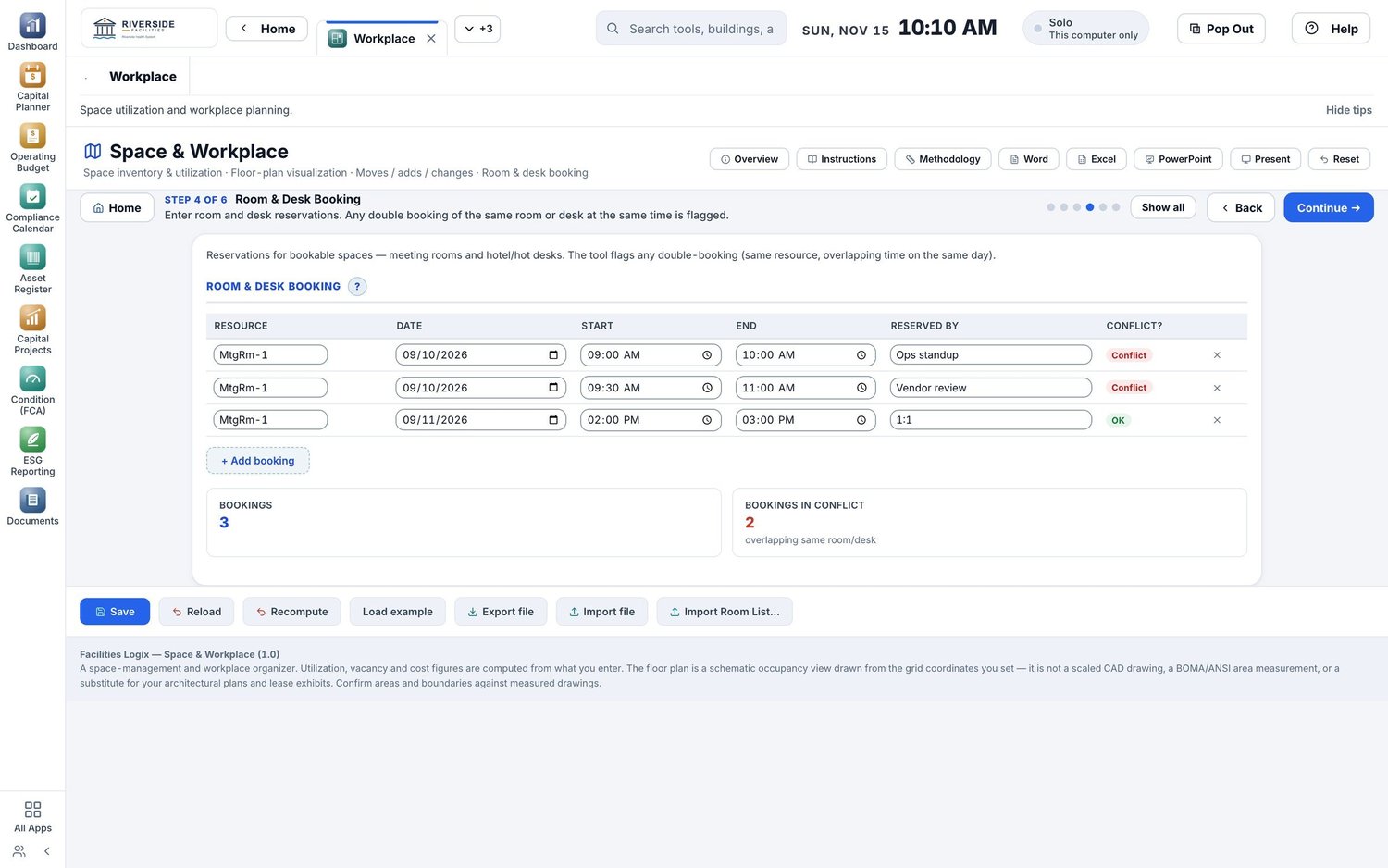
Room & Desk Booking in Space & Workplace: enter room and desk reservations. Any double booking of the same room or desk at the same time is flagged.
Federal Space Utilization Check
For federal office space, the USE IT Act check measures building utilization against the 60 percent target from daily occupancy counts, with every assumption listed in the report.
Learn MoreShow Less
Federal space that falls short of the utilization target is a target for consolidation. The check shows where each building stands before the agency reports.
- Capacity = usable square feet / 150
- Badge events counted once per cardholder per day; cardholder IDs are not saved
- Averaged by two-week periods, the memo's reporting interval
- The average occupancy that would reach 60 percent
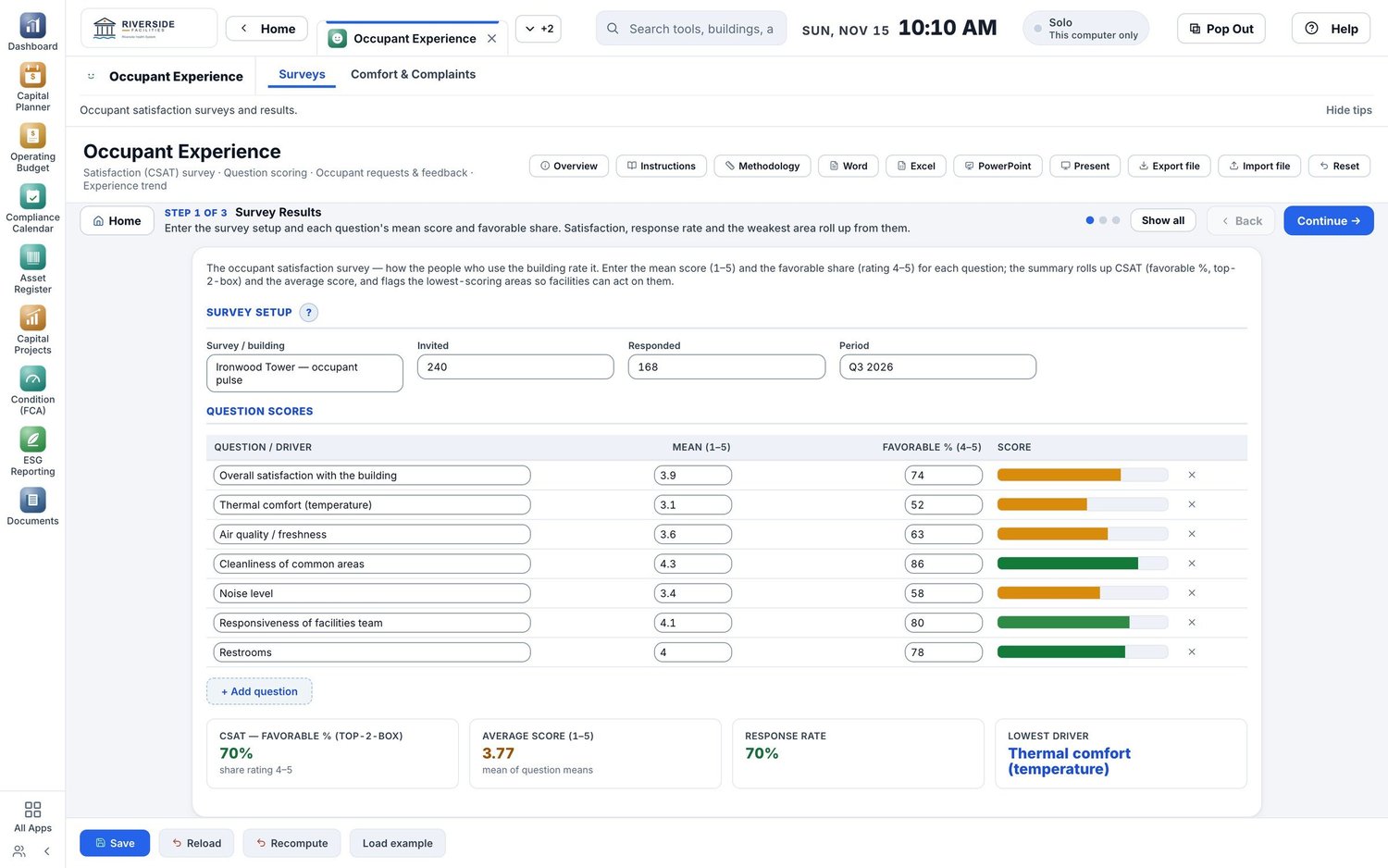
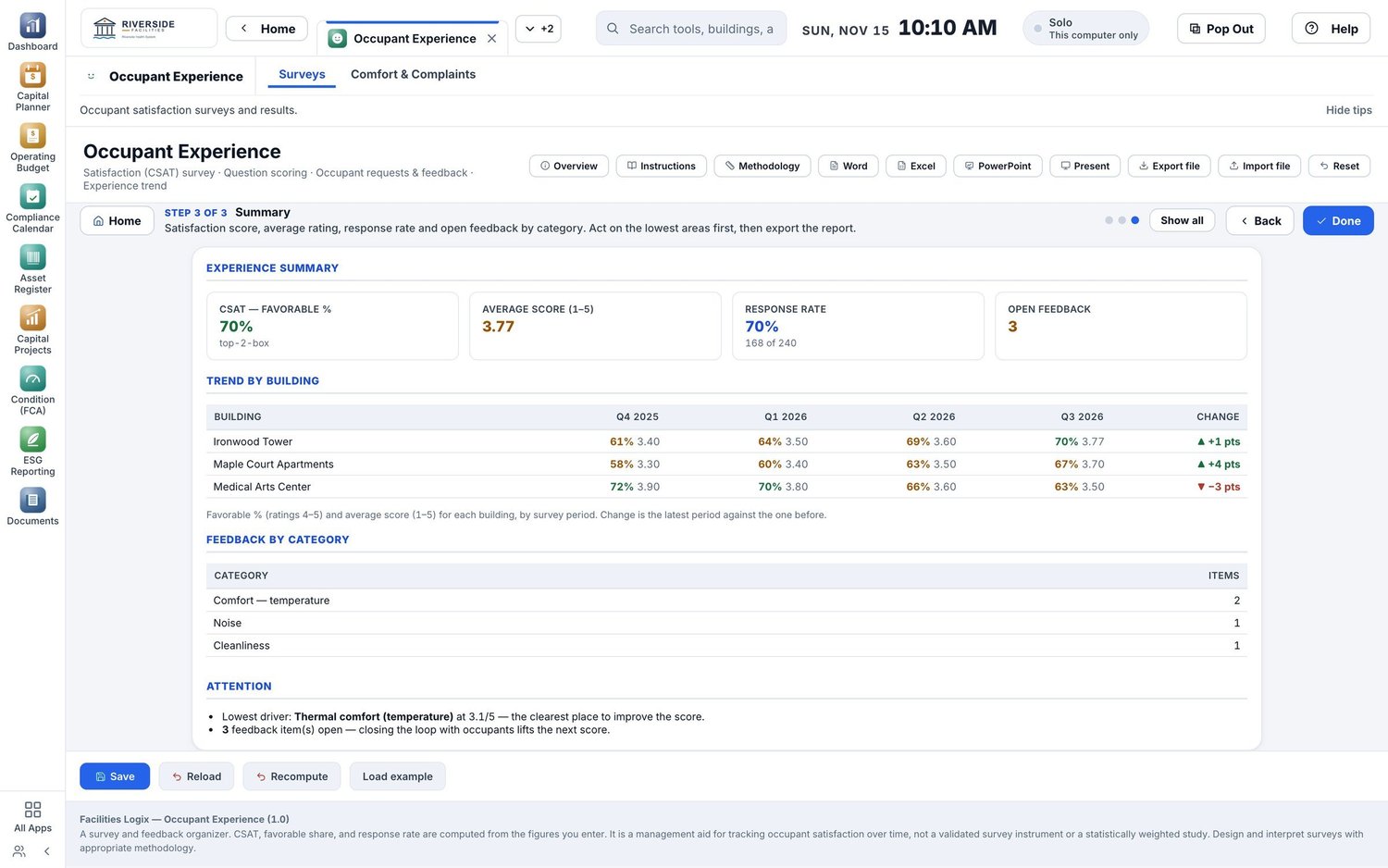
Occupant Experience
Satisfaction surveys scored by driver and a request and feedback log, with each period lined up by building to show the trend.
Learn More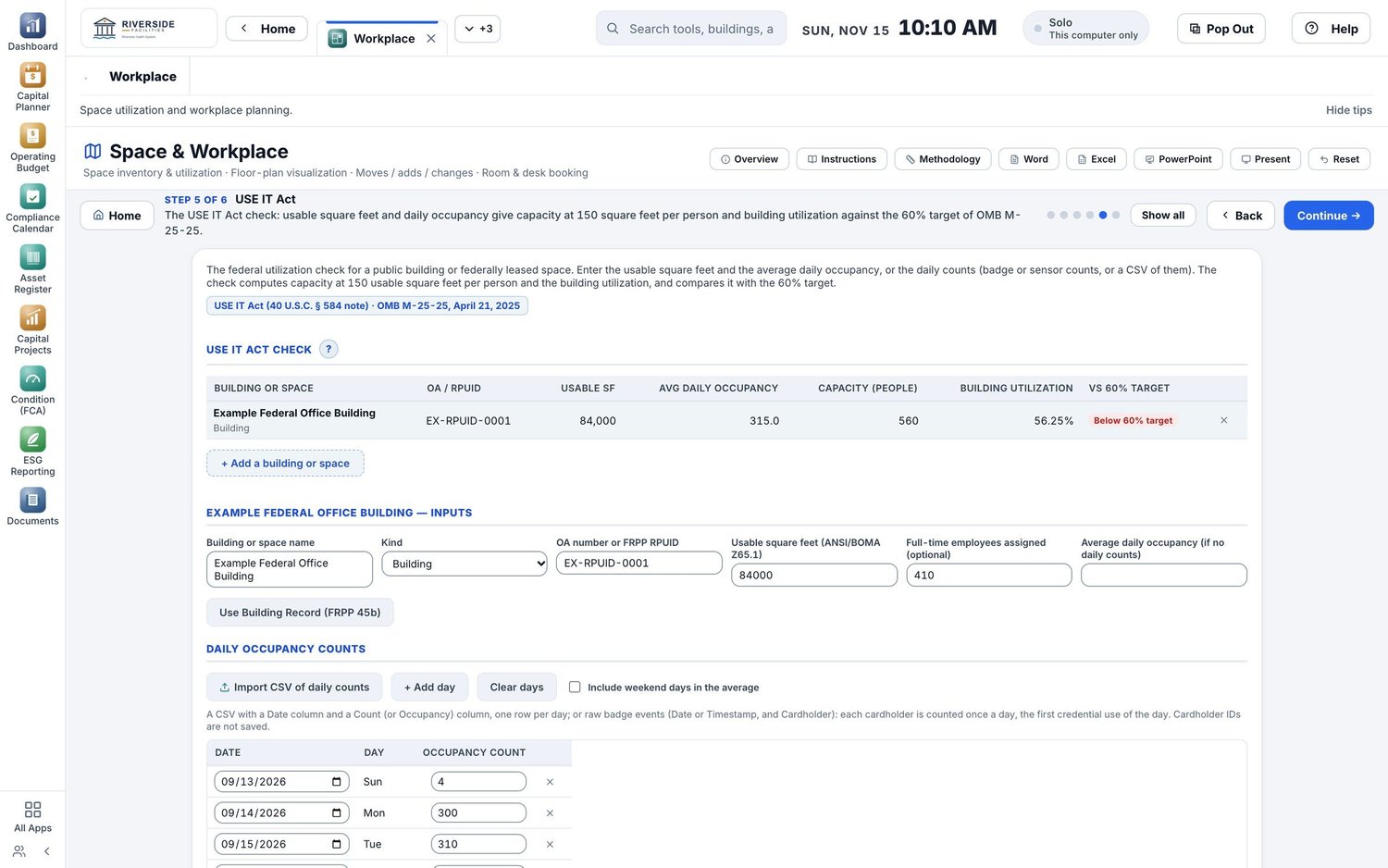
USE IT Act in Space & Workplace: the USE IT Act check: usable square feet and daily occupancy give capacity at 150 square feet per person and building utilization against the 60% target of OMB M-25-25.
Frequently Asked Questions
Are roles a security control?
Can messages reach vendors or contractors?
Does the program text or call staff?
Be First When Facilities Logix Opens
Stop chasing building records across spreadsheets and binders. Join the list and we will tell you the day downloads open, with setup guides ready.
Launching early 2027 for Facilities Logix. Nothing to buy today, and no sales calls.
